Aliasing and the sampling theorem: why wagon wheels turn backward on film
Afterwards you can explain aliasing, compute the frequency a sampled signal will appear to have, and say how fast to sample to avoid it.
- Topic
- Signal processing
- Field
- Cross-disciplinary
- Prerequisites
- none beyond Python basics
- Libraries
matplotlib 3.11.2numpy 2.4.3
py-aliasing.ipynb, executed with the versions above. The download needs a free account
Run it yourself. In a terminal, this installs exactly the versions above:
pip install numpy==2.4.3 matplotlib==3.11.2 jupyterlabPlay: film a turning wheel at 24 frames per second
A wheel with eight spokes turns at 2.5 revolutions per second, and a film camera records it at 24 frames per second, the frame rate of cinema. On the film the wheel turns backward, like the wagon wheels of every western. Signal processing calls this aliasing: a motion too fast for the frame rate shows up as a different, slower one. The game draws the wheel only at its own camera's frames, at most 30 a second, so what you see is the camera's doing, not your screen's. Move the speed slider, or tap − and +, toward 3 rev/s and past it, step the frame rate, and switch on true motion to see the real wheel faintly behind the filmed one. Watch the speed on film next to the true speed, and the panel that follows the brightness of the fixed gray spot at the top of the rim, with the camera's samples as dots. At 2.5 rev/s the film says −0.50 rev/s, at 3 rev/s it says 0. On a keyboard, the arrow keys set the speed, [ and ] the frame rate, and T, Space, and R switch the true motion, pause, and reset.
Show code
// game.js: a wheel with eight spokes, filmed by a camera. Set the wheel's speed and the camera's frame rate,
// and compare the wheel on film with its true motion and the brightness of one spot with the camera's samples.
// The notebook writes the constants and the sawtooth (speed on film against true speed) into #data.
"use strict";

const DATA = JSON.parse(document.getElementById("data").textContent);
const N = DATA.n_spokes;
const STEPS_PER_REV = Math.round(1 / DATA.speed_step);         // 20 slider steps per rev/s
const MAX_STEPS = Math.round(DATA.speed_max * STEPS_PER_REV);
const WINDOW = DATA.window_s;                                   // the sine panel shows the last 0.5 s

// ---- the state: everything that changes, in one object
const DEFAULTS = {speedSteps: Math.round(DATA.start.speed * STEPS_PER_REV), fps: DATA.fps_steps.indexOf(DATA.start.fps), showTrue: false};
const state = {...DEFAULTS, running: true, t: 0, turns: 0, filmTurns: 0, frameTime: 0, blur: 0};
const speed = (s) => s.speedSteps / STEPS_PER_REV;             // rev/s; a count of steps, so a tie is exact
const fps = (s) => DATA.fps_steps[s.fps];

// The speed on film: the step per frame in spoke spacings, rounded to the nearest whole spoke; the eye sees the rest.
function apparentSpeed(r, fs) {
  const x = N * r / fs;                                         // the step per frame, in spoke spacings
  return r - fs / N * Math.floor(x + 0.5);                      // floor(x + 0.5): a half goes up, as in the notebook
}
const isTie = (r, fs) => (N * r / fs) % 1 === 0.5;

// One tick: the true wheel turns on; the camera holds the wheel as it was at its last frame, k / fs.
function tick(dt) {
  const r = speed(state), fs = fps(state);
  state.t += dt;
  state.turns += r * dt;
  const k = Math.floor(state.t * fs);                           // the frame on film
  state.frameTime = k / fs;
  state.filmTurns = state.turns - r * (state.t - state.frameTime);
  state.blur = dt;                                              // the true wheel is smeared over the last refresh
}
// the true angle in turns at an earlier time tp, at the current speed
const turnsAt = (tp) => state.turns - speed(state) * (state.t - tp);

// ---- drawing
const $ = (id) => document.getElementById(id);
const canvas = $("scene"), strip = $("strip");
let dpr = 1;

function fit(c) {
  const box = c.getBoundingClientRect();
  c.width = Math.round(box.width * dpr);
  c.height = Math.round(box.height * dpr);
}
function layout() {
  dpr = window.devicePixelRatio || 1;
  fit(canvas);
  fit(strip);
  render();
}

function colors() {
  const css = getComputedStyle(document.documentElement);
  return Object.fromEntries(["bg", "fg", "ink", "accent", "second", "muted", "pale"].map((k) => [k, css.getPropertyValue(`--${k}`).trim()]));
}

function spokes(ctx, cx, cy, R, turns) {
  ctx.beginPath();
  for (let i = 0; i < N; i++) {
    const a = 2 * Math.PI * (turns + i / N) - Math.PI / 2;      // clockwise on screen: the wheel rolls to the right
    ctx.moveTo(cx + 0.12 * R * Math.cos(a), cy + 0.12 * R * Math.sin(a));
    ctx.lineTo(cx + R * Math.cos(a), cy + R * Math.sin(a));
  }
  ctx.stroke();
}

// The wheel in a frame of film: sprocket holes above and below, the ground, the true wheel faintly behind.
function drawWheel(ctx, c, box) {
  const pad = 6, hole = Math.max(5, Math.min(box.w, box.h) / 28);
  ctx.strokeStyle = c.muted; ctx.fillStyle = c.muted; ctx.lineWidth = 1.5;
  ctx.strokeRect(box.x + pad, box.y + pad, box.w - 2 * pad, box.h - 2 * pad);
  for (let x = box.x + pad + hole; x < box.x + box.w - pad - hole; x += 2.2 * hole) {
    for (const y of [box.y + pad + 0.6 * hole, box.y + box.h - pad - 1.6 * hole]) ctx.fillRect(x, y, hole, hole);
  }
  const inner = {x: box.x + pad, y: box.y + pad + 2.4 * hole, w: box.w - 2 * pad, h: box.h - 2 * pad - 4.8 * hole};
  const R = 0.4 * Math.min(inner.w, inner.h), cx = inner.x + inner.w / 2, cy = inner.y + inner.h / 2 - 0.04 * R;
  const lw = Math.max(2, R / 28);
  ctx.beginPath(); ctx.moveTo(inner.x + 0.1 * inner.w, cy + R + lw); ctx.lineTo(inner.x + 0.9 * inner.w, cy + R + lw); ctx.stroke();  // ground
  ctx.beginPath(); ctx.moveTo(cx, cy - R - 0.22 * R); ctx.lineTo(cx, cy - R - 0.08 * R); ctx.stroke();                              // fixed tick
  if (state.showTrue) {                                          // a few faint copies over the last refresh, as the eye blurs it
    const copies = 6, r = speed(state);
    ctx.strokeStyle = c.second; ctx.lineWidth = lw; ctx.globalAlpha = 0.5 / Math.sqrt(copies);
    for (let j = 0; j < copies; j++) spokes(ctx, cx, cy, 0.97 * R, state.turns - r * state.blur * j / (copies - 1 || 1));
    ctx.globalAlpha = 1;
  }
  ctx.strokeStyle = c.ink; ctx.lineWidth = lw;
  spokes(ctx, cx, cy, R, state.filmTurns);
  ctx.lineWidth = 1.6 * lw;
  ctx.beginPath(); ctx.arc(cx, cy, R, 0, 2 * Math.PI); ctx.stroke();                                                              // rim
  ctx.fillStyle = c.ink;
  ctx.beginPath(); ctx.arc(cx, cy, 0.12 * R, 0, 2 * Math.PI); ctx.fill();                                                         // hub
  ctx.fillStyle = c.muted; ctx.strokeStyle = c.bg; ctx.lineWidth = 2;
  ctx.beginPath(); ctx.arc(cx, cy - R, Math.max(5, R / 14), 0, 2 * Math.PI); ctx.fill(); ctx.stroke();                            // the spot
}

// The brightness of the marked spot over the last WINDOW seconds of film, modeled as sin(2π N turns):
// the true sine, the camera's samples as dots, and the slow sine that runs through the dots.
function drawSine(ctx, c, box) {
  const r = speed(state), fs = fps(state), f = N * r, fa = N * apparentSpeed(r, fs);
  const font = Math.max(14, Math.min(16, box.h / 9)), pad = 8;
  const top = box.y + pad + 1.4 * font, bottom = box.y + box.h - pad - 1.3 * font;
  const left = box.x + pad, width = box.w - 2 * pad, mid = (top + bottom) / 2, amp = (bottom - top) / 2 * 0.9;
  const t1 = state.frameTime, t0 = t1 - WINDOW;
  const X = (tp) => left + (tp - t0) / WINDOW * width, Y = (b) => mid - amp * b;
  const brightness = (tp) => Math.sin(2 * Math.PI * N * turnsAt(tp));
  // the slow sine: the true phase minus a whole number of turns per sample, so it meets every dot
  const seen = (tp) => Math.sin(2 * Math.PI * N * turnsAt(tp) - 2 * Math.PI * (f - fa) * tp);
  ctx.strokeStyle = c.muted; ctx.lineWidth = 1;
  ctx.beginPath(); ctx.moveTo(left, mid); ctx.lineTo(left + width, mid); ctx.stroke();
  const curve = (g, color, lw) => {
    const n = Math.max(2, Math.round(width));
    ctx.strokeStyle = color; ctx.lineWidth = lw;
    ctx.beginPath();
    for (let i = 0; i <= n; i++) {
      const tp = t0 + WINDOW * i / n;
      if (i) ctx.lineTo(X(tp), Y(g(tp))); else ctx.moveTo(X(tp), Y(g(tp)));
    }
    ctx.stroke();
  };
  if (state.showTrue) curve(brightness, c.second, 1.2);
  curve(seen, c.accent, 2.2);
  ctx.fillStyle = c.ink;
  for (let k = Math.ceil(t0 * fs - 1e-9); k <= Math.round(t1 * fs); k++) {
    ctx.beginPath(); ctx.arc(X(k / fs), Y(brightness(k / fs)), 4, 0, 2 * Math.PI); ctx.fill();
  }
  ctx.font = `${font}px system-ui, sans-serif`; ctx.textBaseline = "top";
  ctx.textAlign = "left"; ctx.fillStyle = c.second;
  ctx.fillText(`true ${f.toFixed(1)} Hz`, left, box.y + pad);
  ctx.textAlign = "right"; ctx.fillStyle = c.accent;
  ctx.fillText(`seen ${Math.abs(fa).toFixed(1)} Hz`, left + width, box.y + pad);
  ctx.textAlign = "left"; ctx.textBaseline = "bottom"; ctx.fillStyle = c.muted;
  ctx.fillText(`spot's brightness, last ${WINDOW} s`, left, box.y + box.h - 2);
}

// The strip under the slider: the speed on film against the true speed for this frame rate, on the slider's scale.
function drawStrip(c) {
  const ctx = strip.getContext("2d");
  ctx.setTransform(dpr, 0, 0, dpr, 0, 0);
  const W = strip.width / dpr, H = strip.height / dpr, inset = 11;   // the slider's thumb stops short of the ends
  ctx.clearRect(0, 0, W, H);
  const fs = fps(state), top = fs / (2 * N), values = DATA.sawtooth[String(fs)];
  const X = (i) => inset + i / MAX_STEPS * (W - 2 * inset), Y = (v) => H / 2 - v / top * (H / 2 - 4);
  ctx.strokeStyle = c.muted; ctx.lineWidth = 1;
  ctx.beginPath(); ctx.moveTo(X(0), Y(0)); ctx.lineTo(X(MAX_STEPS), Y(0)); ctx.stroke();      // zero on film
  ctx.strokeStyle = c.accent; ctx.lineWidth = 1.8;
  ctx.beginPath();
  values.forEach((v, i) => {                                    // lift the pen at every jump of the sawtooth
    if (i && Math.abs(v - values[i - 1]) < top) ctx.lineTo(X(i), Y(v)); else ctx.moveTo(X(i), Y(v));
  });
  ctx.stroke();
  ctx.fillStyle = c.accent;
  ctx.beginPath(); ctx.arc(X(state.speedSteps), Y(values[state.speedSteps]), 5, 0, 2 * Math.PI); ctx.fill();
}

function drawScene(c) {
  const ctx = canvas.getContext("2d");
  ctx.setTransform(dpr, 0, 0, dpr, 0, 0);
  const W = canvas.width / dpr, H = canvas.height / dpr;
  ctx.fillStyle = c.bg;
  ctx.fillRect(0, 0, W, H);
  const wide = W > 1.25 * H;                                    // side by side, or the wheel above the sine panel
  const wheel = wide ? {x: 0, y: 0, w: Math.min(0.5 * W, H * 1.15), h: H} : {x: 0, y: 0, w: W, h: 0.6 * H};
  const sine = wide ? {x: wheel.w + 8, y: 0.1 * H, w: W - wheel.w - 8, h: 0.8 * H} : {x: 0, y: 0.6 * H + 4, w: W, h: 0.4 * H - 4};
  drawWheel(ctx, c, wheel);
  drawSine(ctx, c, sine);
}

const signed = (v) => (v > 0 ? "+" : v < 0 ? "−" : "") + Math.abs(v).toFixed(2);
function render() {
  const c = colors(), r = speed(state), fs = fps(state), ra = apparentSpeed(r, fs);
  drawScene(c);
  drawStrip(c);
  const tie = isTie(r, fs);
  $("film").textContent = `on film ${tie ? "±" + Math.abs(ra).toFixed(2) : signed(ra)} rev/s`;
  $("verdict").textContent = tie ? "either way" : Math.abs(ra) < 1e-9 ? "standing" : ra < 0 ? "backward" : "forward";
  $("true").textContent = `true ${r.toFixed(2)} rev/s`;
  $("speed").value = state.speedSteps;
  $("fps-val").textContent = `${fs} fps`;
  $("slower").disabled = state.speedSteps === 0;
  $("faster").disabled = state.speedSteps === MAX_STEPS;
  $("fewer").disabled = state.fps === 0;
  $("more").disabled = state.fps === DATA.fps_steps.length - 1;
  $("show-true").setAttribute("aria-pressed", state.showTrue);
  $("play").textContent = state.running ? "Pause" : "Play";
}

// ---- controls, keys, and the frame
function set(partial) {
  const p = {...partial};
  if ("speed" in p) { p.speedSteps = Math.round(p.speed * STEPS_PER_REV); delete p.speed; }   // rev/s from outside
  if ("fps" in p) p.fps = DATA.fps_steps.indexOf(p.fps);       // frames per second, kept as an index into the steps
  Object.assign(state, p);
  state.speedSteps = Math.min(MAX_STEPS, Math.max(0, state.speedSteps));
  tick(0);
  render();
}
const nudge = (k) => set({speedSteps: state.speedSteps + k});
const stepFps = (k) => set({fps: DATA.fps_steps[Math.min(DATA.fps_steps.length - 1, Math.max(0, state.fps + k))]});
const actions = {
  slower: () => nudge(-1), faster: () => nudge(1), fewer: () => stepFps(-1), more: () => stepFps(1),
  "show-true": () => set({showTrue: !state.showTrue}), play: () => set({running: !state.running}),
  reset: () => set({...DEFAULTS, fps: DATA.start.fps}),
};
for (const [id, act] of Object.entries(actions)) $(id).addEventListener("click", act);
$("speed").addEventListener("input", (e) => set({speedSteps: Number(e.target.value)}));
const keys = {arrowleft: "slower", arrowright: "faster", "[": "fewer", "]": "more", t: "show-true", " ": "play", r: "reset"};
document.addEventListener("keydown", (e) => {
  const key = keys[e.key.toLowerCase()];
  if (!key || (e.target instanceof HTMLInputElement && e.key.startsWith("Arrow"))) return;   // the slider steps itself
  if (e.target instanceof HTMLButtonElement && e.key === " ") return;
  e.preventDefault();
  actions[key]();
});

let last = null;
function frame(now) {                                           // called by the browser once per screen refresh
  const elapsed = last === null ? 0 : Math.min((now - last) / 1000, 0.05);   // capped: a background tab does not jump
  last = now;
  tick(state.running ? elapsed : 0);
  render();
  requestAnimationFrame(frame);
}

const fitter = new ResizeObserver(layout);                       // refit both canvases whenever the grid moves them
fitter.observe($("view"));
fitter.observe(strip);
$("speed").max = MAX_STEPS;
layout();
requestAnimationFrame(frame);
window.game = {state, set, render};
At 3 turns a second the wheel stands still
Slide the speed to 3 rev/s and leave the camera at 24 fps. The wheel on film stops dead, every spoke where it was, and the readout says 0.00 rev/s, standing. Switch on true motion and the real wheel behind it is a blur.
Show code
import json
from pathlib import Path

import numpy as np
import matplotlib.pyplot as plt

plt.rcParams.update({
    "figure.figsize": (7, 3.6), "figure.dpi": 110,
    "axes.spines.top": False, "axes.spines.right": False,
    "axes.grid": True, "grid.alpha": 0.25,
    "font.size": 11, "lines.linewidth": 1.8,
})
INK, ACCENT, SECOND, MUTED = "#1f2a44", "#c8553d", "#2a7f9e", "#8a8f98"

N_SPOKES = 8
FPS_STEPS = [12, 16, 18, 24, 25, 30]            # the game's frame rates / fps
FPS = 24                                        # cinema
SPEED_MAX, SPEED_STEP, START_SPEED = 6, 0.05, 2.5   # rev/s
WINDOW_S = 0.5                                  # the game's sine panel / s
N = N_SPOKES

def spoke_angles(r, fps, k):
    """Angles in degrees of the spokes in frame k, for a wheel at r rev/s filmed at fps frames per second."""
    return (360 * r * k / fps + 360 * np.arange(N) / N) % 360

def nearest_spoke_speed(r, fps):
    """The eye's rule: the step between two frames, wrapped to the nearest spoke, as a speed in rev/s."""
    step = 2 * np.pi * r / fps                  # radians per frame
    return np.angle(np.exp(1j * N * step)) / N / (2 * np.pi) * fps

def apparent_speed(r, fps):
    """The folding rule in rev/s, the line the game runs; floor(x + 0.5) rounds a half up."""
    return r - fps / N * np.floor(N * r / fps + 0.5)

def apparent_frequency(f, fs):
    """What one sampled quantity shows: |f - fs round(f / fs)|, between 0 and fs / 2."""
    return np.abs(f - fs * np.floor(f / fs + 0.5))

def draw_wheel(ax, turns, color=INK, true_turns=None, lw=1.6):
    """The game's wheel in Matplotlib: rim, hub, spokes, the fixed tick and the marked spot at the top."""
    a = np.deg2rad(90 - 360 * turns - 360 * np.arange(N) / N)   # clockwise from the top, as on screen
    if true_turns is not None:
        b = np.deg2rad(90 - 360 * true_turns - 360 * np.arange(N) / N)
        for x, y in zip(np.cos(b), np.sin(b)):
            ax.plot([0.12 * x, x], [0.12 * y, y], color=SECOND, lw=lw, alpha=0.35)
    for x, y in zip(np.cos(a), np.sin(a)):
        ax.plot([0.12 * x, x], [0.12 * y, y], color=color, lw=lw)
    ax.add_patch(plt.Circle((0, 0), 1, fill=False, color=color, lw=1.6 * lw))
    ax.add_patch(plt.Circle((0, 0), 0.12, color=color))
    ax.plot([0, 0], [1.08, 1.22], color=MUTED, lw=1.5)
    ax.plot(0, 1, "o", ms=6, color=MUTED, mec="white", mew=1.2)
    ax.set(xlim=(-1.3, 1.3), ylim=(-1.3, 1.35), aspect="equal")
    ax.set_axis_off()

print(f"{N} spokes; frame rates {FPS_STEPS} fps; speeds 0 to {SPEED_MAX} rev/s in steps of {SPEED_STEP}")
8 spokes; frame rates [12, 16, 18, 24, 25, 30] fps; speeds 0 to 6 rev/s in steps of 0.05
Show code
r = 3.0
fig, axes = plt.subplots(1, 4, figsize=(7, 2.2))
for k, ax in enumerate(axes):
    draw_wheel(ax, r * k / FPS)
    ax.text(0, -1.3, f"frame {k}", ha="center", va="top", color=MUTED)
fig.text(0.99, 0.98, f"{r} rev/s · {FPS} fps · true motion off", ha="right", va="top", color=MUTED)
plt.show()
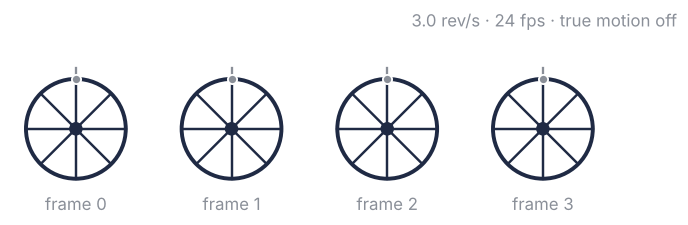
The camera does not record motion, only positions, one picture every 1/24 s. Between two pictures the wheel turns by
with \(r\) the speed in revolutions per second and \(f_s\) the frame rate. The hidden setup cell has a helper, spoke_angles(r, fps, k), that returns the angles of the spokes in frame \(k\). The cell prints them for two frames at 3 rev/s, then the speeds at which each of the game's frame rates freezes the wheel, and what two of those speeds mean on a road:
r = 3.0
step = 360 * r / FPS
spacing = 360 / N
print(f"step per frame {step:.1f}°, spoke spacing {spacing:.1f}°")
for k in [0, 1]:
    print(f"frame {k}: spokes at " + " ".join(f"{a:5.1f}°" for a in np.sort(spoke_angles(r, FPS, k))))
for fps in FPS_STEPS:
    print(f"{fps:2d} fps: the wheel stands at {fps / N:.3f} and {2 * fps / N:.3f} rev/s")
for r_stand in [r, 2 * r]:
    print(f"a wheel 1 m across at {r_stand} rev/s rolls at {np.pi * 1.0 * r_stand * 3.6:.0f} km/h")
step per frame 45.0°, spoke spacing 45.0°
frame 0: spokes at   0.0°  45.0°  90.0° 135.0° 180.0° 225.0° 270.0° 315.0°
frame 1: spokes at   0.0°  45.0°  90.0° 135.0° 180.0° 225.0° 270.0° 315.0°
12 fps: the wheel stands at 1.500 and 3.000 rev/s
16 fps: the wheel stands at 2.000 and 4.000 rev/s
18 fps: the wheel stands at 2.250 and 4.500 rev/s
24 fps: the wheel stands at 3.000 and 6.000 rev/s
25 fps: the wheel stands at 3.125 and 6.250 rev/s
30 fps: the wheel stands at 3.750 and 7.500 rev/s
a wheel 1 m across at 3.0 rev/s rolls at 34 km/h
a wheel 1 m across at 6.0 rev/s rolls at 68 km/h
At 3 rev/s the step is 45°, and eight spokes sit 45° apart, so each spoke lands exactly where its neighbor was. Frames 0 and 1 hold the same eight angles, and a film of identical pictures is a wheel at rest. The wheel stands whenever \(\Delta\theta\) is a whole number of spacings, at \(r = k f_s / N\) for \(N\) spokes and \(k = 1, 2, \dots\): 3 and 6 rev/s at 24 fps, 3.125 rev/s at the 25 fps of European television.
The next two sections need the same fact in the language of frequencies. The spoke pattern repeats \(N r\) times a second, 24 times at 3 rev/s, and a pattern that repeats exactly once per frame, or twice, looks frozen. A wheel 1 m across stands still on film at 34 km/h and again at 68 km/h, and every wheel that speeds up from rest passes through the speeds just below the first, where it turns backward, as the next section shows. That is why the effect belongs to every chase in a western.
A little slower and the wheel turns backward
Go back to 2.5 rev/s. The wheel on film turns backward at half a turn per second, and the readout says −0.50 rev/s. At 3.5 rev/s it creeps forward at the same rate, +0.50.
Show code
from matplotlib.patches import Wedge

fig, axes = plt.subplots(2, 3, figsize=(7, 4.4))
for row, r in zip(axes, [2.5, 3.5]):
    true_step = 360 * r / FPS                           # degrees per frame, clockwise
    seen = 360 * apparent_speed(r, FPS) / FPS           # the step to the nearest spoke
    for k, ax in enumerate(row):
        draw_wheel(ax, r * k / FPS)
        if k:
            start = 90 - 360 * r * (k - 1) / FPS               # spoke 0 in the frame before, in degrees
            end = start - seen                                 # the nearest spoke in this frame
            ax.add_patch(Wedge((0, 0), 1, min(start, end), max(start, end), color=ACCENT, alpha=0.4, lw=0))
            ax.plot([0.12 * np.cos(np.deg2rad(end)), np.cos(np.deg2rad(end))],
                    [0.12 * np.sin(np.deg2rad(end)), np.sin(np.deg2rad(end))], color=ACCENT, lw=2.6)
            ax.plot([0, np.cos(np.deg2rad(start))], [0, np.sin(np.deg2rad(start))], color=MUTED, lw=1, ls="--")
            arc = np.deg2rad(start - true_step * np.linspace(0, 1, 40))
            ax.plot(1.12 * np.cos(arc[:-3]), 1.12 * np.sin(arc[:-3]), color=SECOND, lw=2)
            ax.annotate("", xy=(1.12 * np.cos(arc[-1]), 1.12 * np.sin(arc[-1])),
                        xytext=(1.12 * np.cos(arc[-5]), 1.12 * np.sin(arc[-5])),
                        arrowprops=dict(arrowstyle="-|>", color=SECOND, lw=0, mutation_scale=12))
        ax.text(0, -1.3, f"frame {k}", ha="center", va="top", color=MUTED)
    v = apparent_speed(r, FPS)
    row[-1].text(1.35, 0, f"{seen:+.1f}° a frame\n{v:+.2f} rev/s".replace("-", "−"), color=ACCENT, va="center", ha="left")
    row[0].text(-1.35, 0, f"{r}\nrev/s", color=MUTED, va="center", ha="right")
fig.text(0.99, 0.99, f"{FPS} fps · teal: true step · red: step to the nearest spoke", ha="right", va="top", color=MUTED)
plt.show()
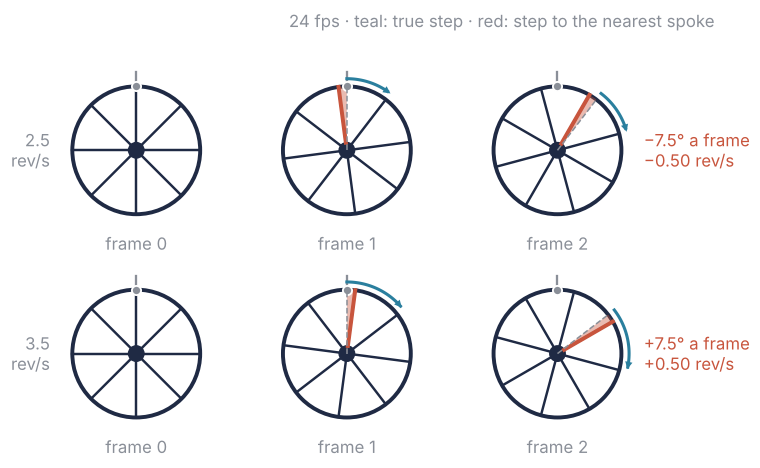
The spokes all look alike, so the eye pairs each spoke with the nearest spoke in the next frame. At 2.5 rev/s the true step is 37.5°, 7.5° short of the next spoke, so the nearest spoke in the new frame sits 7.5° behind the old position. That is the step the film shows: −7.5° a frame, 24 frames a second, −180° per second or −0.5 rev/s.
Now count the step in spoke spacings instead of degrees. At 2.5 rev/s it is 37.5°/45° = 0.833 spacing, the same number as \(N r / f_s = 20/24\), the frequency of the spoke pattern over the frame rate. The eye rounds it to the nearest whole spoke, 1, and sees only what is left over, \(0.833 - 1 = -0.167\) spacing, which is the −7.5°. In symbols, with \(f = N r\) the frequency of the spoke pattern,
The round is the nearest spoke, the subtraction the leftover, and the factor \(f_s\) turns spacings per frame back into patterns per second; \(f_a\) is the apparent frequency and \(r_a\) the apparent speed. The leftover lies between −½ and +½ spacing, so the step on film never exceeds 22.5° either way.
A negative \(f_a\) is a pattern that repeats while moving the other way: for the wheel, the sign is the direction. apparent_speed(r, fps) is the formula in rev/s, the same line the game runs. The cell checks it against the eye's rule, nearest_spoke_speed, which wraps the angle between two frames to the nearest spoke without any round:
# apparent_speed (the folding rule) and nearest_spoke_speed (the eye's rule) live in the hidden setup cell
print("   r      N·r/fs   nearest spoke   folding rule     (rev/s, at 24 fps)")
for r in [1.0, 1.4, 2.5, 2.8, 3.0, 3.2, 3.5, 6.0]:
    eye, rule = np.round([nearest_spoke_speed(r, FPS), apparent_speed(r, FPS)], 2) + 0   # + 0 turns −0.0 into 0.0
    print(f"{r:4.1f}   {N * r / FPS:8.3f}   {eye:+11.2f}   {rule:+12.2f}")
print(f"Nyquist: {FPS / 2:.0f} Hz, a wheel at {FPS / (2 * N):.2f} rev/s")
   r      N·r/fs   nearest spoke   folding rule     (rev/s, at 24 fps)
 1.0      0.333         +1.00          +1.00
 1.4      0.467         +1.40          +1.40
 2.5      0.833         -0.50          -0.50
 2.8      0.933         -0.20          -0.20
 3.0      1.000         +0.00          +0.00
 3.2      1.067         +0.20          +0.20
 3.5      1.167         +0.50          +0.50
 6.0      2.000         +0.00          +0.00
Nyquist: 12 Hz, a wheel at 1.50 rev/s
The two rules agree at every speed. The film tells the truth, as at 1.0 and 1.4 rev/s, only while the step stays under half a spacing, that is, while the pattern repeats fewer than \(f_s/2\) = 12 times a second: a wheel below 1.5 rev/s. That limit is the Nyquist frequency, and every frequency above it appears on film as one between −12 and +12 Hz.
Free account
The second half of this tutorial needs a free account
Sign in, or create an account with your email address, and the page goes on right here. The account costs nothing and also brings the notebook download, collections, and done marks.
Still to come
- One sensor sees a false, slower sine
- How the game computes it
- Variations
- Further reading