Align two time series sampled at different rates onto one hourly table
Afterwards you can bring two time series with different sampling rates and gaps onto one hourly index with pandas and line them up without inventing data.
- Topic
- Data wrangling, Time series
- Field
- Cross-disciplinary
- Libraries
matplotlib 3.11.2numpy 2.5.4pandas 3.0.6
py-align-time-series.ipynb, executed with the versions above. The download needs a free account
Run it yourself. In a terminal, this installs exactly the versions above:
pip install numpy==2.5.4 pandas==3.0.6 matplotlib==3.11.2 jupyterlabThe problem
You have two time series of the same weeks, logged by two instruments at different rates on their own clocks, each with its own gaps, start, and stop. You want one hourly table of means, only for hours covered well enough, and the hours both cover. The example is two weeks of June 2026: air temperature every 10 minutes, and soil moisture every 15 minutes from a probe whose clock wanders by tens of seconds and whose battery died for a day. Swap in your own files at the top, each with a time column and a value column named like its key in FILES. Each step of the code is taught in pandas from the ground up.
The code
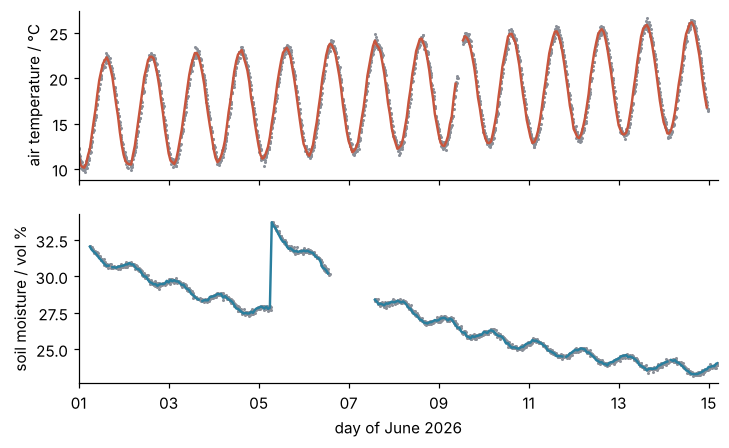
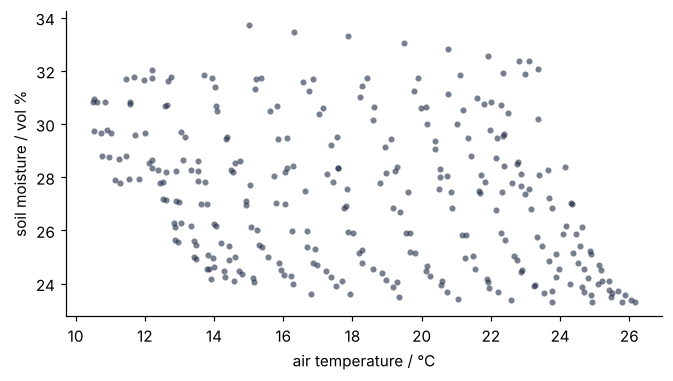
Each log is resampled to hourly means with its own coverage rule, as in Step 5 of the prerequisite, and the two Series go into one DataFrame, which lines them up by timestamp. When the two Series do not have the same hours, the table gets a row for every hour that either one has, and the column of the log that lacks an hour holds NaN there. dropna() then keeps the hours both have. Below, 336 hours from each log make a table of 342 rows. The cell then plots both logs on one time axis, raw readings behind hourly means, and soil moisture against air temperature for the hours both cover, the plot you would draw to compare them.
import numpy as np
import pandas as pd
import matplotlib.pyplot as plt
import matplotlib.dates as mdates

# ---- your data: CSV files with a "time" column and a value column named like the key
FILES = {"air_temp": ("station.csv", "10min"), "soil_moisture": ("probe.csv", "15min")}
BIN = "1h"                                   # the time step of the table
COVERAGE = 0.75                              # fraction of a bin's readings that a mean needs

# ---- the two instruments: delete this block and use your own files
rng = np.random.default_rng(20261018)
time = pd.date_range("2026-06-01", periods=2016, freq="10min")
day = (time - time[0]) / pd.Timedelta("1D")
air = 16 + 0.3 * day + 6 * np.cos(2 * np.pi * (day - 15 / 24)) + rng.normal(0, 0.3, time.size)
station = pd.DataFrame({"time": time, "air_temp": np.round(air, 2)})
station.loc[(time >= "2026-06-09 10:20") & (time < "2026-06-09 12:50"), "air_temp"] = np.nan
station.to_csv("station.csv", index=False)                                      # power cut: empty fields
time = pd.date_range("2026-06-01 06:00", periods=1344, freq="15min")
time = time + pd.to_timedelta(rng.normal(0, 40, time.size).round(), unit="s")   # clock jitter
day = (time - pd.Timestamp("2026-06-01")) / pd.Timedelta("1D")
soil = (22 + 10 * np.exp(-day / 7) + 6 * np.exp(-(day - 4.29) / 3) * (day > 4.29)   # rain on 5 June
        - 0.4 * np.cos(2 * np.pi * (day - 17 / 24)) + rng.normal(0, 0.1, time.size))
probe = pd.DataFrame({"time": time, "soil_moisture": np.round(soil, 2)})
dead = (time >= "2026-06-06 14:00") & (time < "2026-06-07 14:00")             # battery: rows absent
probe[~dead & (rng.random(time.size) > 0.02)].to_csv("probe.csv", index=False)

# ---- read and resample: one mean per bin, NaN where coverage is short
raw, hourly = {}, {}
for name, (path, interval) in FILES.items():
    s = pd.read_csv(path, parse_dates=["time"], index_col="time")[name]
    r = s.resample(BIN)
    n = r.count()
    need = COVERAGE * pd.Timedelta(BIN) / pd.Timedelta(interval)
    raw[name], hourly[name] = s, r.mean().where(n >= need)
    print(f"{name}: {len(s):,} rows, {len(n)} hours, a mean needs {need:g} readings")
    print("  hours with k readings:", {k: int((n == k).sum()) for k in range(n.max() + 1)})

# ---- align: one row per hour of either log, one column per log
hourly = pd.DataFrame(hourly)
both = hourly.dropna()

# ---- report and plot
print(f"{len(hourly)} hours in the table, with a mean: {hourly.notna().sum().to_dict()}, with both: {len(both)}")
print(both.head(3).round(2))

plt.rcParams.update({"axes.spines.top": False, "axes.spines.right": False})
fig, axes = plt.subplots(2, 1, sharex=True, figsize=(7.5, 4.4), dpi=110)
for ax, name, color in zip(axes, FILES, ["#c8553d", "#2a7f9e"]):
    ax.plot(raw[name].index, raw[name], "o", color="#8a8f98", ms=2, mew=0)
    ax.plot(hourly.index, hourly[name], color=color, lw=1.6)
axes[0].set(ylabel="air temperature / °C")
axes[1].set(ylabel="soil moisture / vol %", xlabel="day of June 2026", xlim=(hourly.index[0], hourly.index[-1]))
axes[1].xaxis.set_major_formatter(mdates.DateFormatter("%d"))
plt.show()
fig, ax = plt.subplots(figsize=(7, 3.6), dpi=110)
ax.plot(both["air_temp"], both["soil_moisture"], "o", color="#1f2a44", ms=4, mew=0, alpha=0.6)
ax.set(xlabel="air temperature / °C", ylabel="soil moisture / vol %")
plt.show()
air_temp: 2,016 rows, 336 hours, a mean needs 4.5 readings
  hours with k readings: {0: 1, 1: 1, 2: 1, 3: 0, 4: 0, 5: 0, 6: 333}
soil_moisture: 1,225 rows, 336 hours, a mean needs 3 readings
  hours with k readings: {0: 24, 1: 0, 2: 4, 3: 93, 4: 137, 5: 78}
342 hours in the table, with a mean: {'air_temp': 333, 'soil_moisture': 308}, with both: 299
                     air_temp  soil_moisture
time
2026-06-01 06:00:00     12.21          32.05
2026-06-01 07:00:00     13.71          31.83
2026-06-01 08:00:00     15.21          31.70
The knobs
COVERAGE and each file's interval set how many readings an hour needs for a mean: three quarters of six is 4.5 for the station, so five, and three quarters of four is three for the probe. The station's count line in the printout is plain, 333 full hours and three short ones in the power cut of 9 June. The probe's is not: 93 hours with three readings and 78 with five, against 137 with the scheduled four, though only about 2 % of its readings were lost. The cause is the jitter: a reading due at 10:00 and stamped 09:59:40 belongs to the 09:00 bin, which then holds five readings and the next one three. The rule of three of four passes both and fails the four hours with two, and a five-reading mean that takes in the next hour's first reading does no harm to a quantity that changes over hours. Set COVERAGE = 1.0 and all 93 three-reading hours go, complete ones included, while a logger that stamps at :07, :22, :37, and :52 gives four in every hour with no change to the code. For readings paired with readings instead of hourly means, use pd.merge_asof, which pairs each row of one sorted table with the last reading of the other within a tolerance (its documentation).
Every number in both is a mean of real readings. Nothing was filled, so the 43 hours missing from it are lost, and the printout accounts for each: six before the probe starts and six after the station stops, the 24 of the dead day, the three of the power cut, and the four probe hours with two readings. In the first figure they are the breaks in the lines, with sharex=True keeping both panels on one time axis as in Matplotlib from the ground up. In the scatter, the dots of one hour of the day, 15:00 on each day of the fortnight, form one streak, and so does every other hour. Each streak runs down because the fortnight warms while the soil dries, with one step back up at the rain, not because one series predicts the other. Both clocks are assumed to keep the same zone with no switch inside the window; for a logger on local time, see the daylight saving pitfall of Read a folder of CSV files into one pandas DataFrame.
Pitfalls
A clock that runs a few minutes off. If the probe's clock runs 20 minutes fast, it stamps every reading 20 minutes after it was taken. Its daily cycle in the hourly table then lags the air temperature by a third of an hour, and nothing in the output warns you. The bins are cut on the timestamps as written, so the fix goes before resample: s.index = s.index - pd.Timedelta("20min"), with the offset measured against a clock you trust. A logger that stamps each reading at the end of its interval needs s.resample(BIN, closed="right", label="right") instead, which counts a reading stamped 10:00 in the hour that ends then and names each hour by its end.
Interpolating across the dead day. Call interpolate() on the soil column before dropna() and the lower panel shows a straight ramp across 6 and 7 June, and the scatter gains 28 points: the 24 hours without readings and the four with two, none of them measured. The table cannot tell those hours from real ones. Do not fill before lining up. If single lost hours must be filled, use interpolate(limit=1) and mask the long gaps again, as in the Variations of the prerequisite.
One index naive, the other with a time zone. One logger writes 2026-06-01 06:00:00+00:00, the other the same time without the +00:00. read_csv parses the first as aware, a timestamp that carries its zone, and the second as naive, a clock reading with none, and pd.DataFrame(hourly) stops with TypeError: Cannot join tz-naive with tz-aware DatetimeIndex. Give the naive index its zone before lining up, s.index = s.index.tz_localize("UTC") or the logger's own zone. Never strip the zone off the aware one without converting it first: an index in "Europe/Berlin" stripped of its zone keeps its local hours, two ahead of UTC in summer, and the table pairs them with the wrong hours without a word.