Units with pint: catch the mistake that lost the Mars Climate Orbiter
Afterwards you can compute, convert, and check units with pint, handle temperature offsets, carry units through arrays and tables, and strip them for SciPy.
- Topic
- Data wrangling
- Field
- Cross-disciplinary
- Prerequisites
- none beyond Python basics
- Libraries
matplotlib 3.11.2numpy 2.4.3pandas 3.0.6pint 0.26.1pint_pandas 0.8.0scipy 1.18.1
py-pint.ipynb, executed with the versions above. The download needs a free account
Run it yourself. In a terminal, this installs exactly the versions above:
pip install pint==0.26.1 numpy==2.4.3 scipy==1.18.1 pandas==3.0.6 matplotlib==3.11.2 pint_pandas==0.8.0 jupyterlabThe problem: a factor of 4.45 that nobody checked
The Mars Climate Orbiter was lost on 23 September 1999 because one program wrote thruster impulses in pound-force seconds and the next one read them as newton seconds, the unit the interface specified. One pound-force second is 4.448 N·s, the 4.45 of the heading. Take an invented impulse of 25.0 lbf·s: it is 111.2 N·s, and read as 25.0 N·s it is 4.448 times too small. The unit lived in a document, not in the number. With pint the unit becomes part of the number, so that the receiving code either converts it or refuses it.
The running example is smaller. A double-glazed window of 1.2 m by 1.5 m has a datasheet U-factor of 0.30 BTU/(h·ft²·°F): the heat that flows through each unit of window area per unit time for each degree of difference between inside and outside, so that heat flow = U-factor × area × temperature difference. At 20 °C inside and -5 °C outside it loses 76.7 W. The same trap waits in every lab: a pressure in bar fed to a formula that wants pascal, a temperature in °C in an Arrhenius exponent (the first pitfall computes how bad that is), a concentration in mmol/L beside one in mol/m³.
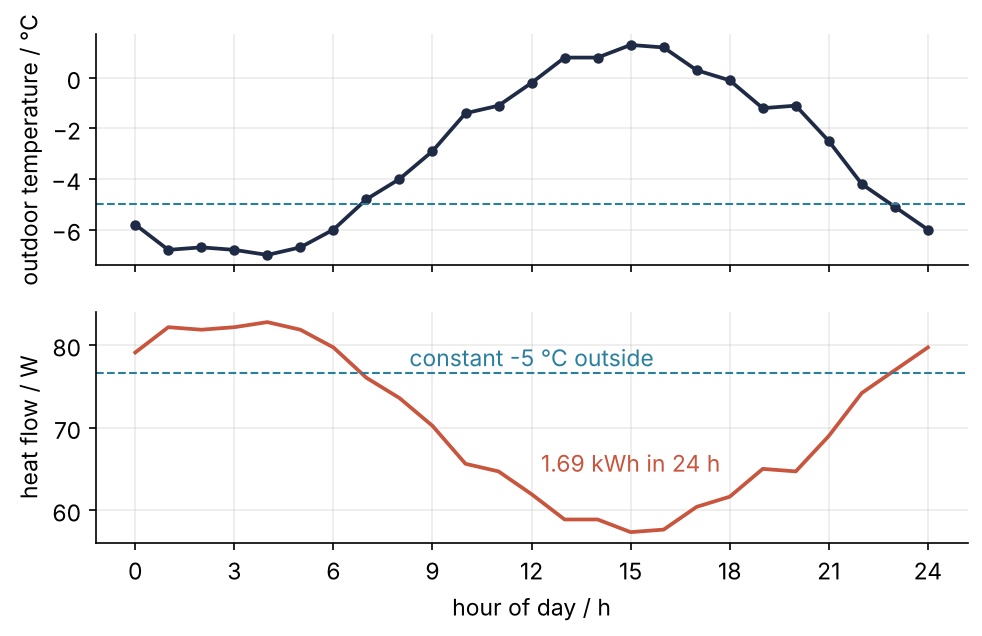
This is where we end up: the outdoor temperature of one day on top, the heat flow through the window below. Both axis units are taken from the data, and the day's total of 1.69 kWh comes from an integral that kept its units.
Setup
The registry is pint's table of units. set_application_registry makes the pandas column of Step 5 use the same one (the second pitfall says why), and Q_ is only a short name for ureg.Quantity, a habit of pint users. The day's outdoor temperatures go into a pandas DataFrame, a table with named columns, here hour and T_out as a logger would write them; df["T_out"] picks one column and .to_numpy() turns it into a NumPy array. pandas from the ground up has more, and Random numbers with numpy.random explains the seeded default_rng.
import numpy as np
import pandas as pd
import pint
import pint_pandas                         # registers the "pint[...]" column type with pandas
import warnings
import matplotlib.pyplot as plt
from scipy.integrate import cumulative_trapezoid

ureg = pint.UnitRegistry()
pint.set_application_registry(ureg)        # pint-pandas uses this registry too
Q_ = ureg.Quantity
ureg.setup_matplotlib()                    # lets ax.plot take quantities

plt.rcParams.update({
    "figure.figsize": (7.5, 4.4), "figure.dpi": 110,
    "axes.spines.top": False, "axes.spines.right": False,
    "axes.grid": True, "grid.alpha": 0.25,
    "font.size": 11, "lines.linewidth": 1.8,
})
INK, ACCENT, SECOND, MUTED = "#1f2a44", "#c8553d", "#2a7f9e", "#8a8f98"

# one winter day, hourly, warmest at 15:00, as plain floats like a logger file
rng = np.random.default_rng(20261019)
hour = np.arange(25)
T_out = (-3 + 4 * np.cos(2 * np.pi * (hour - 15) / 24) + rng.normal(0, 0.3, 25)).round(1)
df = pd.DataFrame({"hour": hour, "T_out": T_out})

print(f"pint {pint.__version__}, pandas {pd.__version__}, table {df.shape}")
pint 0.26.1, pandas 3.0.6, table (25, 2)
Step 1: Make quantities from a unit registry
A quantity is a magnitude and a unit, and every quantity belongs to a registry, which knows how its units relate. Multiply a number by a unit from the registry, or parse a string:
width, height = 1.2 * ureg.m, 1.5 * ureg.m
A = width * height
U_us = Q_(0.30, "BTU/(hour*foot**2*degF)")

print(A)
print(U_us)
print(A.magnitude, "|", A.units, "|", A.dimensionality)
print(U_us.dimensionality)
1.7999999999999998 meter ** 2
0.3 british_thermal_unit / delta_degree_Fahrenheit / foot ** 2 / hour
1.7999999999999998 | meter ** 2 | [length] ** 2
[mass] / [time] ** 3 / [temperature]
The area is meter ** 2 because the multiplication said so; nobody typed m**2. The U-factor's dimensionality is mass per temperature per time cubed, with the length gone: what pint compares when it decides whether a conversion makes sense.
One distinction matters from here on. A temperature reading such as 20 °C is a point on a scale whose zero is arbitrary; a temperature difference is a step, and a step of 1 °C is as large as a step of 1 K, while a step of 1 °F is 5/9 K. Inside a compound unit like the U-factor pint reads degF as a step, which is what a U-factor means, and it prints it as delta_degree_Fahrenheit. Step 4 shows what goes wrong with points.
Step 2: Compute the heat loss and convert the result
.to() converts to the unit you name. The temperature difference of the motivation, 25 degrees, goes in as a step:
U = U_us.to("W/(m**2*K)")
dT = Q_(25, "delta_degC")
P = U * A * dT

print(f"{U:.2f~P}")
print(P)
print(f"{P.to('W'):.1f~P}   {P.to('BTU/hour'):.0f~P}   {(P * ureg.day).to('kWh'):.2f~P}")
print(f"{Q_(1, 'mmol/L').to('mol/m**3'):.3g~P}")
1.70 W/K/m²
76.65656581313162 delta_degree_Celsius * watt / kelvin
76.7 W   262 Btu/h   1.84 kWh
1 mol/m³
The U-factor is 1.70 W/K/m², pint's way of writing W/(m²·K), and the heat flow first prints as 76.66 with the unit delta_degree_Celsius * watt / kelvin. A step of 1 °C divided by 1 K is exactly 1, but pint keeps both names as you wrote them instead of guessing, until you ask. Ask with .to("W") and you get 76.7 W, or 262 BTU/h for the datasheet's author, or 1.84 kWh over a whole day at that difference.
The format string does the rest: after the usual .1f, the ~ asks for abbreviated unit names and the P for pretty printing with superscripts. The last line is the chemist's check, a millimole per liter is one mole per cubic meter; the .3g hides the 0.9999999999999999 that the raw conversion carries.
Step 3: Reproduce the orbiter's mistake and let pint catch it
Two functions stand in for the two programs. The first returns an impulse, intended in pound-force seconds; the second turns it into a change of velocity for a spacecraft of 500 kg (invented, like the impulse) and expects newton seconds:
def ground_impulse():
    return 25.0                               # lbf*s, says the author's head

def delta_v(J, m=500.0):
    return J / m                              # N*s / kg = m/s, says the interface

print(f"plain floats: delta_v = {delta_v(ground_impulse()):.3f}")
plain floats: delta_v = 0.050
Nothing complains, and the answer is wrong by the factor that lost the orbiter. Now let the impulse carry its unit:
def ground_impulse():
    return Q_(25.0, "lbf*s")

J = ground_impulse()
print(f"quantities:   delta_v = {delta_v(J, Q_(500.0, 'kg')).to('m/s'):.3f~P}")
print(f"{J.to('N*s'):.1f~P}   equal to 25.0 N·s: {J == Q_(25.0, 'N*s')}   "
      f"ratio {(J / Q_(25.0, 'N*s')).to('').magnitude:.3f}")
quantities:   delta_v = 0.222 m/s
111.2 N⋅s   equal to 25.0 N·s: False   ratio 4.448
The same delta_v now returns 0.222 m/s instead of 0.050, because 25.0 lbf·s is 111.2 N·s, 4.448 times what the plain float claimed. The last number is that factor: .to('') converts the ratio of the two impulses to the empty unit, a plain number. That is conversion.
Refusal comes from @ureg.check, the line above a function that runs a dimension check on its arguments at every call. Its string is written the way .dimensionality printed in Step 1, base dimensions in square brackets: [length], [mass], [time], [temperature], [current], and [substance] for an amount, so a concentration is [substance]/[length]**3. An impulse in N·s is kg·m/s, so the dimension to demand is mass times length per time. Each call below is wrapped in lambda: so that it runs inside the try, where its error is caught and printed, and not while the list is built:
@ureg.check("[mass]*[length]/[time]")
def receive(J):
    return J.to("N*s")

for bad in [lambda: receive(25.0), lambda: receive(Q_(25.0, "lbf")), lambda: J + Q_(3, "lbf")]:
    try:
        bad()
    except pint.DimensionalityError as e:
        print(f"{type(e).__name__}: {e}")
DimensionalityError: Cannot convert from '25.0' (dimensionless) to 'a quantity of' ([mass] * [length] / [time])
DimensionalityError: Cannot convert from '25.0 force_pound' ([length] * [mass] / [time] ** 2) to 'a quantity of' ([mass] * [length] / [time])
DimensionalityError: Cannot convert from 'force_pound * second' ([length] * [mass] / [time]) to 'force_pound' ([length] * [mass] / [time] ** 2)
A bare 25.0 fails with "Cannot convert from '25.0' (dimensionless)", a force with the seconds forgotten fails too, and so does adding a force to an impulse. The bare number is the one case pint cannot protect you from, unless the receiver checks.
Step 4: Handle temperatures with offsets
The trouble with points from Step 1 is that 0 °C is not zero of anything physical, so twice 20 °C has no single answer. pint knows which operations make sense:
T_in, T_out_ref = Q_(20, "degC"), Q_(-5, "degC")

print(T_in - T_out_ref, "|", f"{(T_in - T_out_ref).to('delta_degF'):.0f~P}")
print(T_in.to("K"), "|", f"{T_in.to('degF'):.0f~P}")
print(T_out_ref + Q_(3, "delta_degC"))
try:
    T_in * 2
except pint.OffsetUnitCalculusError as e:
    print(f"{type(e).__name__}: {e}")
print(f"{(U * A * (T_in - T_out_ref)).to('W'):.1f~P}")
25 delta_degree_Celsius | 45 Δ°F
293.15 kelvin | 68 °F
-2 degree_Celsius
OffsetUnitCalculusError: Ambiguous operation with offset unit (degree_Celsius). See https://pint.readthedocs.io/en/stable/user/nonmult.html for guidance.
76.7 W
The difference of two readings is 25 delta_degree_Celsius, a step, or 45 Δ°F: the dT of Step 2, now computed instead of typed. A reading converts as a point, 20 °C is 293.15 K and 68 °F, and a point plus a step is a point, -2 °C. Doubling a point raises OffsetUnitCalculusError. The window with both temperatures as readings loses the same 76.7 W as before. Anything that multiplies a point waits until you have written .to("K").
Step 5: Carry units through NumPy arrays and a pandas column
A quantity can hold a whole array, and NumPy's functions keep the unit:
T = Q_(df["T_out"].to_numpy(), "degC")
q = (U * A * (T_in - T)).to("W")

print(f"coldest {np.min(T):~P}, warmest {np.max(T):~P}, mean {np.mean(T):.2f~P}")
print(f"heat flow from {q.min():.1f~P} to {q.max():.1f~P}, {q.size} values")
coldest -7.0 °C, warmest 1.3 °C, mean -3.04 °C
heat flow from 57.3 W to 82.8 W, 25 values
The table can carry units too, with pint-pandas. astype changes the type of a column, here to pint's type, which stores a unit with the column. .pint gathers pint's methods for a column the way .str gathers the text methods, so .pint.to("W") is the familiar .to:
df["T_out"] = df["T_out"].astype("pint[degC]")
df["q"] = (U * A * (T_in - df["T_out"])).pint.to("W")

print(df.dtypes, end="\n\n")
print(df.head(3), end="\n\n")
print(df.pint.dequantify().head(3))
hour                             int64
T_out    pint[degree_Celsius][Float64]
q                  pint[watt][Float64]
dtype: object

   hour  T_out          q
0     0   -5.8  79.109576
1     1   -6.8  82.175839
2     2   -6.7  81.869212

        hour          T_out          q
unit No Unit degree_Celsius       watt
0          0           -5.8  79.109576
1          1           -6.8  82.175839
2          2           -6.7  81.869212
df.dtypes lists each column's type: pint[degree_Celsius][Float64] is the unit first, then the pandas floating-point type that holds the magnitudes. head(3) shows the first three rows, and dequantify() moves the units into a second header row, the form to write to a CSV file. The coldest hour is 04:00 at -7.0 °C, and the largest heat flow is 82.8 W, 6 W above the 76.7 W that Step 2 computed for a steady -5 °C outside.
Step 6: Strip units for SciPy and plot the day
A boundary is any place where a quantity passes into code that knows only plain numbers: a SciPy function, a file writer, a compiled extension. The day's energy is the integral of the heat flow over time, and NumPy's trapezoid rule takes the quantities as they are:
t = Q_(df["hour"].to_numpy(float), "h")
print(f"day total, np.trapezoid: {np.trapezoid(q, t).to('kWh'):.2f~P}")

E_run = cumulative_trapezoid(q, t, initial=0)
print(type(E_run).__name__, f"{E_run[12]:.1f}")
day total, np.trapezoid: 1.69 kWh
ndarray 911.3
UnitStrippedWarning: The unit of the quantity is stripped when downcasting to ndarray.
The running total from SciPy's cumulative_trapezoid is a bare array with a UnitStrippedWarning, and 911.3 means W·h only because you remember it does. The difference lies in who does the work. pint takes part in __array_function__, NumPy's protocol for handing a function call to the array type. When you call a NumPy function that pint supports, NumPy hands the call to pint, which computes the result and keeps the units. SciPy's functions first turn their inputs into plain arrays with np.asarray, which keeps the magnitudes and drops the units. Assume that anything outside NumPy strips them; the warning names the place.
The fix is to cross the boundary on purpose. .m_as("W") is the magnitude after converting to W, so the number going in has the unit you chose, and Q_(..., "W*h") puts the unit back on the way out:
E_run = Q_(cumulative_trapezoid(q.m_as("W"), t.m_as("h"), initial=0), "W*h").to("kWh")
print(f"by noon {E_run[12]:.2f~P}, by midnight {E_run[-1]:.2f~P}")
by noon 0.91 kWh, by midnight 1.69 kWh
0.91 kWh by noon, 1.69 kWh for the day, 0.15 kWh less than the 1.84 kWh that Step 2 gave for a whole day at -5 °C. After setup_matplotlib, Matplotlib takes the quantities directly, and the axis labels below are written from the units the data carries (the Matplotlib tutorial covers the two-panel layout):
P_const = (U * A * dT).to("W")

fig, (ax1, ax2) = plt.subplots(2, 1, sharex=True)
ax1.plot(t, T, "o-", color=INK, ms=4)
ax1.axhline(Q_(-5, "degC"), color=SECOND, lw=1, ls="--")
ax1.set_ylabel(f"outdoor temperature / {T.units:~P}")

ax2.plot(t, q, color=ACCENT)
ax2.axhline(P_const, color=SECOND, lw=1, ls="--")
ax2.text(Q_(12, "h"), P_const + Q_(0.8, "W"), "constant -5 °C outside", color=SECOND, ha="center")
ax2.text(Q_(15, "h"), Q_(64, "W"), f"{E_run[-1]:.2f~P} in 24 h", color=ACCENT, ha="center", va="bottom")
ax2.set_ylabel(f"heat flow / {q.units:~P}")
ax2.set_xlabel(f"hour of day / {t.units:~P}")
ax2.set_xticks(Q_(np.arange(0, 25, 3), "h"))
fig.align_ylabels()
plt.show()
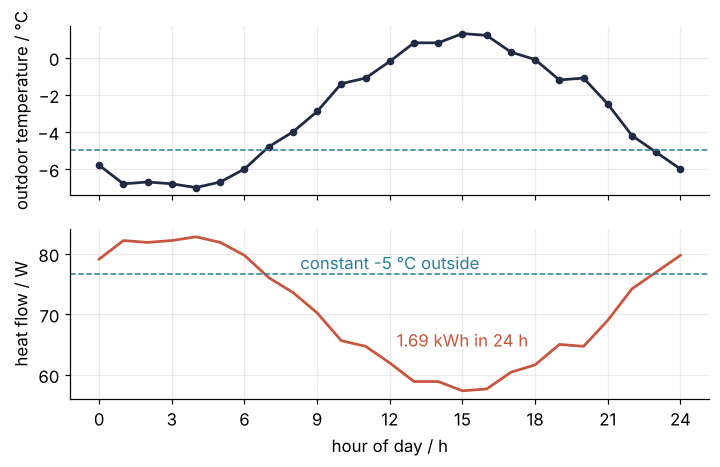
The heat flow is the temperature turned upside down: highest before dawn, lowest at 15:00.
Pitfalls
A temperature in an Arrhenius exponent. The rate factor \(e^{-E_a/(RT)}\) needs \(T\) in kelvin, and a 25 written for 25 °C runs without complaint:
Ea, R = Q_(50, "kJ/mol"), Q_(8.314, "J/(mol*K)")
print(f"plain floats, 25: {np.exp(-50e3 / (8.314 * 25)):.2e}")
try:
    np.exp(-Ea / (R * Q_(25, "degC")))
except pint.OffsetUnitCalculusError as e:
    print(f"pint, 25 degC: {type(e).__name__}")
print(f"pint, in K:       {np.exp(-Ea / (R * Q_(25, 'degC').to('K'))).magnitude:.2e}")
plain floats, 25: 3.36e-105
pint, 25 degC: OffsetUnitCalculusError
pint, in K:       1.74e-09
The silent answer is 3.36e-105, the right one 1.74e-9, 96 orders of magnitude apart. With pint the same line refuses with the error of Step 4. The fix is .to("K") before the temperature enters any product.
Two registries in one program. A helper module that makes its own pint.UnitRegistry(), or a notebook cell with the registry run twice, and quantities that look identical no longer add:
ureg2 = pint.UnitRegistry()
try:
    Q_(1, "m") + ureg2.Quantity(1, "m")
except ValueError as e:
    print(f"{type(e).__name__}: {e}")
ValueError: Cannot operate with Quantity and Quantity of different registries.
Make one registry per program, once, and register it with pint.set_application_registry(ureg) as in the setup, so that pint-pandas and any library that asks pint for "the" registry gets yours. Without that line the pandas column of Step 5 fails with this very error.
Units dropped without a sound. J.magnitude is 25.0 whatever unit J happens to carry, lbf·s or N·s, and in a long script the UnitStrippedWarning of Step 6 scrolls past or is filtered away. Use .m_as("N*s") at every boundary, never .magnitude. While you develop, make the warning loud: warnings.simplefilter("error", pint.UnitStrippedWarning) turns every silent strip into an exception that names the line, and cumulative_trapezoid(q, t) then stops the script instead of returning bare numbers.
Variations
- Functions that need plain numbers.
@ureg.wraps("W", ("W/(m**2*K)", "m**2", "K"))above a function converts the arguments to those units, calls it with magnitudes, and attaches watts to the result: a wrapper for legacy code or a compiled routine. - Your own units.
ureg.define("cell_volume = 2.5 picoliter")orureg.load_definitions("my_units.txt")adds a lab-specific unit that converts like any other. - Contexts. Inside
with ureg.context("sp"):a wavelength converts to a frequency or a photon energy, the conversions of spectroscopy that are not dimensionally plain. - Automatic prefixes.
q.to_compact()picks the SI prefix that keeps the number readable: 1690 W·h becomes 1.69 kW·h, 6.08e6 J becomes 6.08 MJ.
Cheat sheet
ureg = pint.UnitRegistry(); pint.set_application_registry(ureg)   # one registry per program
Q_ = ureg.Quantity; x = Q_(0.30, "BTU/(hour*foot**2*degF)")          # or 1.2 * ureg.m
x.to("W/(m**2*K)"); x.m_as("W/(m**2*K)")                             # convert; plain number in a unit you chose
f"{x:.2f~P}"                                                         # 1.70 W/K/m², abbreviated and pretty
Q_(20, "degC") - Q_(-5, "degC"); Q_(25, "degC").to("K")             # point - point = step; multiply only in K
@ureg.check("[mass]*[length]/[time]")                                # DimensionalityError on wrong arguments
def receive(J): ...
df["T"] = df["T"].astype("pint[degC]"); df["T"].pint.to("K")        # units in a pandas column
df.pint.dequantify()                                                 # units into a header row, ready for CSV
warnings.simplefilter("error", pint.UnitStrippedWarning)             # every silent strip becomes an error
Further reading
- pint documentation, with its tutorial, the page on temperatures and other offset units, and the page on NumPy support, which lists the functions that keep units.
- pint-pandas, the README with the accessor's methods.
- Mars Climate Orbiter Mishap Investigation Board, Phase I Report, NASA, 10 November 1999, for what went wrong and why nobody caught it.
- BIPM, The International System of Units (SI), 9th edition, 2019, for what the units are.
- E. R. Cohen et al., Quantities, Units and Symbols in Physical Chemistry (the IUPAC Green Book), 3rd edition, RSC Publishing, 2007, the standard reference for writing quantities and units in the sciences.
- Related tutorials on this site: pandas from the ground up: a week of temperature logs, Matplotlib from the ground up: a two-panel figure for one journal column, Random numbers with numpy.random: ten thousand reproducible random walks; planned: the same window and orbiter in Julia with Unitful.jl.
- Download the notebook. It was executed with the library versions in the header.