Manim animation of normal modes: three gliders on an air track
Afterwards you can animate a physical system with Manim, move its objects with updaters driven by a computed solution, and render a short mp4 for a web page.
- Topic
- Linear algebra, Visualization
- Field
- Engineering, Physics
- Prerequisites
- Eigenvalues with numpy.linalg: normal modes of coupled oscillators, Matplotlib from the ground up: a two-panel figure for one journal column
- Libraries
av 19.0.1manim 0.22.0matplotlib 3.11.2numpy 2.4.3
py-manim.ipynb, executed with the versions above. The download needs a free account
Run it yourself. In a terminal, this installs exactly the versions above:
pip install av==19.0.1 manim==0.22.0 numpy==2.4.3 matplotlib==3.11.2 jupyterlabBefore and after: normal modes as a physicist draws them
On a 2 m air track, three gliders of 200 g rest 0.5 m from one another, with four springs of 10 N/m between neighbors and from the outer gliders to a post at each end. Eigenvalues with numpy.linalg finds their normal modes at 0.86, 1.59, and 2.08 Hz and draws each as arrows on three dots. On a board a physicist draws something else: carts, springs that stretch and squeeze, and the carts in motion. Manim Community Edition draws vector shapes, moves them, and writes a video, and here every position comes from the computed solution.
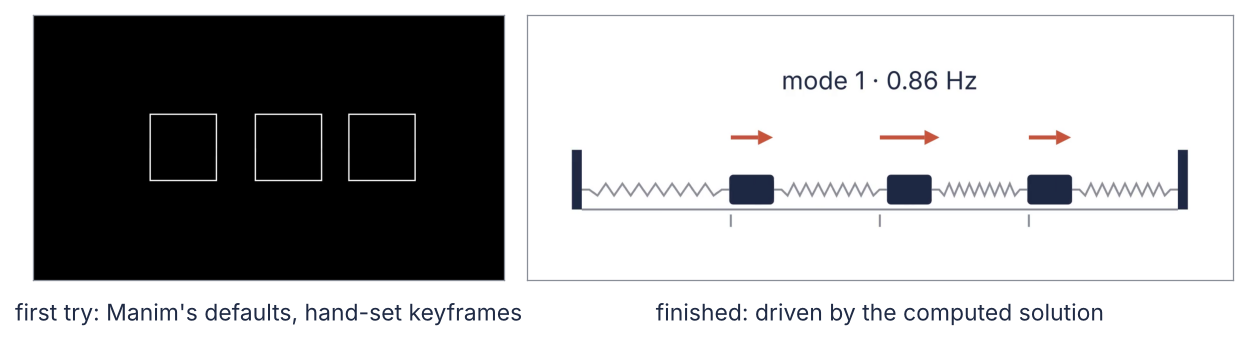
On the left is a first Manim scene with the library's defaults, moved by keyframes set by hand, and on the right the same moment of the finished video. A hidden cell at the end takes both frames from the video files.
The finished video runs the three modes one after another, each pulled into its shape and let go for a whole number of periods. Then it releases the gliders from a 1 N pull on the first, a motion that never repeats, and comes back to rest, because the page plays it in a loop. The script under Full source renders it:
The setup rebuilds the physics of the eigenvalue tutorial without deriving it again: the matrix K, the frequencies f, the start x_pull held with 1 N, and displacement, the modal sum for a release from rest at x_start. INK, ACCENT, SECOND, and MUTED are this site's colors. The collapsed cell after it holds two inspection tools, video_info and show_frames: they open an mp4 with PyAV, which comes with Manim, and print what the file stores or show its frames at given times in a Matplotlib figure, so every number and still about a video comes from a file.
import tempfile
from pathlib import Path

import numpy as np
import matplotlib.pyplot as plt
import av
from manim import (Scene, Mobject, VGroup, VMobject, Square, Rectangle, RoundedRectangle, Line, Arrow,
                   Text, ValueTracker, FadeIn, FadeOut, always_redraw, linear, smooth, tempconfig,
                   config, UP, LEFT, RIGHT)

plt.rcParams.update({
    "figure.figsize": (7, 3.6), "figure.dpi": 110,
    "axes.spines.top": False, "axes.spines.right": False,
    "axes.grid": True, "grid.alpha": 0.25,
    "font.size": 11, "lines.linewidth": 1.8,
})
INK, ACCENT, SECOND, MUTED = "#1f2a44", "#c8553d", "#2a7f9e", "#8a8f98"

m, k = 0.200, 10.0                                       # kg per glider, N/m per spring
K = k * np.array([[2, -1, 0], [-1, 2, -1], [0, -1, 2]])  # N/m, posts at both ends
w2, V = np.linalg.eigh(K / m)
omega = np.sqrt(w2)                                      # rad/s
f = omega / (2 * np.pi)                                  # Hz
x_pull = np.linalg.solve(K, [1.0, 0.0, 0.0])             # m, held with 1 N on glider 1

def displacement(t, x_start):
    """Displacements in m at time t after a release from rest at x_start: the modal sum."""
    return V @ ((V.T @ x_start) * np.cos(omega * t))

def mode_shape(n):
    """Mode n scaled to a largest component of 1, the first component positive."""
    v = V[:, n] / np.abs(V[:, n]).max()
    return v * np.sign(v[0])

drafts = Path(tempfile.mkdtemp())                        # draft videos; only the final one goes to assets/

print("normal modes:", ", ".join(f"{x:.3f}" for x in f), "Hz")
print("held with 1 N:", ", ".join(f"{100 * x:.1f}" for x in x_pull), "cm")
normal modes: 0.861, 1.592, 2.079 Hz
held with 1 N: 7.5, 5.0, 2.5 cm
Show code
def video_info(path):
    """Print and return what an mp4 stores: pixels, frame rate, frames, duration, size."""
    with av.open(str(path)) as container:
        stream = container.streams.video[0]
        info = dict(width=stream.width, height=stream.height, fps=float(stream.guessed_rate),
                    frames=stream.frames)
    info["seconds"] = info["frames"] / info["fps"]
    info["kB"] = Path(path).stat().st_size / 1024
    print(f"{Path(path).name}: {info['width']} x {info['height']} px, {info['fps']:.0f} fps, "
          f"{info['frames']} frames, {info['seconds']:.2f} s, {info['kB']:,.0f} kB")
    return info

def show_frames(path, seconds):
    """Show the frames of an mp4 nearest to the given times, decoded from the file."""
    with av.open(str(path)) as container:
        stream = container.streams.video[0]
        wanted = [min(round(s * float(stream.guessed_rate)), stream.frames - 1) for s in seconds]
        images = {i: frame.to_ndarray(format="rgb24")
                  for i, frame in enumerate(container.decode(stream)) if i in wanted}
    h, w = images[wanted[0]].shape[:2]
    cols = len(seconds) if w / h < 2 else min(len(seconds), 2)   # wide strips two to a row
    rows = -(-len(seconds) // cols)
    panel = 8 / cols * h / w                                     # height of one frame, in inches
    fig, axs = plt.subplots(rows, cols, figsize=(8, rows * (panel + 0.3)), squeeze=False,
                            gridspec_kw=dict(left=0, right=1, top=1, bottom=0.3 / (rows * (panel + 0.3)),
                                             wspace=0.04, hspace=0.3 / panel))
    for ax in axs.flat[len(seconds):]:
        ax.set_axis_off()
    for ax, s, i in zip(axs.flat, seconds, wanted):
        ax.imshow(images[i])
        ax.set(xticks=[], yticks=[])
        for spine in ax.spines.values():                 # a thin frame, so a white strip shows its edges
            spine.set(visible=True, color=MUTED, linewidth=0.6)
        ax.text(0.5, -0.04, f"t = {s:g} s", transform=ax.transAxes, ha="center", va="top", color=INK)
    plt.show()
Step 1: Write a first Scene, move the carts with animate, and render it
A Manim animation is a class derived from Scene that fills in one method, construct. Manim creates the scene and calls construct for you. Inside, self.add places mobjects, Manim's drawable objects, and self.play animates them. square.animate.shift(...) turns a change into an animation from the old state to the new one, over a run_time of 1 s by default, with the rate function smooth. A rate function spreads the change over the run time, and smooth starts and ends slowly; Step 6 comes back to it.
From a terminal, the manim command renders a scene into a media folder in the current directory:
manim render scene.py FirstTry # writes media/videos/scene/1080p60/FirstTry.mp4
In a notebook the same render is three lines: with tempconfig({...}):, then scene = FirstTry() and scene.render(). The dictionary's settings hold for this one render: media_dir sends the video and Manim's working files to a temporary folder, progress_bar and verbosity keep it quiet, and disable_caching makes every render start fresh. The file lands at scene.renderer.file_writer.movie_file_path. render wraps these lines, and its **settings gathers any keyword arguments into a dictionary for tempconfig:
def render(scene_class, **settings):
    """Render a scene into the drafts folder, quietly, and return the path of its mp4."""
    settings.update(media_dir=str(drafts), progress_bar="none", verbosity="WARNING",
                    disable_caching=True)
    with tempconfig(settings):
        scene = scene_class()
        scene.render()
    path = Path(scene.renderer.file_writer.movie_file_path)
    print(path.relative_to(drafts))                      # the temporary folder itself changes per run
    return path
The first try keyframes the slow mode by hand. Each square moves right by its share of the mode's shape, then left by twice that, then back to the start: three moves of 1 s per cycle, and three cycles. LEFT, RIGHT, and UP are Manim's unit vectors, so 3 * LEFT is three units to the left:
class FirstTry(Scene):
    def construct(self):
        squares = [Square().shift(3 * LEFT), Square(), Square().shift(3 * RIGHT)]
        self.add(*squares)
        a = 0.6 * mode_shape(0)                          # how far each square swings, in scene units
        for cycle in range(3):
            for factor in (1, -2, 1):                    # right, left by twice that, back to the start
                self.play(*[sq.animate.shift(factor * x * RIGHT) for sq, x in zip(squares, a)])

first_try = render(FirstTry)
video_info(first_try)
show_frames(first_try, [0, 1, 2])
videos/1080p60/FirstTry.mp4
FirstTry.mp4: 1920 x 1080 px, 60 fps, 540 frames, 9.00 s, 201 kB
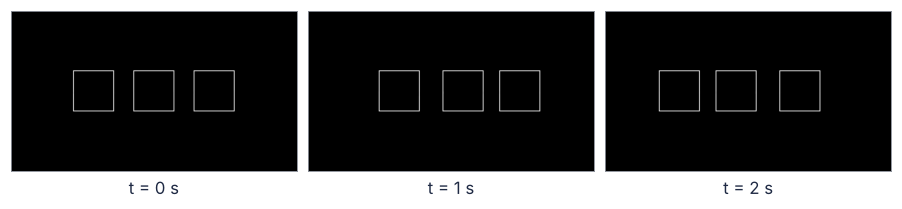
The folder name gives Manim's default quality, 1920 x 1080 px at 60 fps: 540 frames for 9.00 s of white outlines on black. Worse, the period comes from run_time, not from the physics: 3 s per cycle against the slow mode's 1.16 s. And the release from the 1 N pull, three cosines with irrational frequency ratios, cannot be keyframed at all. Step 3 fixes both.
Step 2: Set the stage: a white strip the shape of the page
Step 1's frame is 16:9 and black, made for a full screen. The page's text column is 768 px wide at most, and the scene is a row of carts, so from here on the drafts are a strip of 768 x 288 px, 8:3, at 30 fps; Step 7 settles the final size. The background turns white, so the stills read on the page.
Manim places mobjects in scene units, with the origin at the center of the frame and y pointing up, not at the bottom left as in a Matplotlib axes. The frame is 14.2 units wide at any pixel size, Manim's default height of 8 units times 16/9. An 8:3 strip is then 14.2 x 288/768 = 5.3 units high: x runs from -7.1 to 7.1 and y from -2.7 to 2.7, and a label at y = 3 would be cut off. config.frame_height would still say 8, so STRIP sets it to match.
At 6 units per meter the 2 m track spans x = -6 to 6. make_track and make_carts each return a VGroup, an ordered group of mobjects that Manim handles as one: self.add takes the whole group, carts[i] is the i-th cart, and before every frame Manim updates the members in the group's order. In render(Stage, **STRIP) the ** does the reverse of Step 1: in a call it spreads a dictionary out into keyword arguments.
STRIP = dict(pixel_width=768, pixel_height=288, frame_rate=30, background_color="#ffffff",
             frame_height=config.frame_width * 288 / 768)

SCALE = 6.0                                    # scene units per meter
REST = np.array([-3.0, 0.0, 3.0])              # rest positions of the carts, 0.5 m apart
TRACK_Y, CART_Y = -1.25, -0.85

def make_track():
    """The track from x = -6 to 6, a post at each end, and a mark under each rest position."""
    track = Line([-6, TRACK_Y, 0], [6, TRACK_Y, 0], color=MUTED, stroke_width=4)
    posts = [Rectangle(width=0.2, height=1.2, color=INK, fill_opacity=1, stroke_width=0)
             .move_to([x, TRACK_Y + 0.6, 0]) for x in (-6.1, 6.1)]
    marks = [Line([x, TRACK_Y - 0.1, 0], [x, TRACK_Y - 0.35, 0], color=MUTED, stroke_width=4)
             for x in REST]
    return VGroup(track, *posts, *marks)

def make_carts():
    """Three carts at rest, floating just above the track."""
    return VGroup(*[RoundedRectangle(corner_radius=0.08, width=0.9, height=0.6, color=INK,
                                     fill_opacity=1, stroke_width=0).move_to([x, CART_Y, 0])
                    for x in REST])

class Stage(Scene):
    def construct(self):
        self.add(make_track(), make_carts())
        self.wait(0.5)

stage = render(Stage, **STRIP)
with tempconfig(STRIP):
    print(f"frame: {config.frame_width:.2f} x {config.frame_height:.2f} units, "
          f"x from {config.left_side[0]:.2f} to {config.right_side[0]:.2f}, "
          f"y from {config.bottom[1]:.2f} to {config.top[1]:.2f}")
    px_per_unit = config.pixel_width / config.frame_width
print(f"{px_per_unit:.1f} px per unit, {1000 / SCALE / px_per_unit:.1f} mm of track per px")
show_frames(stage, [0])
videos/288p30/Stage.mp4
frame: 14.22 x 5.33 units, x from -7.11 to 7.11, y from -2.67 to 2.67
54.0 px per unit, 3.1 mm of track per px
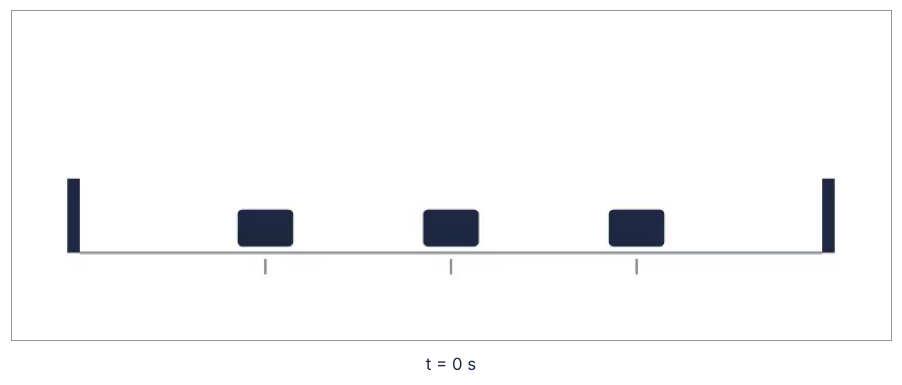
config agrees, and one pixel covers 3.1 mm of track. In the empty stage, the gray mark under each rest position will show how far a cart has moved.
Step 3: Drive the carts from the solution with a ValueTracker
A ValueTracker is an invisible mobject that holds one number, here physical time, in clock. An updater is a function attached with add_updater that Manim calls before every frame, here written in place with lambda, Python's one-line function without a name. The carts' updater, on their VGroup, reads the clock and puts each cart at its rest position plus displacement(t, x_pull) times 6 units per meter. Animate the clock with clock.animate.set_value(4), run_time=4, and rate_func=linear, and one second of video is one second of motion, here for the release from the 1 N pull that Step 1 could not keyframe.
To know that the video shows the solution and not something near it, a second updater, on an invisible Mobject, logs the clock and where the carts were put. It is added last because Manim runs updaters in the order the mobjects were added, so it sees the carts after they moved; Step 4 shows the other order.
The recorder's arguments are (mob, dt), and Manim hands dt, the time since the last update, only to an updater with an argument of that name. The cell counts the calls by their dt, to find out how many updates a play of 4 s makes for its 120 frames.
def place(carts, x):
    """Put each cart at its rest position plus its displacement x, in m."""
    for cart, rest, dx in zip(carts, REST, x):
        cart.set_x(rest + SCALE * dx)

log = []

class Release(Scene):
    def construct(self):
        clock = ValueTracker(0)                  # physical time in s
        carts = make_carts()
        carts.add_updater(lambda group: place(group, displacement(clock.get_value(), x_pull)))
        recorder = Mobject()                     # invisible; logs where the carts were put
        recorder.add_updater(lambda mob, dt: log.append((clock.get_value(), dt, [c.get_x() for c in carts])))
        self.add(make_track(), carts, recorder)
        self.play(clock.animate.set_value(4), run_time=4, rate_func=linear)

release = render(Release, **STRIP)
t_log = np.array([row[0] for row in log])
drawn = (np.array([row[2] for row in log]) - REST) / SCALE        # back to m
exact = np.array([displacement(t, x_pull) for t in t_log])
steps = [round(row[1], 4) for row in log]
print(f"{len(log)} updater calls, largest difference from the solution {np.abs(drawn - exact).max():.1e} m")
print("dt:", ", ".join(f"{d:.4f} s on {steps.count(d)} calls" for d in sorted(set(steps))))
show_frames(release, [0, 1, 2, 3])
videos/288p30/Release.mp4
121 updater calls, largest difference from the solution 4.2e-17 m
dt: 0.0000 s on 2 calls, 0.0333 s on 119 calls
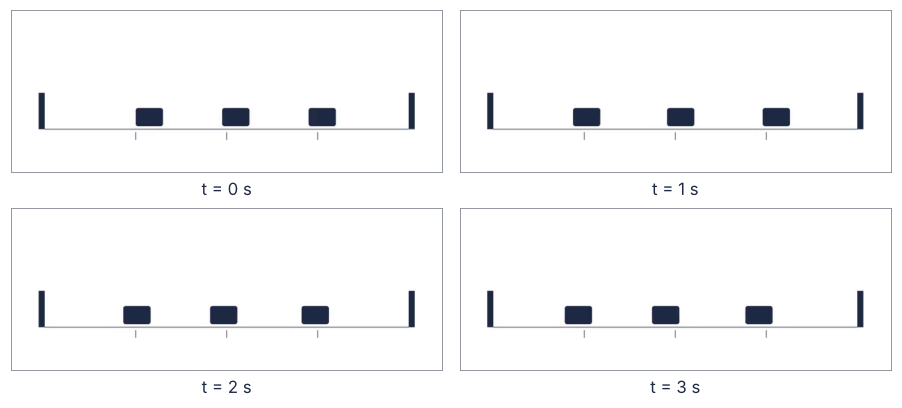
The recorded positions match the solution to 4e-17 m, rounding. The recorder ran 121 times for 120 frames: the first call, at clock 0, has dt = 0 and sets up the first frame, and each of the next 119 has 1/30 s and sets up one more. The last, again with dt = 0, comes after the play has ended, at clock 4, and no frame shows it.
A solution that comes as an array, from a solver or a time loop, must first become positions as a function of t. np.interp per cart over the sample times does that, and solve_ivp(..., dense_output=True) returns sol.sol, which already is one (solve_ivp from the ground up). Here samples every 0.01 s stand in for a solver:
t_samples = np.arange(0, 4.001, 0.01)                              # s
samples = np.array([displacement(t, x_pull) for t in t_samples])   # m, one row per time

def positions_at(t):
    return np.array([np.interp(t, t_samples, samples[:, i]) for i in range(3)])

t_frames = np.arange(0, 4, 1 / 30)
error = max(np.abs(positions_at(t) - displacement(t, x_pull)).max() for t in t_frames)
print(f"interpolated at the frame times: off by at most {1000 * error:.3f} mm")
interpolated at the frame times: off by at most 0.052 mm
At the frame times the interpolated positions are off by 0.052 mm, sixty times less than a pixel's 3.1 mm.
Step 4: Draw springs that stretch and compress
A spring is a zigzag VMobject. The V stands for vectorized: an outline made of curve segments with a stroke, which set_points_as_corners builds from any list of corner points. zigzag computes them from the spring's two ends. always_redraw(lambda: ...) builds the spring anew before every frame from the current edges of its neighbors, post or cart.
Step 3's rule about the order of updaters matters here: a spring added before the carts is redrawn from where they were one frame earlier. The cell renders the release both ways, logging the largest gap between a spring's right end and its cart. It logs 0 on Step 3's two calls with dt = 0: on the first, the carts jump once from rest to the pull, which is not the lag of a moving cart:
def zigzag(x_left, x_right, coils=8, width=0.12):
    """A spring from x_left to x_right at cart height: short leads and a zigzag between them."""
    lead = 0.15
    xs = np.linspace(x_left + lead, x_right - lead, 2 * coils + 1)
    ys = CART_Y + width * np.array([0] + [(-1) ** i for i in range(1, 2 * coils)] + [0])
    corners = [[x_left, CART_Y, 0]] + [[x, y, 0] for x, y in zip(xs, ys)] + [[x_right, CART_Y, 0]]
    return VMobject(color=MUTED, stroke_width=4).set_points_as_corners(corners)

def make_spring(carts, i):
    """Spring i of four, from the left post to the right one, redrawn before every frame."""
    def left():
        return -6.0 if i == 0 else carts[i - 1].get_right()[0]
    def right():
        return 6.0 if i == 3 else carts[i].get_left()[0]
    return always_redraw(lambda: zigzag(left(), right()))

def make_springs(carts):
    return VGroup(*[make_spring(carts, i) for i in range(4)])

gaps = []

class Springs(Scene):
    springs_first = False

    def construct(self):
        clock = ValueTracker(0)
        carts = make_carts()
        carts.add_updater(lambda group: place(group, displacement(clock.get_value(), x_pull)))
        springs = make_springs(carts)
        recorder = Mobject()
        recorder.add_updater(lambda mob, dt: gaps.append(
            max(abs(springs[i].get_end()[0] - carts[i].get_left()[0]) for i in range(3)) if dt > 0 else 0))
        if self.springs_first:
            self.add(make_track(), springs, carts, recorder)
        else:
            self.add(make_track(), VGroup(carts, springs), recorder)
        self.play(clock.animate.set_value(4), run_time=4, rate_func=linear)

class SpringsFirst(Springs):
    springs_first = True

for scene_class in (SpringsFirst, Springs):
    gaps.clear()
    path = render(scene_class, **STRIP)
    print(f"    largest gap between spring and cart: {max(gaps):.2f} units, {max(gaps) * px_per_unit:.0f} px")
show_frames(path, [0, 1.5])
videos/288p30/SpringsFirst.mp4
    largest gap between spring and cart: 0.11 units, 6 px
videos/288p30/Springs.mp4
    largest gap between spring and cart: 0.00 units, 0 px
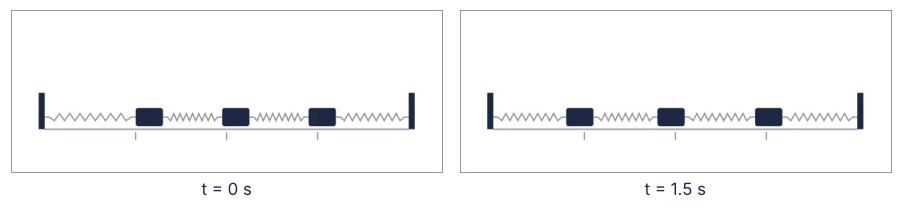
Added first, the springs trail the carts by up to 0.11 units, 6 px at the strip and twice that in the final video, enough to see them come loose. Add the carts first, or put carts and springs into one VGroup in that order, as the second render does, and the gap is 0, since a group updates its members in its own order (Step 2).
Step 5: Draw the mode shape with arrows and the frequency in Text
Now each color gets its meaning: INK for the things, carts and posts; MUTED for the guides, track and springs; ACCENT for the result of the eigenvalue problem, the arrows of the mode shape. The arrows are drawn once per mode, as in the eigenvalue tutorial's picture: as long as each glider's component of the mode, the first one pointing right, and no arrow for a glider at rest. By default Arrow thins short arrows and shrinks their tips, which the three arguments after stroke_width prevent.
The label is Text, which Pango sets from a system font. MathTex, Manim's class for formulas, needs a LaTeX installation, and Text does not. The frequency goes in from the computed f with an f-string, never typed, and font="sans-serif" names a generic family that any machine resolves.
ARROW = 1.2              # scene units of arrow for a mode component of 1

def make_arrows(shape):
    """One arrow above each cart, as long as its component of the mode; none for a cart at rest."""
    return VGroup(*[Arrow([x, 0.2, 0], [x + ARROW * s, 0.2, 0], buff=0, color=ACCENT, stroke_width=8,
                          tip_length=0.3, max_tip_length_to_length_ratio=0.5,   # same tip and stroke
                          max_stroke_width_to_length_ratio=20)                   # on short arrows
                    for x, s in zip(REST, shape) if abs(s) > 1e-6])

def mode_label(n):
    return Text(f"mode {n + 1} · {f[n]:.2f} Hz", font="sans-serif", font_size=36, color=INK).move_to(UP * 1.35)

class ModeTwo(Scene):
    def construct(self):
        clock = ValueTracker(0)
        x_start = 0.10 * mode_shape(1)           # m, 10 cm for the largest component
        carts = make_carts()
        carts.add_updater(lambda group: place(group, displacement(clock.get_value(), x_start)))
        self.add(make_track(), VGroup(carts, make_springs(carts)), make_arrows(mode_shape(1)), mode_label(1))
        duration = 5 / f[1]                      # five periods
        self.play(clock.animate.set_value(duration), run_time=duration, rate_func=linear)

mode_two = render(ModeTwo, **STRIP)
show_frames(mode_two, [0, 0.31])
videos/288p30/ModeTwo.mp4
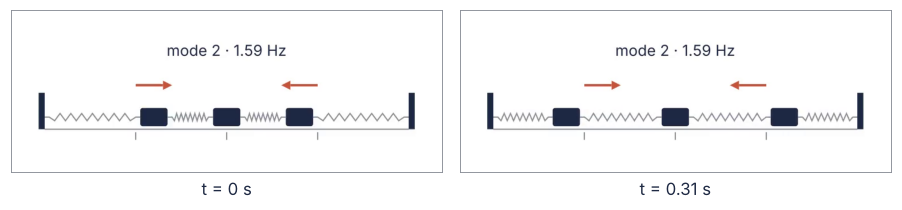
Half a period apart, the outer carts have changed sides and the middle one has not moved. The arrows give the shape and the label the frequency, so the frame reads without a caption.
Step 6: Stage the modes and their sum with rate functions
The finished video has two kinds of motion. Physical time is the oscillation itself, and staging is everything else, a label appearing or the carts pulled into a shape. Staging may be eased with smooth; physical time must run linear. A rate function maps the fraction of the run time gone to the fraction of the change done, one number at a time, hence the list comprehension:
s = np.linspace(0, 1, 1001)
eased = np.array([smooth(x) for x in s])
print(f"largest slope of smooth: {np.diff(eased).max() / np.diff(s)[0]:.2f}")
largest slope of smooth: 2.53
Show code
fig, ax = plt.subplots(figsize=(7, 3.2))
ax.plot(s, s, color=INK)
ax.plot(s, eased, color=SECOND)
ax.text(0.62, 0.5, "linear", color=INK)
ax.text(0.6, 0.88, "smooth", color=SECOND, ha="right")
ax.set(xlabel="fraction of run_time", ylabel="fraction of the change", xlim=(0, 1), ylim=(0, 1))
plt.show()
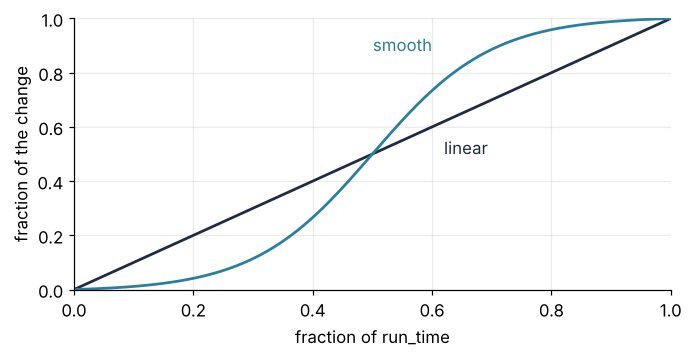
Under smooth a clock would crawl at both ends and run 2.53 times too fast in the middle, and an oscillation would seem to stall, then race.
Two trackers drive the carts through one updater: amount runs from 0 to 1, the clock holds physical time, and each cart sits at its rest position plus amount times displacement(clock, x_start). At clock 0, displacement is x_start itself, so pulling into a shape is amount going from 0 to 1 with smooth while the clock stands. The physics is the clock running linear with amount at 1.
Returning to rest is amount back to 0 while the clock runs on: the release is still moving at 6 s, and a standing clock would stop the carts in one frame. The last play of a segment therefore gives each animation its own rate function, with .animate(rate_func=...), and the run_time to the play.
Between segments, where amount is 0, the scene resets the clock with clock.set_value(0), not animated, and switches self.x_start, an attribute the updater reads every frame, so nothing jumps. FadeIn and FadeOut animate opacity, and in the same self.play as amount they run alongside it, so arrows and label come and go with the carts.
A pure mode starts from rest in its own shape, as in Step 4 of the eigenvalue tutorial. Each mode runs a whole number of periods, three, five, and seven, so each ends back in its shape. The sum starts from the 1 N pull, runs 6 s, and is eased back to rest, where the scene began, so the loop has no jump.
STAGING = 0.75                                   # s, to pull into a shape or let go of it
PERIODS = [3, 5, 7]

class NormalModes(Scene):
    def construct(self):
        clock, amount = ValueTracker(0), ValueTracker(0)
        self.x_start = np.zeros(3)
        carts = make_carts()
        carts.add_updater(lambda group: place(
            group, amount.get_value() * displacement(clock.get_value(), self.x_start)))
        self.add(make_track(), VGroup(carts, make_springs(carts)))
        segments = [(0.10 * mode_shape(n), VGroup(make_arrows(mode_shape(n)), mode_label(n)), p / f[n])
                    for n, p in enumerate(PERIODS)]
        release_label = Text("released from a 1 N pull on glider 1", font="sans-serif",
                             font_size=36, color=INK).move_to(UP * 1.35)
        segments.append((x_pull, release_label, 6.0))
        for x_start, labels, duration in segments:
            clock.set_value(0)                   # the carts are at rest here
            self.x_start = x_start
            self.play(amount.animate.set_value(1), FadeIn(labels), run_time=STAGING, rate_func=smooth)
            self.play(clock.animate.set_value(duration), run_time=duration, rate_func=linear)
            self.play(amount.animate(rate_func=smooth).set_value(0), FadeOut(labels),
                      clock.animate(rate_func=linear).set_value(duration + STAGING),   # time runs on
                      run_time=STAGING)

durations = [p / f[n] for n, p in enumerate(PERIODS)] + [6.0]
print("segments:", ", ".join(f"{d:.2f}" for d in durations), "s;",
      f"with staging {sum(durations) + 2 * STAGING * len(durations):.2f} s")
modes = render(NormalModes, **STRIP)
full = video_info(modes)
show_frames(modes, [1.9, 6.4, 10.9, 18.0])     # one frame per segment
segments: 3.48, 3.14, 3.37, 6.00 s; with staging 21.99 s
videos/288p30/NormalModes.mp4
NormalModes.mp4: 768 x 288 px, 30 fps, 665 frames, 22.17 s, 408 kB
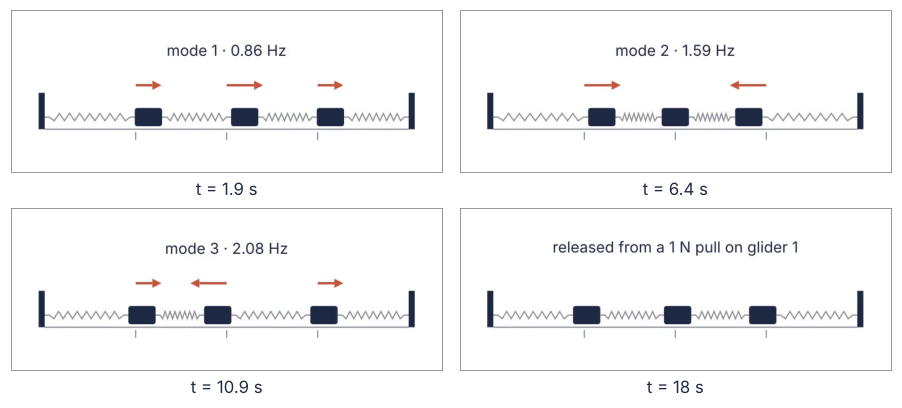
With eight staging moves of 0.75 s the scene lasts 21.99 s. The file holds 665 frames, 22.17 s, because each play is rounded up to whole frames.
Step 7: Render for the page: size, frame rate, and bytes
For the page the strip doubles to 1536 x 576 px, so that text and springs stay sharp on screens with two device pixels per CSS pixel. It stays 8:3, so Step 2's frame and layout hold. Width and height must be even: H.264, the compressed video format inside the mp4 file, stores color here at half resolution, one value per 2 x 2 block of pixels, and 560 x 315 fails with an encoder error. At 30 fps the fastest mode, 2.08 Hz, gets 14 frames per period, enough for smooth motion. The cell measures each choice on Step 5's clip of a little over 3 s:
rows = []
for width, height, fps in [(768, 288, 30), (1536, 576, 30), (1536, 576, 60)]:
    settings = dict(STRIP, pixel_width=width, pixel_height=height, frame_rate=fps)  # still 8:3
    path = render(ModeTwo, **settings)
    with av.open(str(path)) as container:
        seconds = container.streams.video[0].frames / fps
    rows.append((width, height, fps, path.stat().st_size / 1024 / seconds))

print(f"\n{'pixels':>12s} {'fps':>4s} {'kB per s':>9s} {'kB for ' + format(full['seconds'], '.1f') + ' s':>15s}")
for width, height, fps, rate in rows:
    print(f"{width:>5d} x {height:<4d} {fps:4d} {rate:9.1f} {rate * full['seconds']:15.0f}")
print(f"\nfastest mode at 30 fps: {30 / f[2]:.1f} frames per period")
videos/288p30/ModeTwo.mp4
videos/576p30/ModeTwo.mp4
videos/576p60/ModeTwo.mp4

      pixels  fps  kB per s   kB for 22.2 s
  768 x 288    30      20.7             459
 1536 x 576    30      36.9             819
 1536 x 576    60      47.9            1061

fastest mode at 30 fps: 14.4 frames per period
Four times the pixels cost 1.8 times the bytes, and twice the frames only 1.3 times, because H.264 stores mostly the changes between frames. At 1536 x 576 and 30 fps the full video projects to 819 kB, about half the 1,576 kB of the 8.8 s GIF in Matplotlib animation with FuncAnimation.
Both stay under 2 MB, this site's limit for an animation file, which is kept in the repository and served with the page. Your own page sets its own budget from its host and its readers' connections, and a short clip measures against it the same way.
Design principles
The solution moves the drawing; the timeline only stages it. A keyframe encodes what you already believe the motion is. An updater encodes what you computed, so the video can show what you could not have drawn by hand.
Physical time runs linear. Viewers read rates off motion, a frequency or a decay, so any easing on the clock changes the rate they read. Easing belongs to moves that carry no physics.
Start each motion from the state that produces it, and end where you began. The opening state is part of the physics. The closing state is what makes a loop honest.
Draw what the physicist sketches, with one meaning per color. A viewer who knows the board sketch reads the scene at once. A color that keeps its meaning needs no legend, and numbers that come from the computation stay true when the computation changes.
Pixels from the page, frames from the fastest motion. A video is seen at the size of its slot times the screen's pixel density: fewer pixels blur the thinnest line, and more cost bytes without showing anything. Frame rate is a sampling rate, so what counts is frames per period of the quickest motion, not the screen's refresh rate. A codec's output size is hard to predict, so measure the bytes on a short clip before the full render.
Full source
This cell is scene.py, the script behind assets/normal-modes.mp4. Saved to a file, it runs on its own with python scene.py, since its last lines render the scene through tempconfig. To animate a system of your own, replace displacement with its positions as a function of time, in any form from Step 3, then rewrite the mobjects that draw it and the sequence in construct. The stage, the colors, and the render settings carry over.
# scene.py: renders assets/normal-modes.mp4. Run it with `python scene.py`.
import shutil
import tempfile
from pathlib import Path

import av
import numpy as np
from manim import (Scene, VGroup, VMobject, Rectangle, RoundedRectangle, Line, Arrow, Text,
                   ValueTracker, FadeIn, FadeOut, always_redraw, linear, smooth, tempconfig, config, UP)

OUT = Path("assets") / "normal-modes.mp4"
INK, ACCENT, MUTED = "#1f2a44", "#c8553d", "#8a8f98"

# ---- physics: three gliders of 200 g, four springs of 10 N/m, posts at both ends
m, k = 0.200, 10.0
K = k * np.array([[2, -1, 0], [-1, 2, -1], [0, -1, 2]])
w2, V = np.linalg.eigh(K / m)
omega = np.sqrt(w2)                                          # rad/s
f = omega / (2 * np.pi)                                      # Hz
x_pull = np.linalg.solve(K, [1.0, 0.0, 0.0])                 # m, held with 1 N on glider 1

def displacement(t, x_start):
    """Displacements in m at time t after a release from rest at x_start."""
    return V @ ((V.T @ x_start) * np.cos(omega * t))

def mode_shape(n):
    v = V[:, n] / np.abs(V[:, n]).max()
    return v * np.sign(v[0])

# ---- drawing: scene units, 6 per meter, origin at the center of the frame
SCALE, REST = 6.0, np.array([-3.0, 0.0, 3.0])
TRACK_Y, CART_Y, ARROW_Y, LABEL_Y = -1.25, -0.85, 0.2, 1.35

def make_track():
    track = Line([-6, TRACK_Y, 0], [6, TRACK_Y, 0], color=MUTED, stroke_width=4)
    posts = [Rectangle(width=0.2, height=1.2, color=INK, fill_opacity=1, stroke_width=0)
             .move_to([x, TRACK_Y + 0.6, 0]) for x in (-6.1, 6.1)]
    marks = [Line([x, TRACK_Y - 0.1, 0], [x, TRACK_Y - 0.35, 0], color=MUTED, stroke_width=4)
             for x in REST]                                      # rest positions
    return VGroup(track, *posts, *marks)

def make_carts():
    return VGroup(*[RoundedRectangle(corner_radius=0.08, width=0.9, height=0.6, color=INK,
                                     fill_opacity=1, stroke_width=0).move_to([x, CART_Y, 0])
                    for x in REST])

def place(carts, x):
    for cart, rest, dx in zip(carts, REST, x):
        cart.set_x(rest + SCALE * dx)

def zigzag(x_left, x_right, coils=8, width=0.12):
    lead = 0.15
    xs = np.linspace(x_left + lead, x_right - lead, 2 * coils + 1)
    ys = CART_Y + width * np.array([0] + [(-1) ** i for i in range(1, 2 * coils)] + [0])
    corners = [[x_left, CART_Y, 0]] + [[x, y, 0] for x, y in zip(xs, ys)] + [[x_right, CART_Y, 0]]
    return VMobject(color=MUTED, stroke_width=4).set_points_as_corners(corners)

def make_spring(carts, i):
    def left():
        return -6.0 if i == 0 else carts[i - 1].get_right()[0]
    def right():
        return 6.0 if i == 3 else carts[i].get_left()[0]
    return always_redraw(lambda: zigzag(left(), right()))

def make_arrows(shape):
    return VGroup(*[Arrow([x, ARROW_Y, 0], [x + 1.2 * s, ARROW_Y, 0], buff=0, color=ACCENT,
                          stroke_width=8, tip_length=0.3, max_tip_length_to_length_ratio=0.5,
                          max_stroke_width_to_length_ratio=20)
                    for x, s in zip(REST, shape) if abs(s) > 1e-6])

def label(text):
    return Text(text, font="sans-serif", font_size=36, color=INK).move_to(UP * LABEL_Y)

# ---- the scene: each mode for whole periods, then the release from the pull
STAGING, PERIODS = 0.75, [3, 5, 7]

class NormalModes(Scene):
    def construct(self):
        clock, amount = ValueTracker(0), ValueTracker(0)
        self.x_start = np.zeros(3)
        carts = make_carts()
        carts.add_updater(lambda group: place(
            group, amount.get_value() * displacement(clock.get_value(), self.x_start)))
        springs = VGroup(*[make_spring(carts, i) for i in range(4)])
        self.add(make_track(), VGroup(carts, springs))           # carts before springs
        segments = [(0.10 * mode_shape(n), VGroup(make_arrows(mode_shape(n)),
                                                 label(f"mode {n + 1} · {f[n]:.2f} Hz")), p / f[n])
                    for n, p in enumerate(PERIODS)]
        segments.append((x_pull, label("released from a 1 N pull on glider 1"), 6.0))
        for x_start, labels, duration in segments:
            clock.set_value(0)                                   # at rest: nothing jumps
            self.x_start = x_start
            self.play(amount.animate.set_value(1), FadeIn(labels), run_time=STAGING, rate_func=smooth)
            self.play(clock.animate.set_value(duration), run_time=duration, rate_func=linear)
            self.play(amount.animate(rate_func=smooth).set_value(0), FadeOut(labels),
                      clock.animate(rate_func=linear).set_value(duration + STAGING),   # time runs on
                      run_time=STAGING)

# ---- render for the page, then read back what the file stores
settings = dict(pixel_width=1536, pixel_height=576, frame_rate=30, background_color="#ffffff",
                frame_height=config.frame_width * 576 / 1536, media_dir=tempfile.mkdtemp(),
                progress_bar="none", verbosity="WARNING", disable_caching=True)
with tempconfig(settings):
    scene = NormalModes()
    scene.render()
OUT.parent.mkdir(exist_ok=True)
shutil.copy(scene.renderer.file_writer.movie_file_path, OUT)
with av.open(str(OUT)) as container:
    stream = container.streams.video[0]
    fps = float(stream.guessed_rate)
    print(f"{OUT}: {stream.width} x {stream.height} px, {fps:.0f} fps, {stream.frames} frames, "
          f"{stream.frames / fps:.1f} s, {OUT.stat().st_size / 1024:,.0f} kB")
assets/normal-modes.mp4: 1536 x 576 px, 30 fps, 665 frames, 22.2 s, 781 kB
1536 x 576 px at 30 fps, 665 frames, 22.2 s, and 781 kB: 5 % below the projection of Step 7, and under two fifths of the 2 MB limit.
Further reading
- The Manim Community documentation: the quickstart, the configuration guide for the frame settings, and the reference pages for
tempconfig,ValueTracker,Mobject.add_updater,always_redraw, andrate_functions. - Goldstein, Poole, Safko, Classical Mechanics, chapter 6, on small oscillations.
- Related tutorials on this site: Eigenvalues with numpy.linalg: normal modes of coupled oscillators, where the modes come from; solve_ivp from the ground up: the pendulum beyond small angles, for solutions as functions of time with
dense_output; Matplotlib animation with FuncAnimation: a probe sweep as a small GIF, the GIF route; and the same modes in Julia, Eigenvalues with LinearAlgebra: normal modes of coupled oscillators. - Download the notebook. It was executed with the library versions in the header.