Numba from the ground up: a Monte Carlo Ising model a hundred times faster
Afterwards you can compile a Python loop with Numba's njit, seed its random numbers, run it on several cores with prange, and check it against plain Python.
- Field
- Chemistry, Physics
- Prerequisites
- Profiling with cProfile and timeit: find where a script spends its time, Random numbers with numpy.random: ten thousand reproducible random walks, Vectorizing loops with NumPy: nearest neighbors of two thousand points
- Libraries
matplotlib 3.11.2numba 0.68.0numpy 2.4.3pandas 3.0.6
py-numba.ipynb, executed with the versions above. The download needs a free account
Run it yourself. In a terminal, this installs exactly the versions above:
pip install numba==0.68.0 numpy==2.4.3 pandas==3.0.6 matplotlib==3.11.2 jupyterlabThe problem: an Ising magnet too slow for a Python loop
A square grid of magnetic spins, each pointing up or down, magnetizes on its own below a critical temperature \(T_c = 2/\ln(1 + \sqrt 2) \approx 2.269\), the value Kramers and Wannier located in 1941 and Onsager derived exactly in 1944. To see it in a simulation of a 64 × 64 grid you scan 32 temperatures with 3,000 sweeps of the lattice each: 96,000 sweeps, 393 million attempted spin flips. In plain Python that takes 16 to 64 minutes on the machine that built this page, depending on the run. Numba, a compiler for numerical Python, turns the same function into machine code with one decorator, and the scan takes under 25 s, or under 8 s on four cores.
The model is the Ising model. Each spin \(s_i = \pm 1\) talks only to its four neighbors, with the grid wrapped around at the edges, and the energy is
summed over neighboring pairs, so that each aligned pair lowers the energy by \(J\) and each opposed pair raises it by \(J\). Flipping spin \(i\) reverses the sign of its four bonds and changes the energy by \(\Delta E = 2 J s_i \sum_j s_j\), the sum running over its neighbors.
The Metropolis algorithm picks a random spin and accepts the flip with probability \(\min(1, e^{-\Delta E / k_B T})\), the Boltzmann factor. Once the lattice follows the Boltzmann distribution, this rule makes every flip from one configuration to another exactly as frequent as the flip back, a condition called detailed balance, so the distribution stays put. Single flips can reach every configuration, so a long enough run visits each with its Boltzmann weight. Temperatures are in units of \(J/k_B\), so \(T = 1\) means a thermal energy of one bond. Chemists know the same model as the lattice gas of atoms adsorbed on a surface and as the order-disorder transition of β-brass.
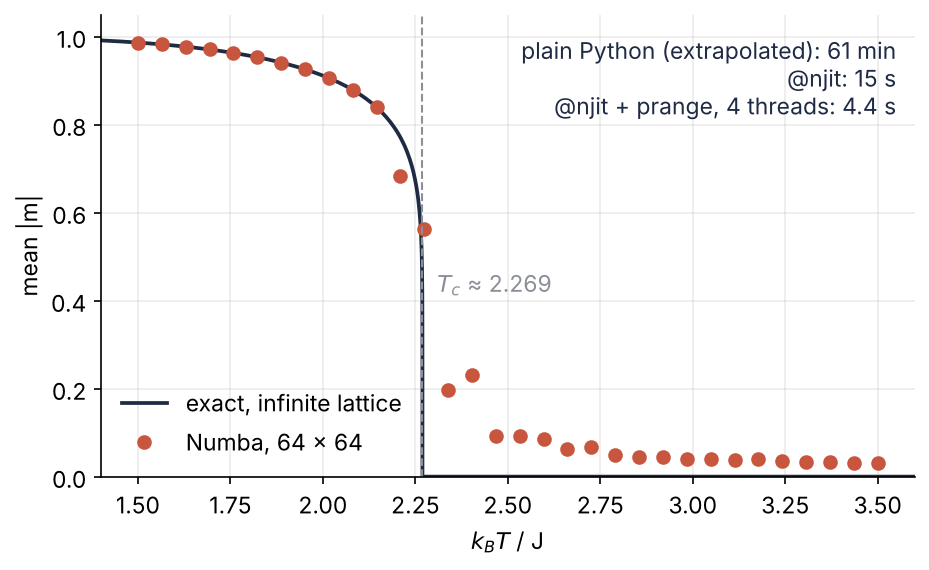
Each dot is one temperature, 3,000 sweeps, computed by the compiled function on four threads. The text at the upper right gives the three run times.
Setup
timed(label, f, n) calls f n times and returns its last result and the best time in seconds, as timeit does in the profiling tutorial. remember stores each time to two significant digits in timings.json, so the page shows the same numbers on every rebuild; delete the file and the notebook measures your machine.
import json, os, time
import numpy as np
import pandas as pd
import matplotlib.pyplot as plt
import numba
from numba import njit, prange, get_num_threads

L = 64                                   # spins per side
TC = 2 / np.log(1 + np.sqrt(2))          # critical temperature, units of J/k_B
TEMPS = np.linspace(1.5, 3.5, 32)
N_EQ, N_MEAS = 1_000, 2_000              # sweeps to equilibrate, sweeps to average
SEED = 20261019

plt.rcParams.update({
    "figure.figsize": (7, 4), "figure.dpi": 110,
    "axes.spines.top": False, "axes.spines.right": False,
    "axes.grid": True, "grid.alpha": 0.25,
    "font.size": 11, "lines.linewidth": 1.8,
})
INK, ACCENT, SECOND, MUTED = "#1f2a44", "#c8553d", "#2a7f9e", "#8a8f98"

TIMINGS = "timings.json"
timings = json.load(open(TIMINGS)) if os.path.exists(TIMINGS) else {}

def remember(label, seconds):
    # returns the STORED time if label is in timings.json: delete the file after changing code
    if label not in timings:
        timings[label] = float(f"{seconds:.2g}")
    with open(TIMINGS, "w") as f:
        json.dump(timings, f, indent=1)
    return timings[label]

def timed(label, f, n=1):
    """Call f n times; return its last result and the best time in seconds."""
    best = np.inf
    for _ in range(n):
        t0 = time.perf_counter()
        result = f()
        best = min(best, time.perf_counter() - t0)
    return result, remember(label, best)

print(f"Numba {numba.__version__}, {get_num_threads()} threads, T_c = {TC:.4f}")
Numba 0.68.0, 4 threads, T_c = 2.2692
Step 1: Write the Metropolis sweep in plain Python and time it
One sweep is \(L^2 = 4{,}096\) attempts. The neighbor below row i is row (i + 1) % L, wrapped by the modulo; the neighbor above is i - 1, which for i = 0 is -1, and Python's negative index wraps it to the last row for free. With \(J = 1\) and beta \(= 1/T\), the code is the rule from above, line by line:
def sweep(s, beta):
    """One Metropolis sweep: L*L attempted flips of randomly chosen spins."""
    L = s.shape[0]
    for _ in range(L * L):
        i = np.random.randint(L)
        j = np.random.randint(L)
        neighbors = s[(i + 1) % L, j] + s[i - 1, j] + s[i, (j + 1) % L] + s[i, j - 1]
        dE = 2 * s[i, j] * neighbors
        if dE <= 0 or np.random.random() < np.exp(-beta * dE):
            s[i, j] = -s[i, j]

s = np.ones((L, L), dtype=np.int64)      # all spins up
np.random.seed(SEED)
_, t5 = timed("plain, 5 sweeps", lambda: [sweep(s, 1 / 2.4) for _ in range(5)], n=3)
t_py = t5 / 5
n_sweeps = len(TEMPS) * (N_EQ + N_MEAS)
print(f"plain Python: {1e3 * t_py:.0f} ms per sweep")
print(f"the scan, {n_sweeps:,} sweeps: about {n_sweeps * t_py / 60:.0f} min")
plain Python: 38 ms per sweep
the scan, 96,000 sweeps: about 61 min
A sweep costs 10 to 40 ms, depending on the run, and the scan 16 to 64 minutes. Vectorizing is no way out: the next attempt reads the spin the previous one may have flipped. cProfile would only confirm that all the time goes into sweep. The function draws with the legacy np.random.randint and np.random.random, which the random-numbers tutorial advised against. Step 4 explains why they are the right choice here.
Step 2: Compile it with @njit and time the first call apart
njit(sweep) returns a compiled version of the same function; writing @njit above the def does the same. Time the first call on its own, then a thousand more:
sweep_nb = njit(sweep)

s = np.ones((L, L), dtype=np.int64)
_, t_first = timed("njit, first call", lambda: sweep_nb(s, 1 / 2.4))
_, t1000 = timed("njit, 1000 sweeps", lambda: [sweep_nb(s, 1 / 2.4) for _ in range(1_000)], n=3)
t_nb = t1000 / 1_000
print(f"first call, compile + 1 sweep: {t_first:.2g} s")
print(f"every later call: {1e6 * t_nb:.0f} µs per sweep, {t_py / t_nb:.0f} times faster than plain Python")
first call, compile + 1 sweep: 0.52 s
every later call: 150 µs per sweep, 253 times faster than plain Python
On the first call Numba reads the function's bytecode, the instructions Python compiles every function to. From the types of the arguments, a 2D array of int64 and a float, it infers a type for every variable inside. It hands the result to LLVM, a compiler library that turns it into machine code for this processor. That takes 0.3 to 1.5 s, over a thousand sweeps' worth. Every later call with the same argument types reuses the machine code, 100 to 250 µs per sweep, 50 to 300 times faster than plain Python depending on the run. The loop runs in what Numba calls nopython mode: no Python objects, no interpreter between the lines, which is where the Python loop loses its time and where the speed comes from.
Step 3: Pass what Numba can type: arrays and scalars
The compiled versions are listed in signatures. Call the function with an int8 lattice, which costs a second compilation, then with a pandas DataFrame:
_, t_int8 = timed("njit, int8 compile", lambda: sweep_nb(np.ones((L, L), dtype=np.int8), 1 / 2.4))
for sig in sweep_nb.signatures:
    print(sig)
print(f"the int8 version took {t_int8:.2g} s to compile\n")

try:
    sweep_nb(pd.DataFrame(s), 1 / 2.4)
except numba.core.errors.TypingError as err:
    lines = str(err).strip().splitlines()
    print(f"TypingError: {lines[1]}\n{lines[-1]}")
(Array(int64, 2, 'C', False, aligned=True), float64)
(Array(int8, 2, 'C', False, aligned=True), float64)
the int8 version took 0.22 s to compile

TypingError: non-precise type pyobject
- argument 0: Cannot determine Numba type of <class 'pandas.DataFrame'>
Two signatures, one per combination of argument types; the int8 one cost under a second more. The 'C' means C-contiguous, the row-by-row memory layout of a fresh NumPy array. Numba knows arrays, numbers, tuples, and a large part of NumPy's functions, not pandas objects or arbitrary classes, so the DataFrame fails before a single spin is touched. The fix is df.to_numpy() at the call.
Step 4: Seed Numba's random generator inside the compiled function
The question for the next cell: seed NumPy in the notebook, run one plain and one compiled sweep from the same lattice, and do they draw the same random numbers? True means the two lattices end up identical; False means the compiled sweep drew other numbers.
start = np.ones((L, L), dtype=np.int64)
np.random.seed(SEED)
a = start.copy(); sweep(a, 1 / 2.4)
np.random.seed(SEED)
b = start.copy(); sweep_nb(b, 1 / 2.4)
print("same lattice after one sweep:", np.array_equal(a, b))
same lattice after one sweep: False
The seed reached NumPy's generator. Compiled code draws from Numba's own, which the notebook's call never touched, so the compiled sweep was not seeded at all. Move the seed inside a compiled run. Check it against run_plain, the same lines calling the plain sweep, and against run.py_func, the uncompiled original that Numba keeps on every compiled function:
@njit
def run(T, n_sweeps, seed):
    np.random.seed(seed)                 # inside compiled code this seeds Numba's generator
    s = np.ones((L, L), dtype=np.int64)
    for _ in range(n_sweeps):
        sweep_nb(s, 1 / T)
    return s

def run_plain(T, n_sweeps, seed):        # the same lines with the plain sweep
    np.random.seed(seed)
    s = np.ones((L, L), dtype=np.int64)
    for _ in range(n_sweeps):
        sweep(s, 1 / T)
    return s

reference = run(2.4, 10, SEED)
print("compiled vs plain Python:", np.array_equal(reference, run_plain(2.4, 10, SEED)))
print("compiled vs compiled:    ", np.array_equal(reference, run(2.4, 10, SEED)))
print("compiled vs run.py_func: ", np.array_equal(reference, run.py_func(2.4, 10, SEED)))
compiled vs plain Python: True
compiled vs compiled:     True
compiled vs run.py_func:  False
Inside compiled code, np.random.seed and np.random.random reach Numba's Mersenne Twister, which implements the same algorithm and seeding as NumPy's legacy generator, so ten sweeps of both leave identical lattices. run.py_func fails for the reason the first cell did: it runs as Python, so its seed goes to NumPy's generator, while the sweep_nb it calls is compiled and draws from Numba's. The random-numbers tutorial objected to the global seed because it is hidden state that every function in a program shares. Inside compiled code nothing else draws from it.
Bit-identical is the strict check for your own code, and a loop that adds floats in the written order passes it. Calls into NumPy may not: Numba's np.sum adds in order where NumPy's adds in pairs, and its np.exp can round the last digit differently. There, compare with np.allclose; a difference in the leading digits is a bug.
Free account
The second half of this tutorial needs a free account
Sign in, or create an account with your email address, and the page goes on right here. The account costs nothing and also brings the notebook download, collections, and done marks.
Still to come
- Step 5: Scan the temperature, and see when fastmath pays
- Step 6: Run the temperatures in parallel with prange
- Pitfalls
- Variations
- Cheat sheet
- Further reading