Why NumPy is faster than a Python loop: the work around the arithmetic
Afterwards you can say why a Python loop over numbers is slow and a NumPy array operation fast, and estimate which of your loops are worth rewriting.
- Topic
- Performance
- Field
- Cross-disciplinary
- Prerequisites
- none beyond Python basics
- Libraries
matplotlib 3.11.2numpy 2.4.3
py-numpy-speed.ipynb, executed with the versions above. The download needs a free account
Run it yourself. In a terminal, this installs exactly the versions above:
pip install numpy==2.4.3 matplotlib==3.11.2 jupyterlabThe question
You have a million numbers, the samples of a seismic trace, the residuals of a fit, or the velocities in a box of atoms, and you want the sum of their squares: the energy of the trace, the chi-square, the kinetic energy. The arithmetic is a million multiplications and a million additions, however you write it. Here it is written three ways and timed on the same million numbers, with timeit as in Profiling with cProfile and timeit: a for loop over a Python list, the same loop over the NumPy array, and np.sum(x * x).
Show code
import datetime, dis, json, os, platform, sys, timeit
from pathlib import Path
import numpy as np
import matplotlib.pyplot as plt

plt.rcParams.update({
    "figure.figsize": (7, 3.6), "figure.dpi": 110,
    "axes.spines.top": False, "axes.spines.right": False,
    "axes.grid": True, "grid.alpha": 0.25,
    "font.size": 11, "lines.linewidth": 1.8,
})
INK, ACCENT, SECOND, MUTED = "#1f2a44", "#c8553d", "#2a7f9e", "#8a8f98"

SEED = 78
x_all = np.random.default_rng(SEED).random(10_000_000)   # the values do not matter, only count and type
xs_all = x_all.tolist()                                   # as Python floats, about 400 MB with the boxes
x = x_all[:1_000_000].copy()                              # the example: its own array of a million
xs = xs_all[:1_000_000]                                   # the same numbers as a list of Python floats

def loop(seq):
    s = 0.0
    for v in seq:
        s += v * v
    return s

# Times and addresses are stored in timings.json for five minutes, so that the page's two
# executions agree; delete the file to measure your own machine.
TIMINGS = "timings.json"
if os.path.exists(TIMINGS):
    timings = json.loads(Path(TIMINGS).read_text())
else:
    cpu = next((line.split(":", 1)[1].strip() for line in open("/proc/cpuinfo") if line.startswith("model name")),
               platform.processor()) if os.path.exists("/proc/cpuinfo") else platform.processor()
    timings = {"date": str(datetime.date.today()),
               "machine": f"{cpu}, {os.cpu_count()} cores, Python {platform.python_version()}, NumPy {np.__version__}"}

def save():
    Path(TIMINGS).write_text(json.dumps(timings, indent=1))

def best_of(labels, funcs, numbers, rounds, repeat=1, names=None):
    """Seconds per call of each func, the minimum over rounds; STORED values if the labels are in timings.json."""
    if not all(label in timings for label in labels):
        best = [float("inf")] * len(funcs)
        for _ in range(rounds):                              # the funcs take turns, so a slow spell
            for i, (f, k) in enumerate(zip(funcs, numbers)):  # of a shared machine hits all of them alike
                runs = timeit.repeat(f, number=k, repeat=repeat, globals=names)
                best[i] = min(best[i], min(runs) / k)
        timings.update({label: float(f"{t:.3g}") for label, t in zip(labels, best)})
        save()
    return [timings[label] for label in labels]

def measured(label, func):
    """Any JSON value, computed once and stored (addresses differ from run to run)."""
    if label not in timings:
        timings[label] = func()
        save()
    return timings[label]

t_list, t_arr, t_np = best_of(["loop over list", "loop over array", "np.sum(x * x)"],
                              [lambda: loop(xs), lambda: loop(x), lambda: np.sum(x * x)], numbers=[1, 1, 20], rounds=11)

print(f"for v in xs (list)   sum = {loop(xs):.10f}   {1e3 * t_list:6.1f} ms")
print(f"for v in x  (array)  sum = {loop(x):.10f}   {1e3 * t_arr:6.1f} ms")
print(f"np.sum(x * x)        sum = {np.sum(x * x):.10f}   {1e3 * t_np:6.1f} ms")
print(f"measured {timings['date']} on {timings['machine']}")

versions = [("for v in xs\n(list)", t_list, INK), ("for v in x\n(NumPy array)", t_arr, SECOND),
            ("np.sum(x * x)", t_np, ACCENT)]
fig, ax = plt.subplots(figsize=(7, 2.6))
for i, (name, t, color) in enumerate(versions):
    ax.barh(i, 1e3 * t, color=color, height=0.6)
    ax.text(1e3 * t * 1.08, i, f"{t / t_np:.0f} ×", va="center", color=color)
ax.set(xscale="log", xlim=(0.5, 250), xlabel="time / ms", yticks=range(3),
       yticklabels=[v[0] for v in versions])
ax.invert_yaxis()
ax.grid(axis="y", visible=False)
ax.set_axisbelow(True)                                        # grid lines behind the bars
plt.show()
for v in xs (list)   sum = 333370.6424291517     18.2 ms
for v in x  (array)  sum = 333370.6424291517    105.0 ms
np.sum(x * x)        sum = 333370.6424291724      1.3 ms
measured 2026-10-17 on Intel(R) Xeon(R) Processor @ 2.10GHz, 4 cores, Python 3.12.3, NumPy 2.4.3
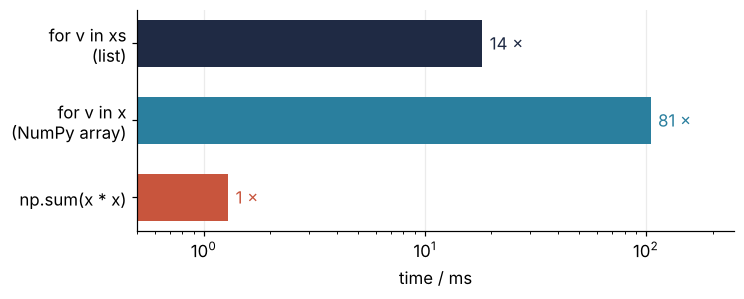
The three sums agree to 13 digits, and the last ones differ because the additions happen in a different order. Yet np.sum(x * x) is 10 to 25 times faster than the loop over the list, which most people expect: NumPy is "written in C". The surprise is the middle bar. Hand the very same loop a NumPy array instead of a list and it gets 5 to 8 times slower, 60 to 120 times slower than NumPy.
So here is the question. If the million multiplications are the same in all three versions, what is the computer doing for more than 90 % of the time in the first loop and more than 98 % of it in the second, and why does handing a loop a NumPy array make it worse? The times are from the machine that built this page. On yours the milliseconds will differ, the ratios much less.
The idea: a list of boxes, an array of raw numbers
Start with what memory is. The computer's memory is one long row of bytes, each with a number, its address. Every object your program makes sits at some address, and a pointer is an 8-byte number that holds the address of another object. Following a pointer means reading those 8 bytes and then going to the place they name.
A Python float is an object, a box at some address. The box holds three things of 8 bytes each: a reference count (how many names and lists point to the box, so Python knows when it may free it), a pointer to the box's type, and finally the value. A Python list does not hold numbers at all. It holds pointers to such boxes. A NumPy array is the other extreme: one block of raw 8-byte doubles, side by side, plus a small header that says "float64, 8 bytes apart" once for all of them.
Next, what Python does with your loop. It does not run the loop as written. It first translates the function into bytecode, a list of simple instructions such as "load this name" or "multiply the top two values", and a program written in C, the interpreter, carries them out one at a time. The body of s += v * v is nine such instructions per element. For each element the interpreter fetches the pointer from the list, follows it to the box, checks that the box holds a float, takes the value out, multiplies, and puts the product into a new box. The addition checks both boxes again, writes the sum into the product's box, which nothing else needs anymore, and lets go of the old box of s. x * x instead hands the whole block to one compiled C loop that does nothing but load, multiply, and store, element after element. The type is checked once per call, not once per element.
There is a second cost hiding in "follows it to the box". The processor keeps a small, fast store of the memory it read last and of the bytes right after it, the cache, and a read from the cache is much faster than one from main memory. Numbers side by side arrive together, while numbers far apart each wait for main memory. So where do the boxes of a list sit? That depends on the list's history. tolist() makes every box in one go, which is the best case, while a list that was sorted or grown piece by piece over a long run holds its boxes in no particular order. The cell below reads the addresses with id() for the list as built and for a shuffled copy, the same objects in a random order, which stands in for the list a real program ends up with. It also times the loop over both, which prices the difference. The figure shows the step in bytes from each number to the next, for 200 neighbors picked at random along the list.
Show code
perm = np.random.default_rng(SEED + 1).permutation(x.size)
xs_shuffled = [xs[i] for i in perm]                       # the same float objects, in another order

# id() is the object's address in CPython, an implementation detail of that interpreter
def address_steps(seq):
    return np.abs(np.diff(np.array([id(v) for v in seq], dtype=np.int64)))

sample = np.sort(np.random.default_rng(SEED + 2).choice(x.size - 1, 200, replace=False))   # 200 neighbors
def sampled_steps(seq):
    return [abs(id(seq[i + 1]) - id(seq[i])) for i in sample]

steps = {
    "list as built": measured("steps, list as built", lambda: sampled_steps(xs)),
    "list shuffled": measured("steps, list shuffled", lambda: sampled_steps(xs_shuffled)),
    "array": [x[i + 1:].ctypes.data - x[i:].ctypes.data for i in sample],
}
near = {
    "list as built": measured("fraction <= 32 B, as built", lambda: float(np.mean(address_steps(xs) <= 32))),
    "list shuffled": measured("fraction <= 32 B, shuffled", lambda: float(np.mean(address_steps(xs_shuffled) <= 32))),
    "array": 1.0 if x.strides == (8,) else 0.0,
}
median_shuffled = measured("median step, shuffled", lambda: float(np.median(address_steps(xs_shuffled))))
t_built, t_shuffled = best_of(["loop over list, as built", "loop over list, shuffled"],
                              [lambda: loop(xs), lambda: loop(xs_shuffled)], numbers=[1, 1], rounds=9)

for name in steps:
    print(f"{name:14s} steps of 32 B or less: {100 * near[name]:7.3f} % of {x.size - 1:,}")
print(f"median step in the shuffled list: {median_shuffled / 1e6:.1f} MB")
print(f"loop over the list as built {1e3 * t_built:5.1f} ms, shuffled {1e3 * t_shuffled:5.1f} ms, "
      f"ratio {t_shuffled / t_built:.1f}")

jitter = np.random.default_rng(SEED + 3).uniform(-0.18, 0.18, 200)
style = {"list as built": dict(color=INK, mfc=INK), "list shuffled": dict(color=INK, mfc="none"),
         "array": dict(color=ACCENT, mfc=ACCENT)}
fig, ax = plt.subplots(figsize=(7, 3))
for row, name in enumerate(steps):
    ax.plot(np.maximum(steps[name], 8), row + jitter, "o", ms=4, alpha=0.6, ls="none", **style[name])
    ax.text(2.5e9, row, f"{100 * near[name]:.1f} %\n≤ 32 B", va="center", ha="left", color=style[name]["color"])
ax.axvline(32, color=MUTED, ls="--", lw=1, zorder=0)
ax.text(36, 2.45, "one box, 32 B", color=MUTED, va="center")
ax.set(xscale="log", xlim=(5, 1e9), ylim=(2.6, -0.6), xlabel="step to the next number in memory / bytes",
       yticks=range(3), yticklabels=list(steps))
ax.grid(axis="y", visible=False)
plt.show()
list as built  steps of 32 B or less:  99.802 % of 999,999
list shuffled  steps of 32 B or less:   0.000 % of 999,999
array          steps of 32 B or less: 100.000 % of 999,999
median step in the shuffled list: 9.6 MB
loop over the list as built  18.3 ms, shuffled  28.8 ms, ratio 1.6
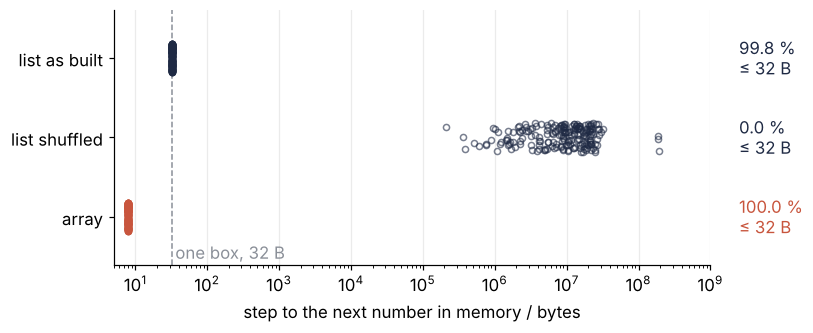
As built, 99.8 % of neighbors are 32 bytes apart, four times the spacing of the array but still in a row. Shuffled, the median step is about 10 MB, and the same loop over the same objects takes 1.5 to 4 times as long, because nearly every box misses the cache. Where the boxes sit costs that factor and no more. The rest of the gap to NumPy is the work done for every box, wherever it sits.
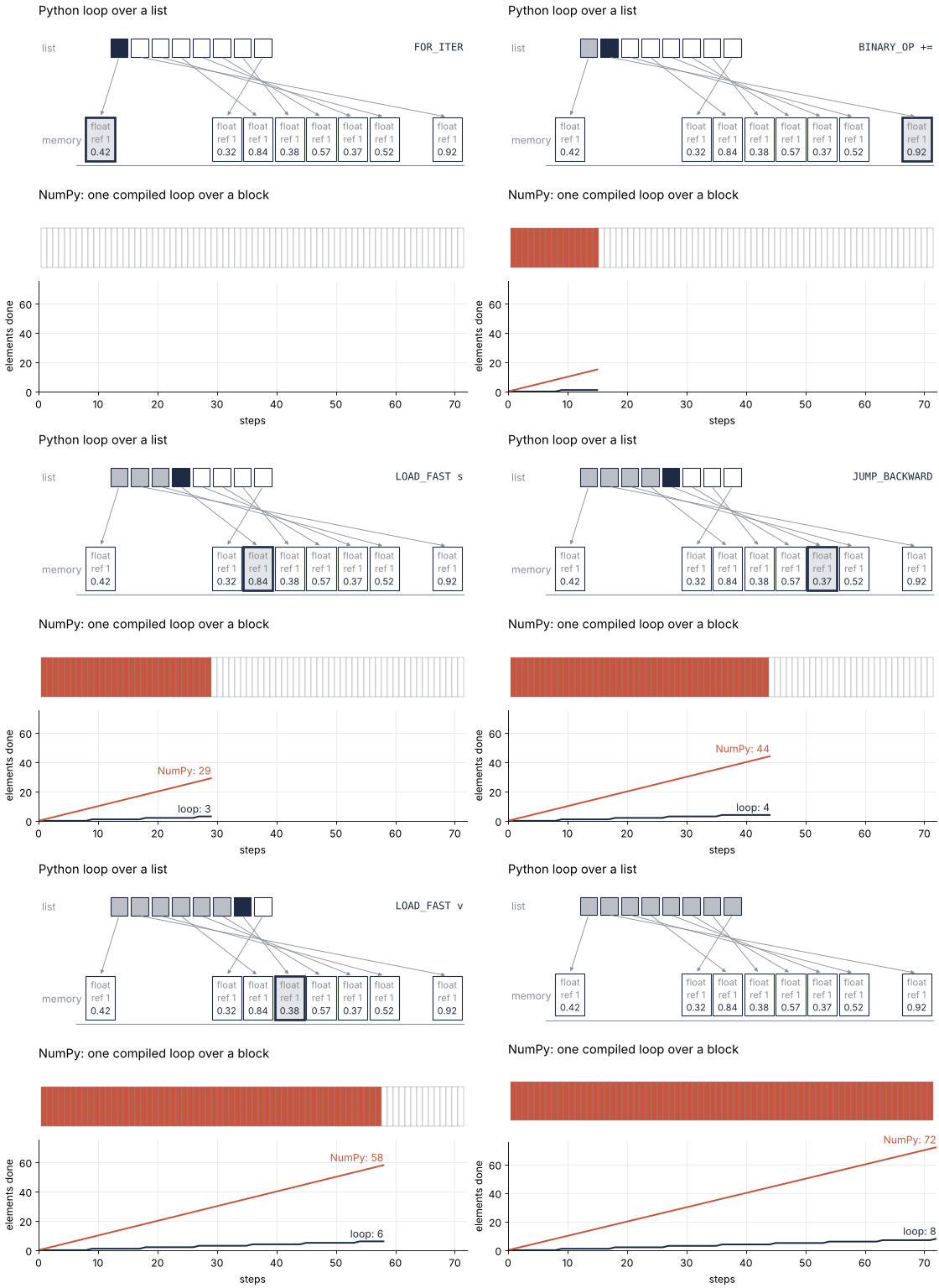
The animation puts the two lanes side by side. Each frame is one step: one bytecode instruction for the loop, one element for NumPy's compiled loop.
Show code
"""Boxes and block: a Python loop over a list against NumPy's compiled loop, counted in steps.

Renders ../../assets/boxes-and-block.gif. Each frame is one step: one bytecode instruction
of the loop body for the Python lane, one element for the NumPy lane. Steps are not time.
Run it from any directory:

    python scene.py
"""
import dis
from pathlib import Path

import numpy as np
import matplotlib.pyplot as plt
from matplotlib.animation import FuncAnimation, PillowWriter
from matplotlib.colors import to_rgb
from matplotlib.patches import FancyArrowPatch, Rectangle
from PIL import Image

OUT = Path(__file__).resolve().parents[2] / "assets" / "boxes-and-block.gif"
INK, ACCENT, SECOND, MUTED = "#1f2a44", "#c8553d", "#2a7f9e", "#8a8f98"
plt.rcParams.update({"axes.spines.top": False, "axes.spines.right": False, "font.size": 11})


def loop(seq):
    s = 0.0
    for v in seq:
        s += v * v
    return s


# ---- the loop body's instructions, read from the bytecode, never typed
# jump targets ("to 34") are bytecode offsets that mean nothing on screen, so they are left out
names = [i.opname if i.opcode in dis.hasjrel else f"{i.opname} {i.argrepr}".strip()
         for i in dis.get_instructions(loop)]
start = next(k for k, n in enumerate(names) if n.startswith("FOR_ITER"))
end = next(k for k, n in enumerate(names) if n.startswith("JUMP_BACKWARD"))
body = names[start:end + 1]                                    # nine in Python 3.12
per_element = len(body)

N_LIST = 8                                                     # elements the Python lane shows
N_BLOCK = N_LIST * per_element                                 # NumPy does one element per step
values = np.random.default_rng(78).random(N_BLOCK)
box_slot = np.random.default_rng(79).permutation(12)[:N_LIST]  # boxes sit at scattered places in memory
HOLD = 12
frames = list(range(N_BLOCK + 1)) + [N_BLOCK] * HOLD

# ---- figure, drawn once
fig, (ax1, ax2, ax3) = plt.subplots(3, 1, figsize=(7, 6.4), dpi=80, height_ratios=[1.6, 0.7, 1.1],
                                    layout="constrained")
for ax in (ax1, ax2):
    ax.set_axis_off()
ax1.set(xlim=(-0.5, 12), ylim=(-0.9, 2.6))
ax1.set_title("Python loop over a list", loc="left")
ax1.text(-0.4, 2.0, "list", color=MUTED, va="center", ha="left")
ax1.text(-0.4, 0.0, "memory", color=MUTED, va="center", ha="left")
ax1.plot([0.6, 11.9], [-0.55, -0.55], color=MUTED, lw=1)       # the memory strip under the boxes
slots, boxes = [], []
for k in range(N_LIST):
    xs = 1.6 + k * 0.6
    slot = Rectangle((xs, 1.8), 0.5, 0.4, fc="white", ec=INK, lw=1)
    ax1.add_patch(slot)
    slots.append(slot)
    bx = 0.88 + box_slot[k] * 0.92
    box = Rectangle((bx, -0.45), 0.86, 0.95, fc="white", ec=INK, lw=1)
    ax1.add_patch(box)
    boxes.append(box)
    for y, text, color in [(0.3, "float", MUTED), (0.02, "ref 1", MUTED), (-0.26, f"{values[k]:.2f}", INK)]:
        ax1.text(bx + 0.43, y, text, ha="center", va="center", fontsize=10, color=color)
    ax1.add_patch(FancyArrowPatch((xs + 0.25, 1.8), (bx + 0.43, 0.5), arrowstyle="-|>", mutation_scale=8,
                                  color=MUTED, lw=0.8))
instr_text = ax1.text(11.9, 2.0, "", ha="right", va="center", color=INK, family="monospace")

ax2.set(xlim=(-0.5, N_BLOCK + 0.5), ylim=(-0.2, 1.6))
ax2.set_title("NumPy: one compiled loop over a block", loc="left")
cells = [Rectangle((k, 0), 1, 1, fc="white", ec=MUTED, lw=0.4) for k in range(N_BLOCK)]
for c in cells:
    ax2.add_patch(c)

ax3.set(xlim=(0, N_BLOCK), ylim=(0, N_BLOCK * 1.05), xlabel="steps", ylabel="elements done")
ax3.grid(alpha=0.25)
(line_py,) = ax3.plot([], [], color=INK, lw=1.8)
(line_np,) = ax3.plot([], [], color=ACCENT, lw=1.8)
label_py = ax3.text(0, 0, "", color=INK, va="bottom", ha="right")
label_np = ax3.text(0, 0, "", color=ACCENT, va="bottom", ha="right")


# ---- one frame: a function of the step count alone
def update(step):
    done_py = step // per_element
    current = min(done_py, N_LIST - 1)
    active = step < N_BLOCK
    for k in range(N_LIST):                                    # the loop's cursor is INK, the loop's color
        on = active and k == current
        slots[k].set_facecolor(INK if on else ((*to_rgb(INK), 0.3) if k < done_py else "white"))
        boxes[k].set_facecolor((*to_rgb(INK), 0.12) if on else "white")
        boxes[k].set_linewidth(2.4 if on else 1)
    instr_text.set_text(body[step % per_element] if active else "")
    for k, c in enumerate(cells):
        c.set_facecolor(ACCENT if k < step else "white")
    s = np.arange(step + 1)
    line_py.set_data(s, s // per_element)
    line_np.set_data(s, s)
    shown = step >= 3 * per_element                            # earlier, the two labels would collide
    label_py.set_position((step, done_py + 1))
    label_py.set_text(f"loop: {done_py}" if shown else "")
    label_np.set_position((step, step + 1))
    label_np.set_text(f"NumPy: {step}" if shown else "")


# ---- render, and read back what was written
OUT.parent.mkdir(exist_ok=True)
FuncAnimation(fig, update, frames=frames).save(OUT, writer=PillowWriter(fps=12))
plt.close(fig)
with Image.open(OUT) as im:
    delay = im.info["duration"]
    print(f"{OUT.name}: {im.width} x {im.height} px, {im.n_frames} frames at {delay} ms, "
          f"{im.n_frames * delay / 1000:.1f} s, {OUT.stat().st_size / 1024:,.0f} kB; body: {', '.join(body)}")
Why a loop over an array is slowest of all
for v in x cannot hand the interpreter a raw double from the array's block, because the interpreter only works with objects. So the array makes a new box for every element it hands out, a numpy.float64.
Show code
v_np, v_py = x[0], xs[0]
# a statement string, so that only the multiplication is timed, not a function call around it
operands = {"v_np": v_np, "v_py": v_py}
t_mul_np, t_mul_py = best_of(["v * v, numpy.float64", "v * v, float"], ["v_np * v_np", "v_py * v_py"],
                             numbers=[200_000, 200_000], rounds=31, names=operands)

print(f"type(x[0]) = {type(v_np).__module__}.{type(v_np).__name__}, sys.getsizeof(x[0]) = {sys.getsizeof(v_np)} bytes")
print(f"one multiplication, numpy.float64 * numpy.float64: {1e9 * t_mul_np:5.1f} ns")
print(f"one multiplication, float * float:                 {1e9 * t_mul_py:5.1f} ns")
type(x[0]) = numpy.float64, sys.getsizeof(x[0]) = 32 bytes
one multiplication, numpy.float64 * numpy.float64:  43.5 ns
one multiplication, float * float:                  17.0 ns
That box is 32 bytes, and it is made a million times, once per pass. Its arithmetic is slow too. The interpreter has a shortcut for multiplying ordinary Python floats, the instruction BINARY_OP_MULTIPLY_FLOAT in the listing of the next section, but that shortcut accepts only the built-in float. Every * on a numpy.float64 takes the general route into NumPy's own code for scalars. That code checks the type of the other operand and converts it, clears the processor's floating-point status flags, multiplies, and reads the flags back to see whether an overflow or an invalid result needs a warning. Timed alone, with both operands already taken out of the array or list, one such multiplication takes 2 to 3 times as long as one on two floats, about 40 ns against about 16 ns. So the loop over the array pays twice: for a new box per element, which the list paid once at tolist(), and for the slow scalar route on every operator. Before a pure Python loop, convert with .tolist(); better, do not loop.
Formalization
The mechanism gives a cost model with three constants. A Python loop pays the same price \(c_\text{py}\) for every pass, and a NumPy call pays a fixed price \(c_\text{call}\) once plus a small \(c_\text{el}\) per element:
Here \(c_\text{py}\) is the cost of one pass of the loop body in the interpreter, \(c_\text{call}\) is the work before NumPy's compiled loop starts, and \(c_\text{el}\) is the cost per element inside it. For large \(n\) the ratio of the two approaches \(c_\text{py}/c_\text{el}\). They break even at
The cell below measures the constants and the facts behind them.
Show code
def loop_empty(seq):
    s = 0.0
    for v in seq:
        pass
    return s

def loop_six(seq):
    s = 0.0
    for v in seq:
        s += (v*v - 0.5*v + 1.0) * v                        # six operators, counting the + of +=
    return s

print(f"sys.getsizeof(1.5) = {sys.getsizeof(1.5):>9,} bytes   one float box")
print(f"sys.getsizeof(xs)  = {sys.getsizeof(xs):>9,} bytes   the list: its pointers only")
print(f"sys.getsizeof(x)   = {sys.getsizeof(x):>9,} bytes   the array: header and data")
print(f"x.nbytes           = {x.nbytes:>9,} bytes   x.strides = {x.strides}")
print()
loop(xs)                                                     # warm up, so the listing shows the specialized names
listing = dis.Bytecode(loop, adaptive=True).dis()
print(listing)
print()

n = x.size
x1 = x[:1]
# all of this cell's timings take turns over seven rounds, a few seconds in all
(t_empty, t_six, t_empty_arr, t_six_arr, t_tolist, t_mul1, c_call, t_reduce1) = best_of(
    ["empty loop over list", "six operators over list", "empty loop over array", "six operators over array",
     "x.tolist()", "x[:1] * x[:1]", "np.sum(x[:1] * x[:1])", "np.add.reduce(x[:1] * x[:1])"],
    [lambda: loop_empty(xs), lambda: loop_six(xs), lambda: loop_empty(x), lambda: loop_six(x),
     lambda: x.tolist(), lambda: x1 * x1, lambda: np.sum(x1 * x1), lambda: np.add.reduce(x1 * x1)],
    numbers=[1] * 5 + [20_000] * 3, rounds=7)
c_py = t_list / n
c_pass, c_op = t_empty / n, (t_six - t_empty) / n / 6
c_pass_arr, c_op_arr = t_empty_arr / n, (t_six_arr - t_empty_arr) / n / 6
c_tolist = t_tolist / n
print(f"loop over list:   {1e9 * c_pass:5.1f} ns per pass + {1e9 * c_op:5.1f} ns per operator; "
      f"s += v * v predicted {1e9 * (c_pass + 2 * c_op):5.1f} ns, measured {1e9 * c_py:5.1f} ns")
print(f"loop over array:  {1e9 * c_pass_arr:5.1f} ns per pass + {1e9 * c_op_arr:5.1f} ns per operator; "
      f"s += v * v predicted {1e9 * (c_pass_arr + 2 * c_op_arr):5.1f} ns, measured {1e9 * t_arr / n:5.1f} ns")
print(f"x.tolist():       {1e9 * c_tolist:5.1f} ns per element, once")
print()

c_el = t_np / n
n_star = c_call / (c_py - c_el)
print(f"x[:1] * x[:1]                 {1e6 * t_mul1:4.2f} µs")
print(f"np.sum(x[:1] * x[:1])         {1e6 * c_call:4.2f} µs = c_call")
print(f"np.add.reduce(x[:1] * x[:1])  {1e6 * t_reduce1:4.2f} µs   the same sum without np.sum's Python wrapper")
print(f"c_py = {1e9 * c_py:.1f} ns, c_el = {1e9 * c_el:.2f} ns, n* = {n_star:.0f} elements")
rows = 2000
t_rows = rows * (c_call + rows * c_el)
print(f"{rows:,} NumPy calls on {rows:,} numbers each: {1e3 * rows * c_call:.1f} ms in fixed prices, "
      f"{1e3 * t_rows:.1f} ms in all; "
      f"{rows * rows:,} Python passes: {1e3 * rows * rows * c_py:.0f} ms")
sys.getsizeof(1.5) =        24 bytes   one float box
sys.getsizeof(xs)  = 8,000,056 bytes   the list: its pointers only
sys.getsizeof(x)   = 8,000,112 bytes   the array: header and data
x.nbytes           = 8,000,000 bytes   x.strides = (8,)

 20           0 RESUME                   0

 21           2 LOAD_CONST               1 (0.0)
              4 STORE_FAST__LOAD_FAST     1 (s)

 22           6 LOAD_FAST                0 (seq)
              8 GET_ITER
        >>   10 FOR_ITER_LIST           10 (to 34)
             14 STORE_FAST__LOAD_FAST     2 (v)

 23          16 LOAD_FAST__LOAD_FAST     1 (s)
             18 LOAD_FAST__LOAD_FAST     2 (v)
             20 LOAD_FAST                2 (v)
             22 BINARY_OP_MULTIPLY_FLOAT     5 (*)
             26 BINARY_OP_ADD_FLOAT     13 (+=)
             30 STORE_FAST               1 (s)
             32 JUMP_BACKWARD           12 (to 10)

 22     >>   34 END_FOR

 24          36 LOAD_FAST                1 (s)
             38 RETURN_VALUE


loop over list:     6.4 ns per pass +   4.9 ns per operator; s += v * v predicted  16.3 ns, measured  18.2 ns
loop over array:   29.2 ns per pass +  40.5 ns per operator; s += v * v predicted 110.1 ns, measured 105.0 ns
x.tolist():        28.6 ns per element, once

x[:1] * x[:1]                 0.38 µs
np.sum(x[:1] * x[:1])         2.43 µs = c_call
np.add.reduce(x[:1] * x[:1])  1.32 µs   the same sum without np.sum's Python wrapper
c_py = 18.2 ns, c_el = 1.29 ns, n* = 144 elements
2,000 NumPy calls on 2,000 numbers each: 4.9 ms in fixed prices, 10.0 ms in all; 4,000,000 Python passes: 73 ms
Three consequences come out of this cell, and you need each one whenever you judge a loop.
A number costs 40 bytes in a list and 8 in an array. sys.getsizeof(1.5) is 24 bytes: 8 for the reference count, 8 for the type pointer, 8 for the value. Python's allocator hands out memory in pieces whose sizes are multiples of 16 bytes, so the box takes 32, which is the 32-byte step of the list as built. Add the list's own 8-byte pointer to it and a million numbers are about 40 MB as a list. As an array they are x.nbytes, 8,000,000 bytes, and x.strides is (8,): one step of 8 bytes from each number to the next. What those 8 bytes hold is in Floating-point numbers.
Every pass goes through the interpreter, and every operator costs. The listing is the bytecode of loop, and the body is the nine lines from FOR_ITER_LIST to JUMP_BACKWARD. After a few passes the interpreter has specialized the general instructions into ones for floats, BINARY_OP_MULTIPLY_FLOAT and BINARY_OP_ADD_FLOAT, but each pass still does the checks and the boxing described in the idea above. For your own loop, split the cost of a pass into a part for the pass and a part for each of its \(k\) arithmetic operators:
The cell separates the two parts with two more loops over the same million numbers. One has an empty body, so its time per element is \(c_\text{pass}\) alone. The other has six operators, s += (v*v - 0.5*v + 1.0) * v, and the difference between the two times per element, divided by six, is \(c_\text{op}\). Time the same pair on your own machine, over the kind of sequence your loop runs over, and you have your own constants. For a loop over a list of Python floats the cell gives about 6 ns per pass and about 5 ns per operator, so s += v * v, with \(k = 2\), should cost about 16 ns, and it costs about 18 ns. A loop over a NumPy array pays about 30 ns per pass and about 40 ns per operator, which predicts about 110 ns, and the loop over the array at the top of the page took about 100 ns per element. Both predictions are good to 25 %, which is all an estimate needs. Or convert with .tolist() first, about 30 ns per element once, and use the list's constants.
A NumPy call has a fixed price. x[:1] * x[:1] costs about 0.4 µs, and np.sum on top of it brings the total to about 2.5 µs, all of it spent before the first multiplication. About half of that is np.sum itself, a few lines of Python that sort out its arguments and then call np.add.reduce: called directly, np.add.reduce(x[:1] * x[:1]) takes about 1.3 µs, the multiplication included. The rest is NumPy's C code checking the operands, choosing the compiled loop, and making the result arrays. That is \(c_\text{call}\), and with \(c_\text{py}\) about 18 ns and \(c_\text{el}\) about 1 ns the break-even is \(n^* \approx 2.5\ \mu\text{s} / (18 - 1)\ \text{ns} \approx 150\) elements. Below that, the plain loop wins. The fixed price is also why a Python loop that calls NumPy is often fine. A loop over 2,000 rows that calls NumPy once per row, on 2,000 numbers each, pays the fixed price 2,000 times, about 5 ms, and about 10 ms with the arithmetic; the same arithmetic as 4,000,000 Python passes takes about 70 ms. The row loop in Vectorizing loops with NumPy is this case.
See it in code
The cell times both versions per element at 15 sizes, from one to ten million elements. The dashed lines are the cost model with the constants measured above, not fitted to these points.
Show code
sizes = [10 ** (k // 2) * (3 if k % 2 else 1) for k in range(15)]   # 1, 3, 10, 30, ..., 10,000,000

cases = ([(f"sweep loop {n}", lambda s=xs_all[:n]: loop(s), n) for n in sizes]
         + [(f"sweep numpy {n}", lambda a=x_all[:n]: np.sum(a * a), n) for n in sizes]
         + [(f"sweep np.sum(x) {n}", lambda a=x_all[:n]: np.sum(a), n) for n in sizes[-3::2]])
labels, funcs, counts = zip(*cases)
numbers = [max(1, int(0.01 / timeit.timeit(f, number=1))) for f in funcs] if not all(l in timings for l in labels) else [1] * len(funcs)
# two back-to-back repeats per size, so that the second finds that size's data in the cache
per_call = best_of(labels, funcs, numbers, rounds=7, repeat=2)
per_el = {label: 1e9 * t / n for label, t, n in zip(labels, per_call, counts)}
ns_loop = np.array([per_el[f"sweep loop {n}"] for n in sizes])
ns_np = np.array([per_el[f"sweep numpy {n}"] for n in sizes])
ns_sum = {n: per_el[f"sweep np.sum(x) {n}"] for n in sizes[-3::2]}

print("         n   loop / ns   np.sum(x * x) / ns   ratio")
for n, a, b in zip(sizes, ns_loop, ns_np):
    print(f"{n:>10,}   {a:9.1f}   {b:18.2f}   {a / b:5.1f}")
cross = next(i for i in range(len(sizes)) if ns_np[i] < ns_loop[i])
print(f"crossover between {sizes[cross - 1]:,} and {sizes[cross]:,} elements (model: n* = {n_star:.0f})")
for n, v in ns_sum.items():
    print(f"np.sum(x) alone at {n:>10,}: {v:.2f} ns per element")
l2 = Path("/sys/devices/system/cpu/cpu0/cache/index2/size")   # Linux only: the second cache level of one core
l2_kib = int(l2.read_text().strip().rstrip("K")) if l2.exists() else None
print(f"x and x * x at 100,000 elements: {2 * x_all[:100_000].nbytes / 1e6:.1f} MB; "
      f"cache level 2 of one core: {f'{l2_kib / 1024:.0f} MB' if l2_kib else 'unknown'}")

n_model = np.logspace(0, 7, 200)
fig, ax = plt.subplots(figsize=(7, 3.8))
ax.plot(n_model, np.full_like(n_model, 1e9 * c_py), color=MUTED, ls="--", lw=1)
ax.plot(n_model, 1e9 * (c_call / n_model + c_el), color=MUTED, ls="--", lw=1)
ax.plot(sizes, ns_loop, "o-", color=INK, ms=4)
ax.plot(sizes, ns_np, "o-", color=ACCENT, ms=4)
ax.plot([n_star], [1e9 * (c_call / n_star + c_el)], "o", color=MUTED, ms=6)
ax.annotate(f"break-even\nn* ≈ {n_star:.0f}", (n_star, 1e9 * (c_call / n_star + c_el)), xytext=(10, 18),
            textcoords="offset points", color=MUTED)
ax.text(3e5, ns_loop[-3] * 1.5, "Python loop over a list", color=INK, ha="center")
ax.text(300, 2.5, "np.sum(x * x)", color=ACCENT, ha="right")
best = np.argmax(ns_loop / ns_np)                          # the largest ratio, as a bracket between the curves
ax.annotate("", (sizes[best], ns_np[best] * 1.15), xytext=(sizes[best], ns_loop[best] / 1.15),
            arrowprops=dict(arrowstyle="<->", color=MUTED, lw=1, shrinkA=0, shrinkB=0))
ax.text(sizes[best] * 1.4, np.sqrt(ns_loop[best] * ns_np[best]), f"{ns_loop[best] / ns_np[best]:.0f} × at best",
        color=ACCENT, va="center")
ax.set(xscale="log", yscale="log", xlim=(0.6, 2e7), ylim=(0.3, 5000),
       xlabel="number of elements n", ylabel="time per element / ns")
plt.show()
         n   loop / ns   np.sum(x * x) / ns   ratio
         1        82.7              2410.00     0.0
         3        40.0               796.67     0.1
        10        23.5               238.00     0.1
        30        20.1                80.00     0.3
       100        18.3                24.10     0.8
       300        17.2                 8.53     2.0
     1,000        17.3                 2.98     5.8
     3,000        17.3                 1.50    11.5
    10,000        17.2                 0.94    18.3
    30,000        16.8                 0.76    22.0
   100,000        17.4                 0.76    22.8
   300,000        17.4                 1.11    15.7
 1,000,000        17.5                 1.15    15.2
 3,000,000        17.8                 1.63    11.0
10,000,000        18.2                 2.55     7.1
crossover between 100 and 300 elements (model: n* = 144)
np.sum(x) alone at  1,000,000: 0.31 ns per element
np.sum(x) alone at 10,000,000: 0.76 ns per element
x and x * x at 100,000 elements: 1.6 MB; cache level 2 of one core: 2 MB
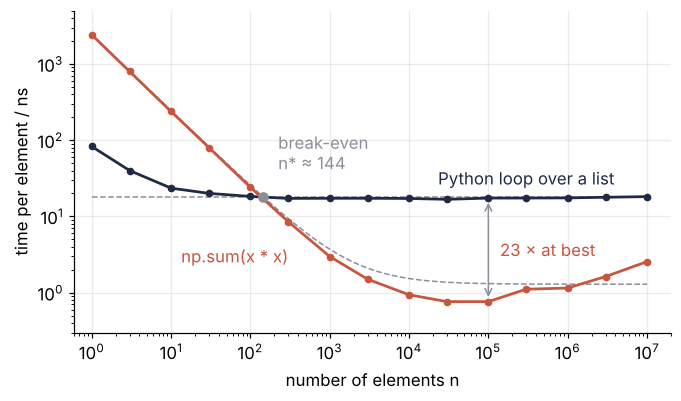
The loop lies flat on \(c_\text{py}\), about 18 ns per element, from 300 elements on. Below that it rises with the fixed cost of calling loop itself, a fraction of a microsecond the model leaves out. NumPy follows \(c_\text{call}/n + c_\text{el}\) to within 25 % up to a few hundred elements, and the two cross between 100 and 300, where the model puts \(n^* \approx 150\). From 3,000 to 100,000 elements NumPy runs faster than the model, about 0.7 ns per element at its best. There x and x * x, 1.6 MB together at 100,000 elements, fit in the part of the cache that each core has to itself, 2 MB on this machine. The constant \(c_\text{el}\) was measured at a million elements, where the two take 16 MB and do not fit. The largest ratio, 15 to 35 times, comes in this range. Past it the time per element climbs again, to about 3 ns at ten million, while np.sum(x) alone takes less than half as long. The difference is the intermediate array x * x, 80 MB at ten million: np.sum(x) reads x once from main memory, while np.sum(x * x) reads x, writes x * x, and reads that back. The model's single \(c_\text{el}\) misses both turns, which come from where the numbers sit, not from the interpreter.
Where it shows up
Every field has loops of both kinds, the ones that run over numbers and the ones that run over calls.
- Geology and geophysics. A day of a seismic trace at 100 Hz is 8.6 million samples, and its energy as a Python loop over a list of floats takes about 0.15 s, about 0.9 s over the array as loaded. A loop over 100 stations that calls NumPy once per trace makes 100 passes and costs nothing.
- Physics and chemistry. The pair loop of a molecular dynamics step over 1,400 atoms is about a million passes with a dozen operators each, some 65 ms per step in Python, and it is where Vectorizing loops with NumPy applies, with compiled loops through Numba as the next step. A loop over 10,000 time steps of a small ODE system stays a loop, because each step needs the last.
- Biology. A per-pixel loop over a 2048 × 2048 microscope frame is 4.2 million passes, about 70 ms per frame for a body of two operators, half a minute for a stack of 500 frames. A loop over the 500 frames that calls NumPy on each makes 500 passes.
- Engineering. A finite-difference stencil swept with two nested Python loops over a 1000 × 1000 grid is a million passes per time step. One array expression per step makes it one NumPy call per step.
- Mathematics and statistics. A bootstrap of 10,000 resamples, as in Bootstrap confidence intervals with scipy.stats, is a Python loop worth keeping when each resample is one NumPy call: 10,000 fixed prices are about 25 ms. A Monte Carlo integral over a million random points,
x*x + y*y < 1.0and a count, has five operators per point: about 30 ms as a Python loop, against about 6 ms as five array operations.
A loop of a few hundred passes whose every NumPy call has more elements than the break-even is fast already. For the others, count the passes of the innermost Python loop and the operators in its body, and price them with the per-pass and per-operator costs: the list's for a list of Python floats, the array's (or .tolist() first) for a loop over a NumPy array. In every field above the verdict is the same: a loop whose price is a visible share of the run, which only profiling tells you, pays about what it paid at the top of the page when rewritten, 10 to 25 times from a list and 60 to 120 times from an array.
Further reading
- NumPy documentation: What is NumPy?, on why arrays are fast, and the internal memory layout of an ndarray. Python documentation:
dis,sys.getsizeof,timeit, and PEP 659, the specializing adaptive interpreter. - Gorelick and Ozsvald, High Performance Python (O'Reilly), the chapters "Lists and Tuples", "Matrix and Vector Computation", and "Compiling to C".
- Jake VanderPlas, Why Python is slow: looking under the hood (2014).
- Related tutorials on this site: Vectorizing loops with NumPy, Memory layout of NumPy arrays, Profiling with cProfile and timeit, Flame graphs with py-spy, Parallel runs with concurrent.futures, Floating-point numbers, and Bootstrap confidence intervals with scipy.stats: the median grain size of sand.
- Download the notebook. It was executed with the library versions in the header.