The wavelet transform: which frequencies a signal contains, and when
Afterwards you can explain what a wavelet transform measures, why its time and frequency resolution change with scale, and when to prefer it to an STFT.
- Topic
- Signal processing
- Field
- Cross-disciplinary
- Libraries
matplotlib 3.11.2numpy 2.4.3pywt 1.10.0scipy 1.18.1
py-wavelet-transform.ipynb, executed with the versions above. The download needs a free account
Run it yourself. In a terminal, this installs exactly the versions above:
pip install pywt==1.10.0 numpy==2.4.3 scipy==1.18.1 matplotlib==3.11.2 jupyterlabThe question
Here are two recordings, each 2 s long and sampled at 16 kHz. In signal A a 440 Hz tone sounds for one second, then a 660 Hz tone for one second. Signal B is A played backwards, sample by sample: 660 Hz first, then 440 Hz.
Show code
import numpy as np
import matplotlib.pyplot as plt
import pywt
from scipy.signal import chirp, ShortTimeFFT
from scipy.signal.windows import hann

plt.rcParams.update({
    "figure.figsize": (7, 3.6), "figure.dpi": 110,
    "axes.spines.top": False, "axes.spines.right": False,
    "axes.grid": True, "grid.alpha": 0.25,
    "font.size": 11, "lines.linewidth": 1.8,
})
INK, ACCENT, SECOND, MUTED = "#1f2a44", "#c8553d", "#2a7f9e", "#8a8f98"

FS = 16000                                             # samples per second
t = np.arange(2 * FS) / FS                             # s
A = np.where(t < 1, np.sin(2 * np.pi * 440 * t), np.sin(2 * np.pi * 660 * (t - 1)))
B = A[::-1]                                            # the same samples, played backwards

freq = np.fft.rfftfreq(t.size, d=1 / FS)
amp_A = 2 * np.abs(np.fft.rfft(A)) / t.size
amp_B = 2 * np.abs(np.fft.rfft(B)) / t.size
print(f"largest difference between the spectra of A and B: {np.max(np.abs(amp_A - amp_B)) / amp_A.max():.1e} of the peak")

def envelope(ax, x, tones):
    """2 s of a tone is a solid band at page width: draw its upper and lower edge per block, and name the tones."""
    blocks = x.reshape(400, -1)
    tb = t.reshape(400, -1).mean(axis=1)
    ax.fill_between(tb, blocks.min(axis=1), blocks.max(axis=1), color=INK, lw=0)
    ax.set_axisbelow(True)                                 # grid lines behind the band
    for t_mid, f in zip([0.5, 1.5], tones):
        ax.text(t_mid, 0, f"{f} Hz", color="white", ha="center", va="center")

fig = plt.figure(figsize=(7, 5.4), layout="constrained")
grid = fig.add_gridspec(3, 3, width_ratios=[2.4, 1, 1])
for row, (name, x, first, second) in enumerate([("A", A, 440, 660), ("B", B, 660, 440)]):
    ax = fig.add_subplot(grid[row, 0])
    envelope(ax, x, (first, second))
    ax.set(xlim=(0, 2), ylim=(-1.3, 1.3), ylabel=f"signal {name}", xlabel="time / s" if row else None)
    ax.tick_params(labelbottom=bool(row))
    for col, t_mid in [(1, 0.5), (2, 1.5)]:
        zoom = np.abs(t - t_mid) <= 0.005
        ax_z = fig.add_subplot(grid[row, col], sharey=ax)
        ax_z.plot((t[zoom] - t_mid) * 1e3, x[zoom], color=INK, lw=1.4)
        ax_z.set(xlim=(-5, 5), xticks=[-4, 0, 4], xlabel=f"t − {t_mid} s / ms" if row else None)
        ax_z.tick_params(labelleft=False, labelbottom=bool(row))
ax = fig.add_subplot(grid[2, :])
ax.plot(freq, amp_A, color=INK, lw=6, alpha=0.3, solid_capstyle="butt")   # both are data: INK, told apart by width and dash
ax.plot(freq, amp_B, color=INK, lw=1.2, ls=(0, (4, 3)))
ax.set(xlim=(300, 800), ylim=(-0.02, 0.6), xlabel="frequency / Hz", ylabel="amplitude")
for f0, text in [(440, "A, pale and broad"), (660, "B, dashed, on A")]:
    ax.annotate(text, xy=(f0 + 3, 0.3), xytext=(f0 + 30, 0.36), color=INK, va="center",
                arrowprops=dict(arrowstyle="-", color=INK, lw=0.8, shrinkA=2, shrinkB=0))
plt.show()
largest difference between the spectra of A and B: 1.1e-16 of the peak
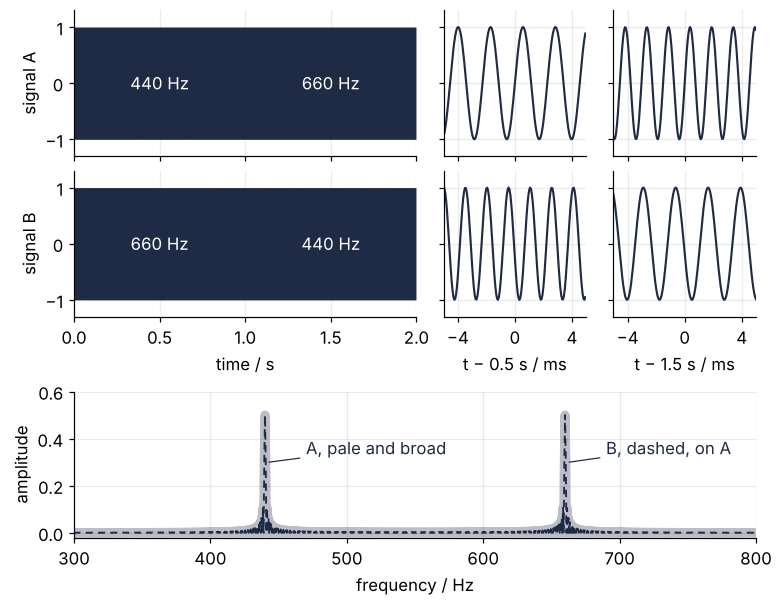
The two are plainly different. Played through a loudspeaker, A rises by a fifth and B falls by one, and the zooms show the slower oscillation in the first second of A and in the second second of B. The amplitude spectra say nothing of the kind: two peaks of equal height at 440 and 660 Hz, the dashed spectrum of B lying on the pale one of A. The largest difference between them is 1.1e-16 of the peak, which is rounding.
That is no accident. Reversing a real record in time changes only the phase of each Fourier coefficient, and the amplitude spectrum throws the phase away, as the Fourier tutorial showed. Each of its probes runs through the whole record, so the transform says which frequencies are present and nothing about when. A seismologist meets the same limit in every seismogram, where the P wave, the S wave, and the surface waves arrive at different times with different frequencies.
How do you ask a signal which frequencies it contains at each moment, and how sharp can the answer be?
The idea: compare the signal with a short probe
The Fourier probe is a sine as long as the record, so its average mixes all times. The first fix is to cut the record into short windows and Fourier-transform each one: the short-time Fourier transform, or STFT, whose magnitude drawn as an image over time and frequency is the spectrogram. Each piece is tapered with a Hann window, so that cutting does not put a jump at its edges, which would spread every peak into broad skirts.
The test signal for the rest of this page is a chirp whose frequency rises from 50 Hz to 2 kHz in 2 s, by the same factor in every interval of time: \(f(t) = 50 \cdot 40^{t/2}\) Hz. It sweeps slowly at the bottom and fast at the top. Here are its spectrograms with a short window and a long one:
Show code
x = chirp(t, f0=50, t1=2, f1=2000, method="logarithmic")
f_true = 50 * 40 ** (t / 2)                            # Hz, the chirp's frequency at time t

def spectrogram(L):
    """|STFT| of the chirp with a Hann window of L samples, hop 1 ms, zero-padded for a smooth image."""
    SFT = ShortTimeFFT(hann(L, sym=False), hop=16, fs=FS, mfft=4096, scale_to="magnitude")
    S = np.abs(SFT.stft(x))
    keep_t = (SFT.t(x.size) >= 0) & (SFT.t(x.size) <= 2)
    keep_f = (SFT.f >= 35) & (SFT.f <= 3300)
    return SFT.t(x.size)[keep_t], SFT.f[keep_f], S[np.ix_(keep_f, keep_t)]

def frequency_axis(ax):
    ax.set(yscale="log", ylim=(40, 3200), xlim=(0, 2), xlabel="time / s")
    ax.set_yticks([50, 100, 200, 500, 1000, 2000], labels=["50", "100", "200", "500", "1k", "2k"])
    ax.yaxis.set_minor_formatter(plt.NullFormatter())
    ax.tick_params(axis="y", which="minor", length=0)
    ax.grid(False)

stft = {L: spectrogram(L) for L in (128, 2048)}
fig, axes = plt.subplots(1, 2, figsize=(8, 3.4), sharey=True, layout="constrained")
for ax, L in zip(axes, stft):
    ts, fs_, S = stft[L]
    mesh = ax.pcolormesh(ts, fs_, S, cmap="cividis", vmin=0, vmax=0.5, shading="auto", rasterized=True)
    ax.plot(t[::40], f_true[::40], color=MUTED, lw=1, ls=(0, (2, 6)))
    frequency_axis(ax)
    ax.text(0.03, 0.95, f"Hann, {L / FS * 1e3:.0f} ms", transform=ax.transAxes, va="top", color="white")
axes[0].set_ylabel("frequency / Hz")
fig.colorbar(mesh, ax=axes, label="magnitude", ticks=[0, 0.25, 0.5])
plt.show()

for L, (ts, fs_, S) in stft.items():
    print(f"window {L / FS * 1e3:3.0f} ms, 1/L = {FS / L:5.1f} Hz")
    for ti in (0.25, 1.9):
        column = S[:, np.argmin(np.abs(ts - ti))]
        band = fs_[column > column.max() / 2]                # where the column is above half its peak
        print(f"   at {ti:4.2f} s (chirp at {50 * 40 ** (ti / 2):4.0f} Hz): peak {column.max():.2f}, "
              f"above half of it from {band.min():4.0f} to {band.max():4.0f} Hz")
print(f"the chirp in its last 128 ms: {50 * 40 ** (1.872 / 2):.0f} Hz to 2000 Hz, a sweep of {2000 - 50 * 40 ** (1.872 / 2):.0f} Hz")
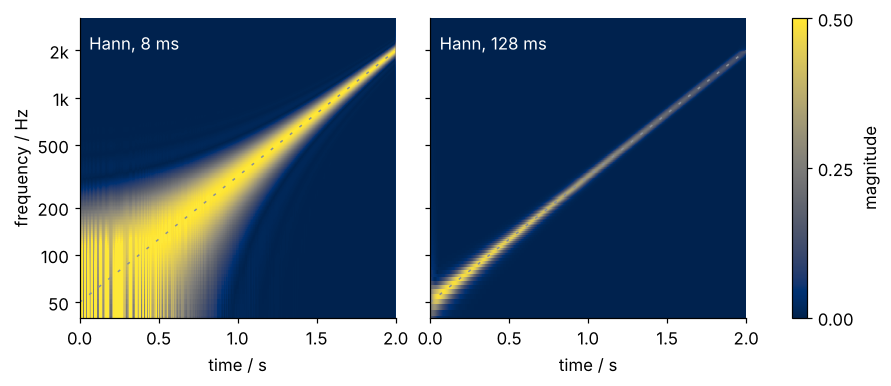
window   8 ms, 1/L = 125.0 Hz
   at 0.25 s (chirp at   79 Hz): peak 0.56, above half of it from   35 to  191 Hz
   at 1.90 s (chirp at 1663 Hz): peak 0.50, above half of it from 1539 to 1785 Hz
window 128 ms, 1/L =   7.8 Hz
   at 0.25 s (chirp at   79 Hz): peak 0.47, above half of it from   74 to   86 Hz
   at 1.90 s (chirp at 1663 Hz): peak 0.14, above half of it from 1566 to 1762 Hz
the chirp in its last 128 ms: 1579 Hz to 2000 Hz, a sweep of 421 Hz
The 8 ms window follows the top of the chirp as a bright track and turns the bottom into a smear: at 0.25 s, with the chirp at 79 Hz, the column is above half its peak from the bottom of the plot up to 191 Hz. The Fourier tutorial's rule says why. A record of length \(L\) resolves frequencies about \(1/L\) apart, 125 Hz for 8 ms, and 8 ms holds less than half a cycle of 50 Hz. The 128 ms window resolves about 7.8 Hz and draws a sharp line at the bottom, 74 to 86 Hz at 0.25 s, but toward the top the line fades. In the last 128 ms the chirp sweeps 421 Hz, from 1,579 Hz to 2 kHz, so the window holds a band rather than a tone, and its peak drops from 0.47 at 0.25 s to 0.14 at 1.9 s.
One window length has to serve every frequency. For this chirp no length does.
Stretch the probe with the frequency
The turn is to make the probe a fixed number of cycles long rather than a fixed number of milliseconds: long at low frequencies, short at high ones. The probe used throughout this page is a complex sine under a Gaussian envelope, the complex Morlet wavelet. Its envelope falls to 1/e at √2 periods either side of the center, so about three cycles fit between those points, at 50 Hz and at 2 kHz alike. Measured as the standard deviation of its squared magnitude, its width is 0.71 of a period.
The Morlet has two parameters: \(B = 2\) sets the width of the envelope and \(C = 1\) the probe's frequency in cycles per unit of stretch, so stretched by a scale \(s\) it oscillates at \(C/s\). PyWavelets calls this wavelet cmor2-1. It is complex for the reason the Fourier transform is: the cosine and the sine probe travel in one complex number, so the magnitude does not depend on where the probe sits relative to the crests of the signal.
Slide the probe along the signal, multiply, sum, and keep the magnitude. That is a convolution, and a correlation with the conjugate probe is the same thing here, because the Morlet satisfies \(\psi^*(-t) = \psi(t)\). Here it is on signal A at three probe frequencies:
def morlet(f, B=2, C=1):
    """Complex Morlet probe at frequency f, as PyWavelets defines cmor2-1; scale s in samples."""
    s = C / f * FS
    u = np.arange(-int(8 * s), int(8 * s) + 1) / s         # ±8 periods, deep in the envelope's tail
    return (np.pi * B) ** -0.5 * np.exp(-u**2 / B) * np.exp(2j * np.pi * C * u) / np.sqrt(s)

first, second = (t > 0.1) & (t < 0.9), (t > 1.1) & (t < 1.9)    # away from the ends and the switch
zoom = np.abs(t - 1) <= 0.010
fig, axes = plt.subplots(3, 2, figsize=(8, 5.4), sharex="col", width_ratios=[1, 2], layout="constrained")
for (ax_l, ax_r), f in zip(axes, [660, 550, 440]):
    psi = morlet(f)
    W = np.convolve(A, psi, mode="same")
    at_switch = FS + np.arange(psi.size) - psi.size // 2      # the probe centered at t = 1 s
    ax_l.plot((t[zoom] - 1) * 1e3, A[zoom], color=INK, lw=1.4)
    ax_l.plot((t[at_switch] - 1) * 1e3, psi.real / np.abs(psi).max(), color=SECOND, lw=1.2)
    ax_l.set(xlim=(-10, 10), ylabel=f"{f} Hz probe")
    ax_r.plot(t[::8], np.abs(W)[::8], color=ACCENT)
    ax_r.set(ylim=(0, 3.4), ylabel="|W|")
    print(f"probe {f} Hz: mean |W| = {np.abs(W)[first].mean():.2f} in the first second, "
          f"{np.abs(W)[second].mean():.2f} in the second")
axes[-1, 0].set_xlabel("time around 1 s / ms")
axes[-1, 1].set_xlabel("time / s")
plt.show()
probe 660 Hz: mean |W| = 0.27 in the first second, 2.46 in the second
probe 550 Hz: mean |W| = 1.22 in the first second, 1.22 in the second
probe 440 Hz: mean |W| = 3.02 in the first second, 0.02 in the second
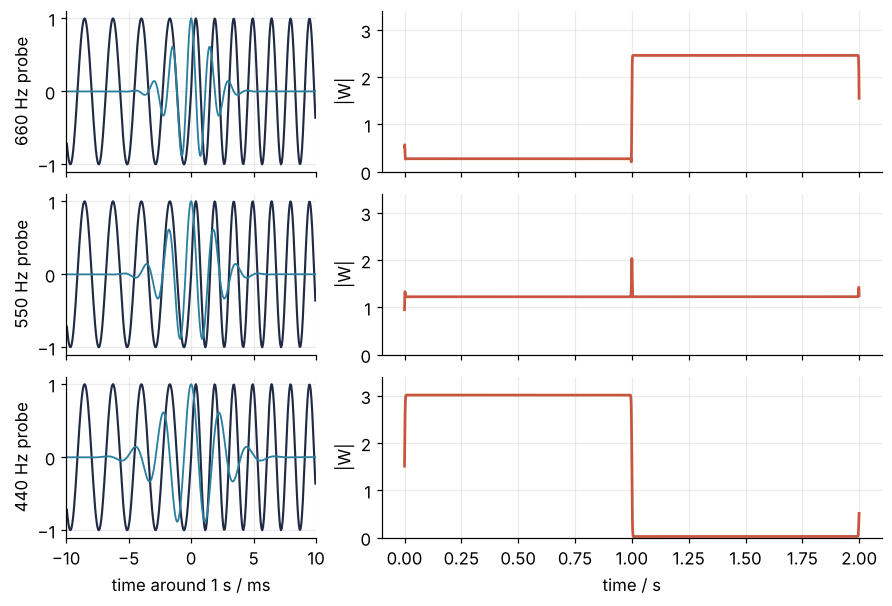
The 440 Hz probe answers with a plateau of 3.02 in the first second, where its tone is, and 0.02 in the second. The 660 Hz probe does the reverse, 2.46 in the second second and 0.27 in the first. The tones are equally loud: the plateaus differ by a normalization, and the 660 Hz probe hears more of its neighbor because its band of frequencies is wider. The 550 Hz probe sits 110 Hz from each tone and hears both a little, 1.22 in each half. Formalization gives the normalization and measures the bands.
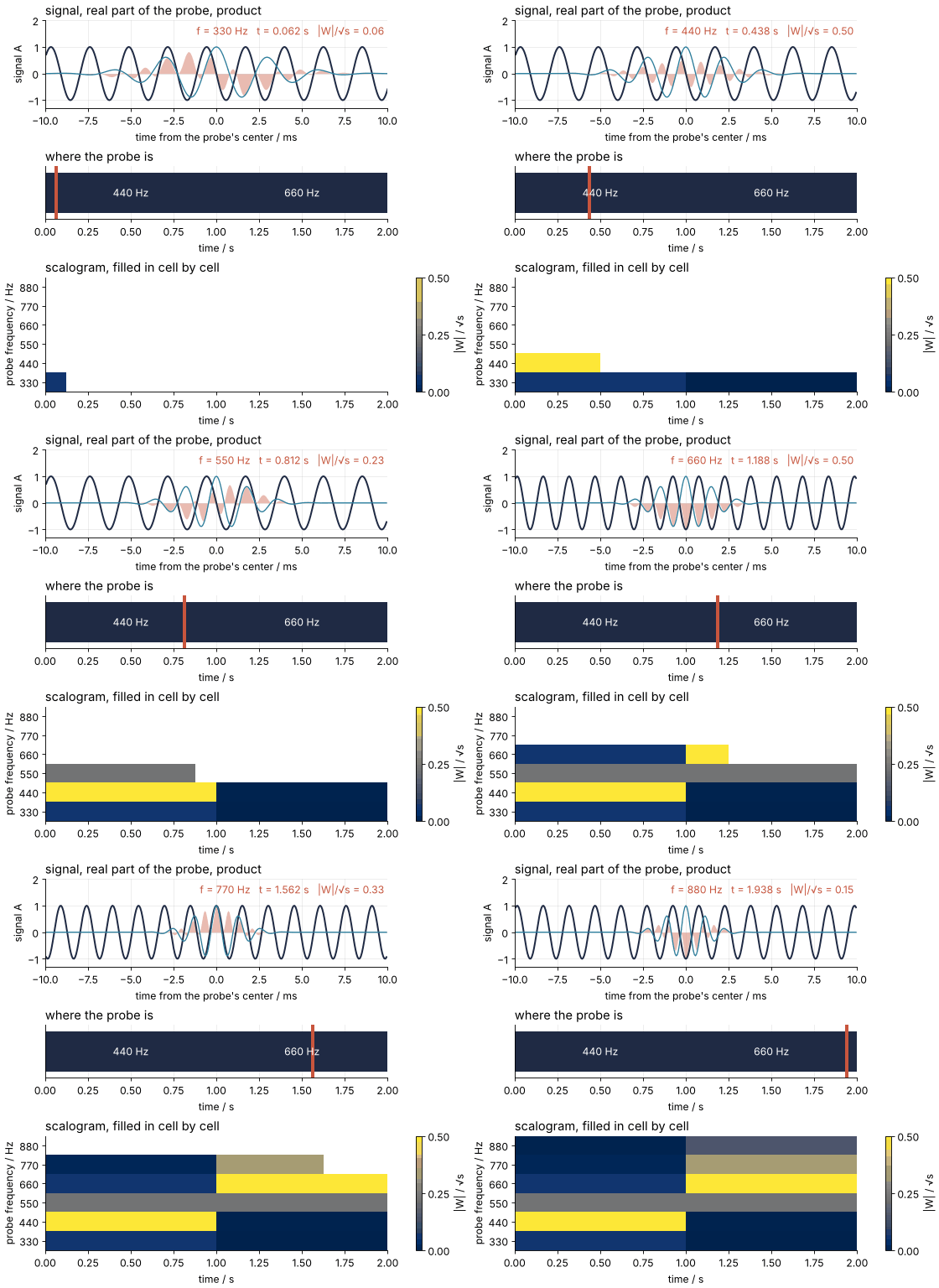
Now do it at every frequency on a grid, and write each magnitude into a row:
Show code
"""Wavelet scan: a Morlet probe slides along signal A at six frequencies and fills in the scalogram.

Renders ../../assets/wavelet-scan.gif. Run it from any directory:

    python scene.py
"""
from pathlib import Path

import numpy as np
import matplotlib.pyplot as plt
from matplotlib.animation import FuncAnimation, PillowWriter
from PIL import Image

OUT = Path(__file__).resolve().parents[2] / "assets" / "wavelet-scan.gif"
INK, ACCENT, SECOND, MUTED = "#1f2a44", "#c8553d", "#2a7f9e", "#8a8f98"
plt.rcParams.update({"axes.spines.top": False, "axes.spines.right": False,
                     "axes.grid": True, "grid.alpha": 0.25, "font.size": 11})

# ---- data: signal A of the tutorial, and the probe of cmor2-1 at a frequency f
FS = 16000
t = np.arange(2 * FS) / FS
A = np.where(t < 1, np.sin(2 * np.pi * 440 * t), np.sin(2 * np.pi * 660 * (t - 1)))

def morlet(f):
    """Complex Morlet, B = 2 and C = 1, stretched to frequency f; scale s in samples."""
    s = FS / f
    u = np.arange(-int(8 * s), int(8 * s) + 1) / s
    return np.exp(-u**2 / 2) * np.exp(2j * np.pi * u) / np.sqrt(2 * np.pi) / np.sqrt(s)

rows = np.array([330, 440, 550, 660, 770, 880])                     # Hz, bottom to top
taus = (np.arange(16) + 0.5) / 8                                     # s, probe positions along each row
# |W|/sqrt(s), the quantity of the tutorial's scalograms, at each row and position
cells = np.array([np.abs(np.convolve(A, morlet(f), mode="same"))[(taus * FS).astype(int)] * np.sqrt(f / FS)
                  for f in rows])

# one frame per (row, position), and a short hold at the end of each row and of the whole scan
frames = [(i, k) for i in range(len(rows)) for k in list(range(16)) + [15, 15]] + [(5, 15)] * 6

# ---- figure, drawn once
fig, (ax1, ax2, ax3) = plt.subplots(3, 1, figsize=(7, 6.4), dpi=80, height_ratios=[1, 0.6, 1.3],
                                    layout="constrained")
(sig_line,) = ax1.plot([], [], color=INK, lw=1.8)
(probe_line,) = ax1.plot([], [], color=SECOND, lw=1.2)
product_fill = ax1.fill_between([0, 1], 0, 0, color=ACCENT, alpha=0.4, lw=0)
label = ax1.text(0.99, 0.95, "", transform=ax1.transAxes, ha="right", va="top", color=ACCENT)
ax1.set(ylim=(-1.3, 2.0), ylabel="signal A", xlabel="time from the probe's center / ms")
ax1.set_title("signal, real part of the probe, product", loc="left")

ax2.fill_between([0, 2], -1, 1, color=INK, lw=0)                     # 2 s of a tone is a solid band
ax2.set_axisbelow(True)
for x, name in [(0.5, "440 Hz"), (1.5, "660 Hz")]:
    ax2.text(x, 0, name, color="white", ha="center", va="center")
marker = ax2.axvspan(0, 0, color=ACCENT, lw=0)
ax2.set(xlim=(0, 2), ylim=(-1.3, 1.3), yticks=[], xlabel="time / s")
ax2.set_title("where the probe is", loc="left")

image = ax3.imshow(np.full(cells.shape, np.nan), origin="lower", aspect="auto", cmap="cividis",
                   vmin=0, vmax=0.5, extent=(0, 2, -0.5, len(rows) - 0.5), interpolation="nearest")
ax3.set(yticks=range(len(rows)), yticklabels=[f"{f}" for f in rows], ylabel="probe frequency / Hz",
        xlabel="time / s")
ax3.grid(False)
fig.colorbar(image, ax=ax3, label="|W| / √s", ticks=[0, 0.25, 0.5])
ax3.set_title("scalogram, filled in cell by cell", loc="left")

# ---- one frame: a function of (row, position) alone
def update(frame):
    global product_fill
    i, k = frame
    f, tau = rows[i], taus[k]
    win = np.abs(t - tau) <= 0.010                                   # the 20 ms that travel with the probe
    psi = morlet(f)
    n0 = int(tau * FS) - psi.size // 2
    probe = np.zeros(t.size, dtype=complex)
    probe[n0:n0 + psi.size] = psi
    probe = probe[win].real / np.abs(psi).max()                      # unit height, for the eye
    ms = (t[win] - tau) * 1e3
    sig_line.set_data(ms, A[win])
    probe_line.set_data(ms, probe)
    product_fill.remove()
    product_fill = ax1.fill_between(ms, 0, A[win] * probe, color=ACCENT, alpha=0.4, lw=0)
    ax1.set_xlim(-10, 10)
    label.set_text(f"f = {f} Hz   t = {tau:.3f} s   |W|/√s = {cells[i, k]:.2f}")
    marker.set_x(tau - 0.010)
    marker.set_width(0.020)
    shown = np.full(cells.shape, np.nan)
    shown[:i] = cells[:i]
    shown[i, :k + 1] = cells[i, :k + 1]
    image.set_data(shown)

# ---- render, and read back what was written
OUT.parent.mkdir(exist_ok=True)
FuncAnimation(fig, update, frames=frames).save(OUT, writer=PillowWriter(fps=12))
plt.close(fig)
with Image.open(OUT) as im:
    delay = im.info["duration"]
    print(f"{OUT.name}: {im.width} x {im.height} px, {im.n_frames} frames at {delay} ms, "
          f"{im.n_frames * delay / 1000:.1f} s, {OUT.stat().st_size / 1024:,.0f} kB")
The stack of rows is an image over time and frequency, the scalogram. In it the order of the two tones is plain.
Formalization
The continuous wavelet transform of a signal \(x(t)\) compares it with the probe stretched by a scale \(s\) and shifted to a time \(\tau\):
Here \(\psi\) is the complex Morlet with \(B = 2\) and \(C = 1\), and the star is the complex conjugate. On a record the integral becomes a sum over samples, and the scales lie on a logarithmic grid: below, 16 per octave, 102 of them from 40 Hz to 3.18 kHz. The factor \(1/\sqrt{s}\) gives every stretched probe the same energy. As a result a sine of unit amplitude gives \(|W|\) proportional to \(\sqrt{s}\), which is why the plateaus read 3.02 at 440 Hz and 2.46 at 660 Hz, a ratio of \(\sqrt{1.5} = 1.22\). The scalograms here show \(|W|/\sqrt{s}\), on which a unit sine reads 0.50 at any frequency. The PyWavelets tutorial divides the power by a white-noise level instead, which is what you want when the question is whether a peak stands out of noise.
Show code
def widths(w):
    """Standard deviations of |w|^2 in time (s) and of |FFT w|^2 in frequency (Hz)."""
    p = np.abs(w) ** 2 / np.sum(np.abs(w) ** 2)
    tw = np.arange(w.size) / FS
    dt = np.sqrt(np.sum((tw - np.sum(tw * p)) ** 2 * p))
    q = np.abs(np.fft.fft(w, 2**20)) ** 2
    q /= q.sum()
    fw = np.fft.fftfreq(2**20, d=1 / FS)
    df = np.sqrt(np.sum((fw - np.sum(fw * q)) ** 2 * q))
    return dt, df

s_440 = pywt.frequency2scale("cmor2-1", 440 / FS)       # in samples
print(f"scale at 440 Hz: {s_440 / FS * 1e3:.2f} ms = {s_440:.1f} samples, "
      f"back to frequency: {pywt.scale2frequency('cmor2-1', s_440) * FS:.1f} Hz")
plateau = {f: np.abs(np.convolve(A, morlet(f), mode="same"))[part].mean() for f, part in [(440, first), (660, second)]}
print("a unit sine on |W|/√s: " + ", ".join(f"{plateau[f] / np.sqrt(FS / f):.2f} at {f} Hz" for f in plateau) + "\n")
print(f"{'probe':>14s}  {'Δt / ms':>8s}  {'Δt / period':>11s}  {'Δf / Hz':>8s}  {'Δf / f':>6s}  {'Δt·Δf':>6s}")
for f in [50, 440, 660, 1000]:
    dt, df = widths(morlet(f))
    print(f"{'Morlet ' + str(f) + ' Hz':>14s}  {dt * 1e3:8.2f}  {dt * f:11.2f}  {df:8.1f}  {df / f:6.3f}  {dt * df:6.4f}")
for L in [128, 2048]:
    dt, df = widths(hann(L, sym=False))
    print(f"{'Hann ' + str(L * 1000 // FS) + ' ms':>14s}  {dt * 1e3:8.2f}  {'':>11s}  {df:8.1f}  {'':>6s}  {dt * df:6.4f}"
          f"   (1/L = {FS / L:.1f} Hz)")
print(f"{'bound 1/(4π)':>14s}  {'':>8s}  {'':>11s}  {'':>8s}  {'':>6s}  {1 / (4 * np.pi):6.4f}\n")
for f in [440, 50]:
    print(f"cone of influence at {f:3d} Hz: √2 s = {np.sqrt(2) / f * 1e3:.1f} ms")
scale at 440 Hz: 2.27 ms = 36.4 samples, back to frequency: 440.0 Hz
a unit sine on |W|/√s: 0.50 at 440 Hz, 0.50 at 660 Hz

         probe   Δt / ms  Δt / period   Δf / Hz  Δf / f   Δt·Δf
  Morlet 50 Hz     14.14         0.71       5.6   0.113  0.0796
 Morlet 440 Hz      1.61         0.71      49.5   0.113  0.0796
 Morlet 660 Hz      1.07         0.71      74.3   0.113  0.0796
Morlet 1000 Hz      0.71         0.71     112.5   0.113  0.0796
     Hann 8 ms      1.13                   72.2          0.0817   (1/L = 125.0 Hz)
   Hann 128 ms     18.11                    4.5          0.0817   (1/L = 7.8 Hz)
  bound 1/(4π)                                           0.0796

cone of influence at 440 Hz: √2 s = 3.2 ms
cone of influence at  50 Hz: √2 s = 28.3 ms
The output carries three consequences you need every time.
Scale is period. For cmor2-1 the frequency a scale listens to is \(f = C/s = 1/s\). At 440 Hz the scale is 2.27 ms, 36.4 samples at 16 kHz, and pywt.scale2frequency turns it back into 440.0 Hz.
Each frequency gets its own resolution. Measure the probe's length \(\Delta t\) as the standard deviation of \(|\psi|^2\) and its band \(\Delta f\) as the standard deviation of the squared magnitude of its spectrum. At 440 Hz, \(\Delta t\) = 1.61 ms and \(\Delta f\) = 49.5 Hz; at 1 kHz, 0.71 ms and 113 Hz. The ratio \(\Delta f/f\) is 0.113 at every frequency, which is why the 550 Hz probe heard both tones. The Hann windows keep one pair for all frequencies: 1.13 ms and 72 Hz at 8 ms, 18.1 ms and 4.5 Hz at 128 ms.
The 72 Hz is not the 125 Hz of \(1/L\) for the same window. They are two yardsticks for one width, a factor of order one apart for any window, and the standard deviation is the one for which a bound holds exactly:
The Gaussian envelope meets the bound with equality, 0.0796 at every scale, and the Hann window comes within 3 %, at 0.0817. The Fourier tutorial's "about \(1/L\)" is this law, stated to the order of magnitude, and so is the uncertainty principle of quantum mechanics. Draw each probe as a tile, \(\pm\Delta t\) by \(\pm\Delta f\) around its center, and the two transforms divide the plane differently:
Show code
from matplotlib.patches import Rectangle

centers = [50, 100, 200, 400, 800, 1600]                     # Hz
dt_hann, df_hann = widths(hann(128, sym=False))
fig, axes = plt.subplots(1, 2, figsize=(8, 3.6), sharey=True, layout="constrained")
for ax, name in zip(axes, ["Hann, 8 ms", "Morlet cmor2-1"]):
    for f in centers:
        dt, df = (dt_hann, df_hann) if name.startswith("Hann") else widths(morlet(f))
        color = MUTED if name.startswith("Hann") else ACCENT
        ax.add_patch(Rectangle((-dt * 1e3, max(f - df, 1)), 2 * dt * 1e3, f + df - max(f - df, 1),
                               facecolor=color, alpha=0.35, edgecolor=color, lw=1.2))
        ax.plot(0, f, "o", color=color, ms=4)
    ax.set(xlim=(-18, 18), yscale="log", ylim=(40, 3200), xlabel="time from the center / ms")
    ax.set_yticks([50, 100, 200, 500, 1000, 2000], labels=["50", "100", "200", "500", "1k", "2k"])
    ax.tick_params(axis="y", which="minor", length=0)
    ax.text(0.03, 0.97, name, transform=ax.transAxes, va="top")
axes[0].set_ylabel("frequency / Hz")
axes[1].text(0.97, 0.97, "Δt·Δf = 1/(4π)\nfor every tile", transform=axes[1].transAxes, ha="right", va="top",
             color=ACCENT)
plt.show()
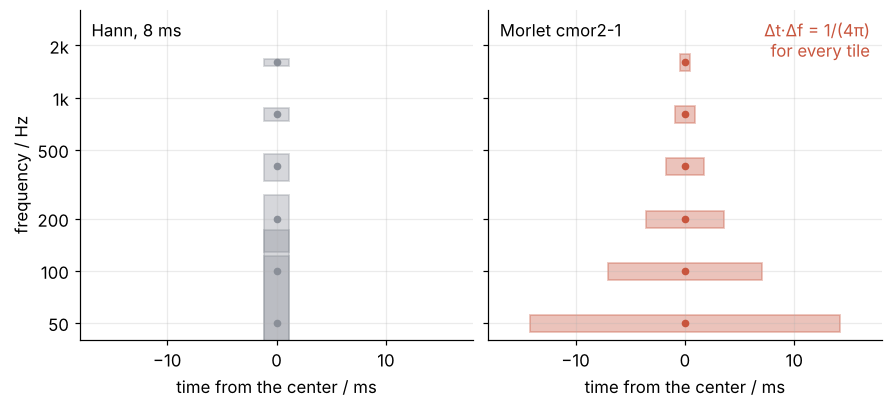
On a log-frequency axis equal areas do not look equal, but the product \(\Delta t\,\Delta f\) is the same for every Morlet tile. No probe beats the bound; the wavelet spends it differently at each frequency, short in time at the top and narrow in frequency at the bottom.
That decides which transform to use. Use the wavelet transform when the frequencies of interest span a wide range and the fast changes ride on the high ones, as in the chirp or a dispersed seismic arrival, because its \(\Delta f/f\) is the same everywhere. Use the STFT when a fixed number of hertz matters at every frequency: two lines 20 Hz apart near 1 kHz lie well inside the wavelet's \(\Delta f\) of 113 Hz there and well outside the 4.5 Hz of the 128 ms window.
The cone of influence. Near the ends the probe reaches past the record, and the transform fills what is missing with zeros, so the signal seems to stop with a jump. A jump has power at every scale, and the probe hears it while it overlaps the end. Trust a scale \(s\) only where the nearer end is more than \(\sqrt{2}\,s\) away: \(|\psi|^2\) falls as \(e^{-t^2/s^2}\), so there the jump's power is down by a factor \(e^{2}\), Torrence and Compo's choice. That is 3.2 ms at 440 Hz and 28 ms at 50 Hz, the cone the PyWavelets tutorial draws.
See it in code
PyWavelets computes the whole grid in one call, pywt.cwt(x, scales, "cmor2-1", sampling_period=1/16000, method="fft", precision=16). The ridge, at each time the frequency where \(|W|/\sqrt{s}\) is largest, reads off what the scalogram shows. Here it is on A and B, under their spectra:
Show code
freqs = 40 * 2 ** (np.arange(102) / 16)                       # Hz, 16 per octave
scales = pywt.frequency2scale("cmor2-1", freqs / FS)          # in samples

def scalogram(signal):
    """|W|/√s on the frequency grid, and W itself."""
    W, f = pywt.cwt(signal, scales, "cmor2-1", sampling_period=1 / FS, method="fft", precision=16)
    return np.abs(W) / np.sqrt(scales)[:, None], W

mag = {}
for name, signal in [("A", A), ("B", B), ("chirp", x)]:
    m, W = scalogram(signal)
    mag[name] = m
    if name == "A":
        W_433 = np.abs(W[np.argmin(np.abs(freqs - 440))])     # the grid point next to 440 Hz
    del W

for name in ["A", "B"]:
    at = [freqs[np.argmax(mag[name][:, int(ti * FS)])] for ti in (0.5, 1.5)]
    print(f"ridge of {name}: {at[0]:.0f} Hz at 0.5 s, {at[1]:.0f} Hz at 1.5 s")

dec = slice(None, None, 16)                                   # every 16th sample, 2,000 columns, for plotting
fig, axes = plt.subplots(3, 2, figsize=(7, 6), sharey="row", height_ratios=[1, 0.8, 1.5], layout="constrained")
fig.get_layout_engine().set(wspace=0.06)                      # room between the two columns
for col, (name, signal, tones) in enumerate([("A", A, (440, 660)), ("B", B, (660, 440))]):
    axes[0, col].plot(freq, 2 * np.abs(np.fft.rfft(signal)) / t.size, color=INK)
    axes[0, col].set(xlim=(300, 800), xticks=[440, 660], xlabel="frequency / Hz")
    axes[0, col].text(0.0, 1.04, f"signal {name}", transform=axes[0, col].transAxes, va="bottom")
    axes[1, col].sharex(axes[2, col])                         # waveform over scalogram, one time axis
    envelope(axes[1, col], signal, tones)
    axes[1, col].set(ylim=(-1.3, 1.3), yticks=[-1, 0, 1])
    axes[1, col].tick_params(labelbottom=False)               # time is labeled once, under the scalogram
    image = axes[2, col].pcolormesh(t[dec], freqs, mag[name][:, dec], cmap="cividis", vmin=0, vmax=0.5,
                                    shading="auto", rasterized=True)
    frequency_axis(axes[2, col])
    axes[2, col].set(ylim=(200, 1500))
    axes[2, col].set_yticks([200, 300, 440, 660, 1000, 1500], labels=["200", "300", "440", "660", "1k", "1.5k"])
    axes[2, col].set_xticks([0, 0.5, 1, 1.5, 2], labels=["0", "0.5", "1", "1.5", "2"])
axes[0, 0].set(ylabel="amplitude")
axes[1, 0].set(ylabel="signal")
axes[2, 0].set(ylabel="frequency / Hz")
fig.colorbar(image, ax=axes[2, :], label="|W| / √s", ticks=[0, 0.25, 0.5])
plt.show()
ridge of A: 433 Hz at 0.5 s, 668 Hz at 1.5 s
ridge of B: 668 Hz at 0.5 s, 433 Hz at 1.5 s
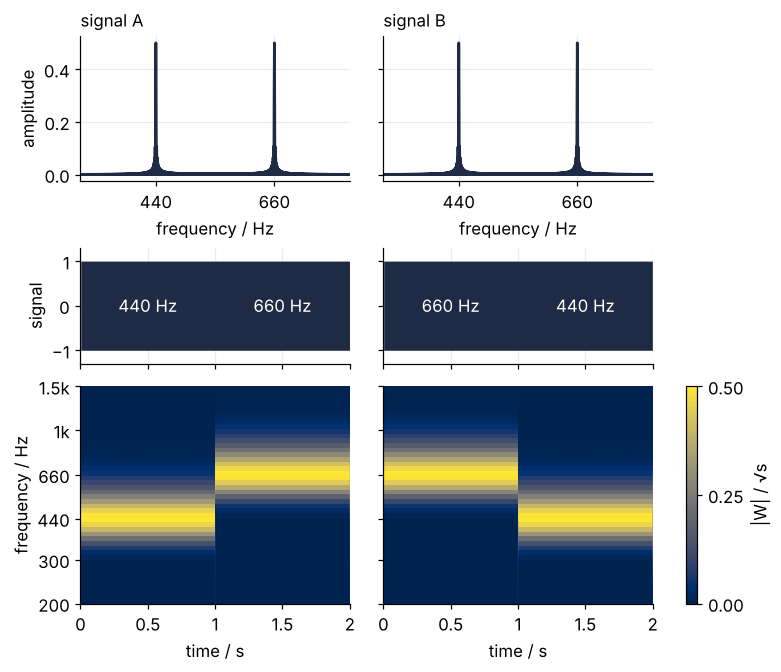
The ridge reads 433 Hz then 668 Hz for A and the reverse for B, the grid points next to 440 and 660 Hz. The spectra are one line; the scalograms are mirror images. The thin line at 1 s in the scalogram of A is the switch between the tones, where the slope jumps.
The chirp goes under its two spectrograms:
Show code
inner = (t > 0.1) & (t < 1.9)
ridge = freqs[np.argmax(mag["chirp"][:, inner], axis=0)]
error = np.abs(ridge / f_true[inner] - 1)
half_step = 2 ** (1 / 32) - 1
print(f"chirp ridge against f(t), 0.1 to 1.9 s: largest error {100 * error.max():.1f} %, "
      f"half grid step {100 * half_step:.1f} %, {100 * (error <= half_step).mean():.0f} % of the time steps within it")

f_433 = freqs[np.argmin(np.abs(freqs - 440))]
W_numpy = np.abs(np.convolve(A, morlet(f_433), mode="same"))
W_default = np.abs(pywt.cwt(A, [pywt.frequency2scale("cmor2-1", f_433 / FS)], "cmor2-1",
                            sampling_period=1 / FS, method="fft")[0][0])   # precision=12, the default
for p, W_p in [(16, W_433), (12, W_default)]:
    print(f"pywt.cwt, precision={p}, against the NumPy convolution at {f_433:.0f} Hz: "
          f"largest difference {100 * np.max(np.abs(W_p - W_numpy)) / W_p.max():.2f} % of the peak")

distance = np.minimum(t + 1 / FS, 2 - t)                      # s to the nearer end of the record
coi = np.sqrt(2) / distance                                   # Hz; below it the ends leak in

fig, axes = plt.subplots(3, 1, figsize=(7, 6.2), sharex=True, layout="constrained")
for ax, L in zip(axes, [128, 2048]):
    ts, fs_, S = stft[L]
    ax.pcolormesh(ts, fs_, S, cmap="cividis", vmin=0, vmax=0.5, shading="auto", rasterized=True)
image = axes[2].pcolormesh(t[dec], freqs, mag["chirp"][:, dec], cmap="cividis", vmin=0, vmax=0.5,
                           shading="auto", rasterized=True)
axes[2].fill_between(t[dec], 40, np.minimum(coi[dec], 3200), color="white", alpha=0.45, lw=0)
for ax, label in zip(axes, ["STFT, Hann 8 ms", "STFT, Hann 128 ms", "wavelet, cmor2-1"]):
    ax.plot(t[::40], f_true[::40], color=MUTED, lw=1, ls=(0, (2, 6)))
    frequency_axis(ax)
    ax.set(ylabel="frequency / Hz", xlabel=None)
    ax.text(0.03, 0.93, label, transform=ax.transAxes, va="top", color="white")
axes[2].set(xlabel="time / s")
fig.colorbar(image, ax=axes, label="|W| / √s, or STFT magnitude", ticks=[0, 0.25, 0.5], shrink=0.6)
plt.show()
chirp ridge against f(t), 0.1 to 1.9 s: largest error 2.3 %, half grid step 2.2 %, 99 % of the time steps within it
pywt.cwt, precision=16, against the NumPy convolution at 433 Hz: largest difference 0.23 % of the peak
pywt.cwt, precision=12, against the NumPy convolution at 433 Hz: largest difference 0.60 % of the peak
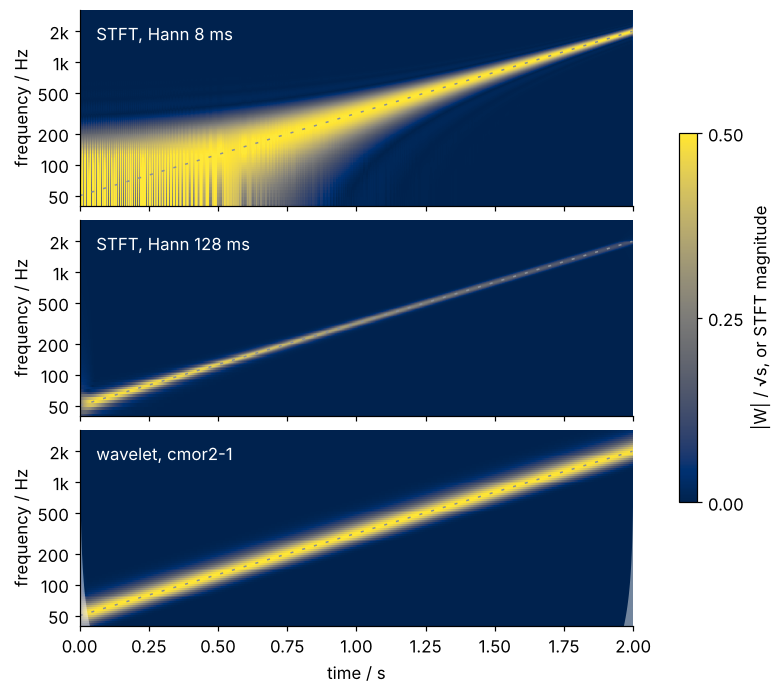
Where each STFT loses the chirp at one end, the wavelet follows it at the same brightness from 50 Hz to 2 kHz. The pale wedges in the lower corners are the cone of influence, slivers because even at 50 Hz it reaches only 28 ms in. Grid points 4.4 % apart put the nearest one up to 2.2 % off, and the ridge stays within 2.3 % of the true frequency from 0.1 to 1.9 s, 99 % of the time steps within that half step. Nearly all of the error is the grid's.
PyWavelets does not evaluate the Morlet at each sample, as the NumPy cell did: it looks up the wavelet's running integral in a table of \(2^{p}\) points, \(p\) being precision, and takes differences. At 433 Hz, precision=16 agrees with the NumPy convolution to 0.23 % of the peak, and the default of 12 to 0.60 %. Pass 16; it costs one argument.
Where it shows up
The tones and the chirp stand for any record whose frequencies change with time, and the fields that deal in such records use the wavelet transform or a close relative of it.
- Gravitational waves. The two black holes LIGO detected in 2015 sent a chirp, rising from about 35 Hz to 250 Hz in a fifth of a second. The coherent WaveBurst search, which assumes no waveform, found it as a track in a wavelet time-frequency plane.
- Seismology. The P and S arrivals of an earthquake differ in time and frequency, and the surface waves are dispersed: their long periods travel faster and arrive first. Frequency-time analysis (FTAN) reads the group velocity period by period with narrow Gaussian filters whose bandwidth is proportional to their center frequency, the same constant \(\Delta f/f\) as the wavelet tiles above.
- Climate. The El Niño oscillation of the Pacific beats strongly for decades and goes quiet for decades. The PyWavelets tutorial finds the quiet stretch in a scalogram of 126 years of sea surface temperature.
- Physiology. The intervals between heartbeats fluctuate in a low-frequency band from 0.04 to 0.15 Hz and a high-frequency band from 0.15 to 0.4 Hz. Their balance changes from minute to minute, with posture and breathing, so heart rate variability is tracked in a time-frequency map.
- Power grids. A switching transient lasts a few milliseconds on a 50 Hz waveform, a fraction of one 20 ms cycle. Short wavelets at high frequency locate it in time, which a spectrum of the whole record cannot.
- Images. JPEG 2000 compresses images with the discrete wavelet transform, with the CDF 9/7 wavelet for lossy and 5/3 for lossless coding. The discrete transform keeps only scales a factor of two apart and samples each scale on its own grid, a relative of the continuous transform shown here.
In every item three facts carry over: a scale stands for a period, the band a probe hears is a fixed fraction of its frequency, and the ends of the record cannot be trusted at the longest periods.
Further reading
- PyWavelets: continuous wavelet transform, the reference for
pywt.cwtand the definitions ofcmorand the other continuous wavelets; SciPyShortTimeFFTfor the STFT. - C. Torrence and G. P. Compo, A practical guide to wavelet analysis, Bull. Amer. Meteor. Soc. 79, 61 (1998), the paper most scientists learn the continuous transform from.
- G. R. Lee, R. Gommers, F. Wasilewski, K. Wohlfahrt, and A. O'Leary, PyWavelets: A Python package for wavelet analysis, J. Open Source Softw. 4, 1237 (2019).
- S. Mallat, A Wavelet Tour of Signal Processing (3rd ed., Academic Press, 2009), for the theory, continuous and discrete.
- Related tutorials on this site: The Fourier transform: asking a signal how much of each frequency it contains, Continuous wavelet transform with PyWavelets: when El Niño went quiet, the next step, Convolution: how a small kernel blurs, sharpens, and finds edges, Filtering with scipy.signal: mains hum and noise out of an ECG, and Matplotlib animation with FuncAnimation: a probe sweep as a small GIF.
- Download the notebook. It was executed with the library versions in the header.